Java安全-IO流
初识IO流
IO是指 Input/Output,即输入和输出。以内存为中心:
为什么要把数据读到内存才能处理这些数据?因为代码是在内存中运行的,数据也必须读到内存,最终的表示方式无非是 byte数 组,字符串等,都必须存放在内存里。
从 Java 代码来看,输入实际上就是从外部,例如,硬盘上的某个文件,把内容读到内存,并且以 Java 提供的某种数据类型表示,例如,byte[],String,这样,后续代码才能处理这些数据。
因为内存有“易失性”的特点,所以必须把处理后的数据以某种方式输出,例如,写入到文件。Output 实际上就是把 Java 表示的数据格式,例如,byte[],String等输出到某个地方。
IO 流是一种顺序读写数据的模式,它的特点是单向流动。数据类似自来水一样在水管中流动,所以我们把它称为 IO 流。
文件操作
创建文件
方式一:根据路径创建一个 File 对象
- 方法
new File(String pathname)
1
2
3
4
5
6
7
8
9
10
11
12
13
14
15
16
17
18
19
20
21
| package src.IOStream;
import java.io.File;
import java.io.IOException;
public class newFile {
public static void main(String[] args) {
createFile();
}
public static void createFile(){
File file = new File("src/main/java/src/IOStream/CreateForFile/new1.txt");
try{
file.createNewFile();
System.out.println("Create Successfully");
} catch (IOException e){
e.printStackTrace();
}
}
}
|
方式二:根据父目录 File 对象,在子路径创建一个文件
- 方法
new File(File parent, String child)
1
2
3
4
5
6
7
8
9
10
11
12
13
14
15
16
17
18
19
20
21
| package src.IOStream;
import java.io.File;
import java.io.IOException;
public class newFile02 {
public static void main(String[] args) {
createFile();
}
public static void createFile(){
File parentFile = new File("src/main/java/src/IOStream/CreateForFile");
File file = new File(parentFile, "new2.txt");
try{
file.createNewFile();
System.out.println("Create Successfully");
} catch (IOException e){
e.printStackTrace();
}
}
}
|
方式三:根据父目录路径,在子路径下生成文件
- 方法
new File(String parent, String child)
1
2
3
4
5
6
7
8
9
10
11
12
13
14
15
16
17
18
19
20
21
22
| package src.IOStream;
import java.io.File;
import java.io.IOException;
public class newFile03 {
public static void main(String[] args) {
createFile();
}
public static void createFile(){
String parentPath = "src/main/java/src/IOStream/CreateForFile";
String fileName = "new3.txt";
File file = new File(parentPath, fileName);
try{
file.createNewFile();
System.out.println("Create Successfully");
} catch (IOException e){
e.printStackTrace();
}
}
}
|
获取文件信息
通过 file 类的方法名进行一些基本信息的获取
1
2
3
4
5
6
7
8
9
10
11
12
13
14
15
16
17
18
19
| package src.IOStream;
import java.io.File;
public class GetFileInfo {
public static void main(String[] args) {
getFileContents();
}
public static void getFileContents(){
File file = new File("Serialable/src/IOStream/CreateForFile/new1.txt");
System.out.println("文件名称为:" + file.getName());
System.out.println("文件的绝对路径为:" + file.getAbsolutePath());
System.out.println("文件的父级目录为:" + file.getParent());
System.out.println("文件的大小(字节)为:" + file.length());
System.out.println("这是不是一个文件:" + file.isFile());
System.out.println("这是不是一个目录:" + file.isDirectory());
}
}
|
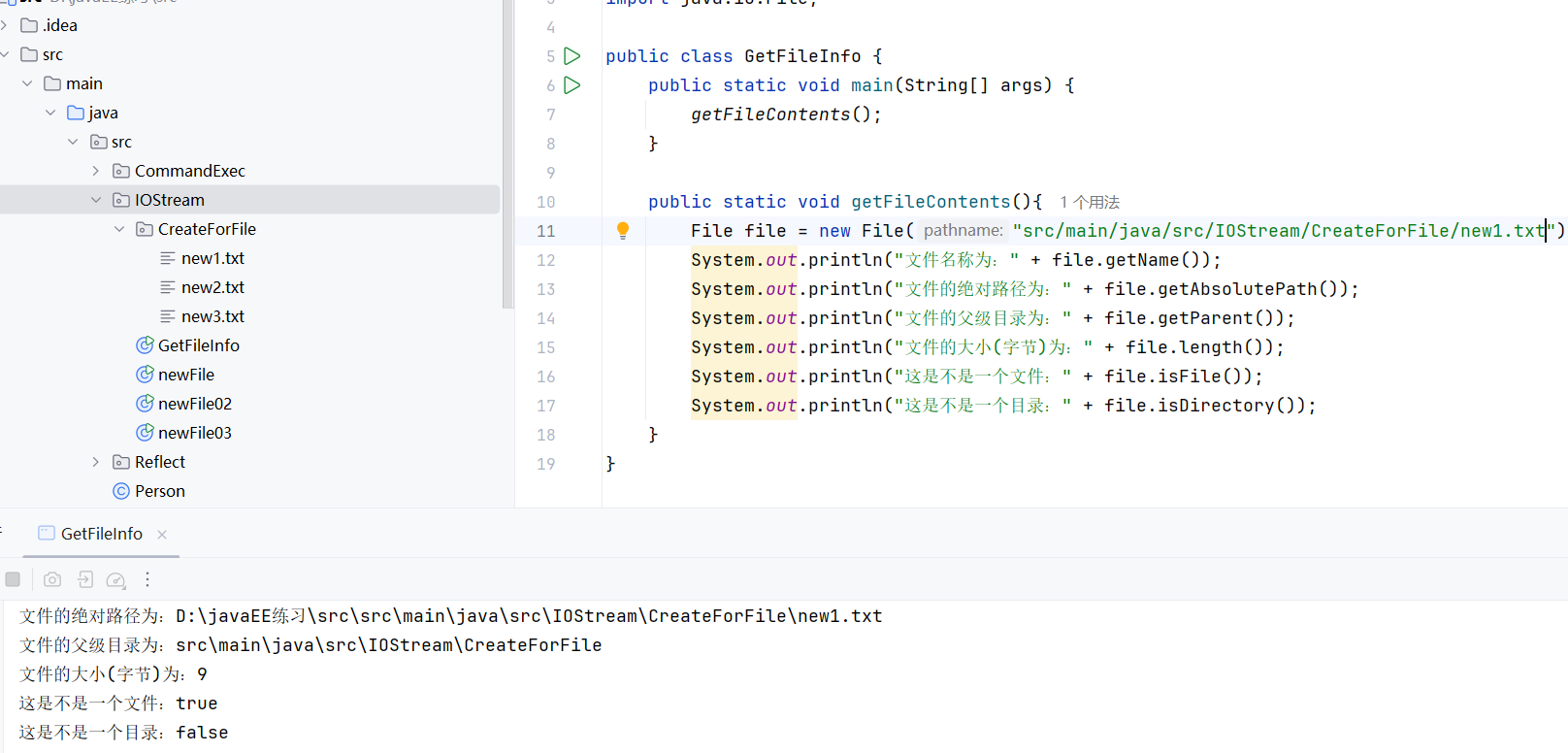
成功获取
文件删除
1
2
3
4
5
6
7
8
9
10
11
12
13
14
15
| package src.IOStream;
import java.io.File;
import java.lang.reflect.Field;
public class FileDelete {
public static void main(String[] args) {
deleteFile();
}
public static void deleteFile(){
File file = new File("src/main/java/src/IOStream/CreateForFile/new1.txt");
System.out.println(file.delete() ? "Delete Successfully":"Delete failed");
}
}
|
顺利删除
目录删除
- 方法
file.delete(目录),这里有个小坑,只有空的目录才可以删除,不然会显示删除失败。
- 我在
CreateForFile 同级目录下新建了一个文件夹 CreateForDelete 用以测试。
1
2
3
4
5
6
7
8
9
10
11
12
13
14
| package src.IOStream;
import java.io.File;
public class DirectoryDelete {
public static void main(String[] args) {
deleteDirectory();
}
public static void deleteDirectory(){
File file = new File("src/main/java/src/IOStream/CreateForFile/CreateForDelete");
System.out.println(file.delete()? "Delete Successfully":"Delete failed");
}
}
|
成功删除
创建单级目录
1
2
3
4
5
6
7
8
9
10
11
12
13
14
| package src.IOStream;
import java.io.File;
public class CreateSingleDirectory {
public static void main(String[] args) {
createSingleDir();
}
public static void createSingleDir(){
File file = new File("src/main/java/src/IOStream/CreateForFile/CreateForDirectory");
System.out.println(file.mkdir() ? "Create Successfully":"Create failed");
}
}
|
成功创建
创建多级目录
- 方法
file.mkdirs(),注意多了个 s 别搞错了。
1
2
3
4
5
6
7
8
9
10
11
12
13
14
15
16
| package src.IOStream;
import java.io.File;
public class CreateMultiDirectory {
public static void main(String[] args) {
createMultiDir();
}
public static void createMultiDir(){
File file = new File("src/main/java/src/IOStream/CreateMultiDirectory/test");
System.out.println(file.mkdirs() ? "Create Successfully":"Create failed");
}
}
|
IO流分类
按照操作数据单位不同分为:字节流和字符流
- 字节流(8bit,适用于二进制文件)
- 字符流(按字符,因编码不同而异,适用于文本文件)
按照数据流流向不同分为:输入流和输出流
按照流的角色不同分为:节点流,处理流/包装流
| 抽象基类 |
字节流 |
字符流 |
| 输入流 |
InputStream |
Reader |
| 输出流 |
OutputStream |
Writer |
在 Java I/O 体系里,输入(Input)和输出(Output) 是 以程序自身为参照物 来定义的:
Input(输入流) 是数据 从外部(文件、网络、键盘等)流入到程序
Output(输出流)是数据 从程序流出到外部(文件、网络、显示器等)
到这里就非常重要了,因为它与我们后续的命令执行直接相关。这些 IO 流在我们命令执行的 Payload 当中充当着缓冲的作用。
关于文件流的一些操作
Runtime 命令执行操作的 Payload
1
2
3
4
5
6
7
8
9
10
11
12
13
14
15
16
17
18
19
20
21
22
23
24
25
26
27
28
29
| package src.CommandExec;
import java.io.ByteArrayOutputStream;
import java.io.InputStream;
public class RuntimeExec {
public static void main(String[] args) throws Exception {
InputStream inputStream = Runtime.getRuntime().exec("whoami").getInputStream();
byte[] cache = new byte[1024];
ByteArrayOutputStream byteArrayOutputStream = new ByteArrayOutputStream();
int readLen = 0;
while ((readLen = inputStream.read(cache)) != -1){
byteArrayOutputStream.write(cache, 0, readLen);
}
System.out.println(byteArrayOutputStream);
}
}
|
在看到这里时心里有一个问题:InputStream 是输入流,为什么这里拿来读取命令输出?
关键在于 “输入/输出” 是相对谁而言的。
InputStream 的名字来源
在 Java 程序的角度:
InputStream = “从外部读入到 Java 程序里的流”
OutputStream = “从 Java 程序写出到外部的流”
所以 InputStream 的 输入,是“输入到 Java 程序”的意思。
在这个例子里
你调用了:
1
2
| Process process = Runtime.getRuntime().exec("whoami");
InputStream inputStream = process.getInputStream();
|
- 这个
process 是一个外部子进程(系统命令 whoami)。
- 对这个子进程来说,它调用
System.out.println(...) 输出结果。
- 对你的 Java 程序来说,你要去读取它的输出 → 这个输出就成了你程序的 输入流。
所以这里叫 getInputStream(),是 获取子进程的标准输出,作为本进程的输入流。
举个生活类比
想象你去快餐店点餐:
- 厨房(子进程)把做好的餐点“输出”给你。
- 你(Java 程序)把餐点“拿来吃”,这对你来说就是“输入”。
所以 同一份数据,既是厨房的输出,也是你的输入。
read() 方法
1
2
3
4
5
6
7
8
9
10
11
| read()
public int read() throws IOException
从此输入流中读取一个数据字节。
如果没有输入可用,则此方法将阻塞。
指定者: 类 InputStream 中的 read
返回: 下一个数据字节;如果已到达文件末尾,则返回 -1。
抛出: IOException - 如果发生 I/O 错误。
|
之前我们用 file 的一系列操作读取过文件的信息,现在我们用 FileInputStream.read() 来读取文件内容。
1
2
3
4
5
6
7
8
9
10
11
12
13
14
15
16
17
18
19
20
21
22
23
24
25
26
27
28
29
30
| package src.IOStream;
import java.io.FileInputStream;
import java.io.IOException;
public class FileInputRead {
public static void main(String[] args) {
readFile();
}
public static void readFile(){
String filePath = "src/main/java/src/IOStream/CreateForFile/new1.txt";
FileInputStream fileInputStream = null;
int readData = 0;
try{
fileInputStream = new FileInputStream(filePath);
while((readData = fileInputStream.read())!=-1){
System.out.print((char)readData);
}
} catch (IOException e){
e.printStackTrace();
} finally {
try{
fileInputStream.close();
} catch (IOException e){
e.printStackTrace();
}
}
}
}
|
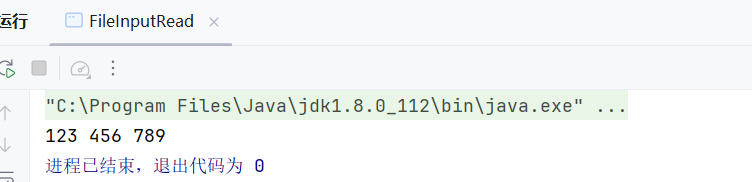
成功读取到文件内容,这里有个小坑
- 使用print((char)readData),字符能够连贯输出
- 使用println((char)readData)换行,每输出一个字符就会换行
read(byte[] d) 方法
允许在方法中添加一个字节数组。
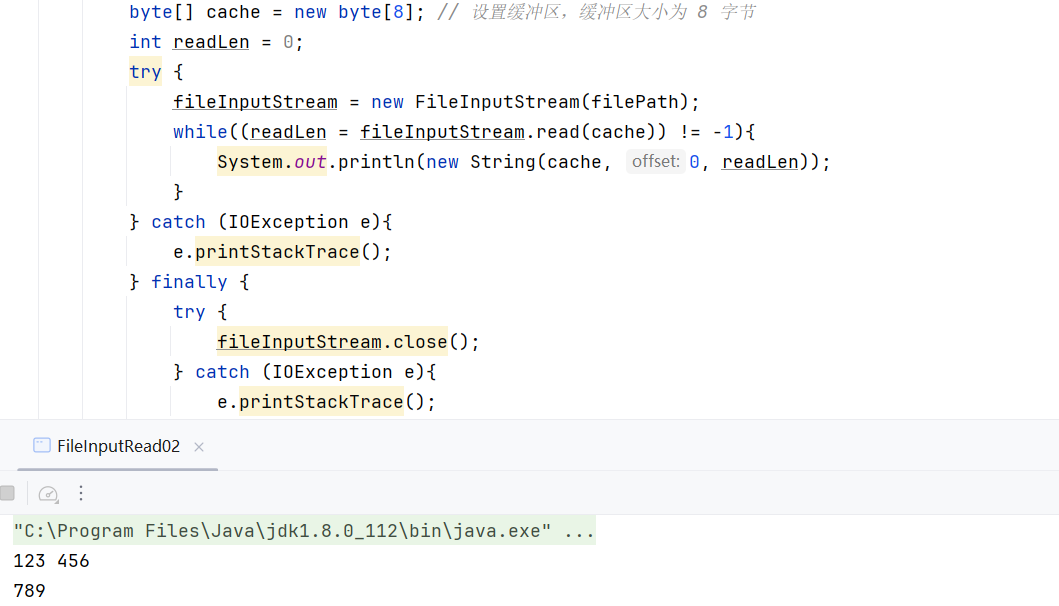
这种方式很有意思,当我们设置缓冲区的值为 8 时,若文件中的字符长度超过了 8,则会换行输出。这和上面的换行实际上是异曲同工。
再回到之前我们讲的 Runtime 类进行命令执行的 Payload,在那里,我们设置的 Cache 缓冲区的值为 1024.
read(byte[] d) 方法
1
2
3
4
5
6
7
8
9
10
11
12
13
14
15
16
17
18
19
20
21
22
23
24
25
26
27
28
29
30
31
| package src.IOStream;
import java.io.FileInputStream;
import java.io.IOException;
public class FileInputRead02 {
public static void main(String[] args) {
readFile();
}
public static void readFile(){
String filePath = "src/main/java/src/IOStream/CreateForFile/new1.txt";
FileInputStream fileInputStream = null;
byte[] cache = new byte[8];
int readLen = 0;
try {
fileInputStream = new FileInputStream(filePath);
while((readLen = fileInputStream.read(cache)) != -1){
System.out.println(new String(cache, 0, readLen));
}
} catch (IOException e){
e.printStackTrace();
} finally {
try {
fileInputStream.close();
} catch (IOException e){
e.printStackTrace();
}
}
}
}
|
这里while函数会运行两次,读取文件中所有字符
FileOutputStream
往文件里面写数据
write(byte[] b) 方法
1
2
3
4
5
6
7
8
9
10
| write(byte[] b)
public void write(byte[] b)
throws IOException
将 b.length 个字节从指定 byte 数组写入此文件输出流中。
覆盖:
类 OutputStream 中的 write
参数:
b - 数据。
抛出:
IOException - 如果发生 I/O 错误。
|
实现代码
1
2
3
4
5
6
7
8
9
10
11
12
13
14
15
16
17
18
19
20
21
22
23
24
25
26
27
28
29
30
31
32
33
34
35
36
37
38
| package src.IOStream;
import java.io.FileNotFoundException;
import java.io.FileOutputStream;
import java.io.IOException;
public class FileOutputWrite01 {
public static void main(String[] args) {
writeFile();
}
public static void writeFile() {
String filePath = "src/main/java/src/IOStream/CreateForFile/new1.txt";
FileOutputStream fileOutputStream = null;
try {
fileOutputStream = new FileOutputStream(filePath);
String content = "123 45";
try {
fileOutputStream.write(content.getBytes());
} catch (IOException e) {
e.printStackTrace();
}
}catch (FileNotFoundException e){
e.printStackTrace();
}
finally {
try {
fileOutputStream.close();
} catch (IOException e){
e.printStackTrace();
}
}
}
}
|
成功写入
write(byte[] b, int off, int len) 方法
b:要写入的字节数组off:从数组的哪个下标开始写len:要写入的字节个数
关键点:len 不是“字符数量”,而是“字节数量”。
对于英文(单字节编码),字符数 == 字节数,所以感觉就是“长度等于字符数”。
但对于中文(UTF-8 编码下通常 3 个字节),一个字符 ≠ 一个字节。如果你误以为 len=字符数 就会出错(写不完整)。
1
2
3
4
5
6
7
8
9
10
11
12
13
14
15
16
17
18
19
20
21
22
23
24
25
26
27
28
29
30
31
32
33
34
35
36
37
38
39
| package src.IOStream;
import java.io.FileNotFoundException;
import java.io.FileOutputStream;
import java.io.IOException;
import java.nio.charset.StandardCharsets;
public class FileOutputWrite02 {
public static void main(String[] args) {
writeFile();
}
public static void writeFile() {
String filePath = "src/main/java/src/IOStream/CreateForFile/new1.txt";
FileOutputStream fileOutputStream = null;
try {
fileOutputStream = new FileOutputStream(filePath);
String content = "123 456";
try {
fileOutputStream.write(content.getBytes(StandardCharsets.UTF_8), 1, 4);
} catch (IOException e) {
e.printStackTrace();
}
}catch (FileNotFoundException e){
e.printStackTrace();
}
finally {
try {
fileOutputStream.close();
} catch (IOException e){
e.printStackTrace();
}
}
}
}
|
顺利写入

追加写入
如果想要写入的数据不被覆盖,可以设置 FileOutputStream 的构造方法 append 参数设置为 true
1
2
3
| fileOutputStream = new FileOutputStream(filePath);
fileOutputStream = new FileOutputStream(filePath), true;
|
利用前文讲的 fileInputStream 和 fileOutputStream 进行文件拷贝。
原理上来说,先将文件的内容(注意,其实图片当中也是内容,这个内容不光是文字!) 读取出来,再写入新的文件当中。
1
2
3
4
5
6
7
8
9
10
11
12
13
14
15
16
17
18
19
20
21
22
23
24
25
26
27
28
29
30
31
32
33
34
35
36
| package src.IOStream;
import java.io.FileInputStream;
import java.io.FileOutputStream;
import java.io.IOException;
public class FileCopy {
public static void main(String[] args) {
copyFile();
}
public static void copyFile(){
String srcFilename = "src/main/java/src/IOStream/CreateForFile/new1.txt";
String desFilename = "src/main/java/src/IOStream/CreateForFile/new2.txt";
FileInputStream fileInputStream = null;
FileOutputStream fileOutputStream = null;
try {
fileInputStream = new FileInputStream(srcFilename);
fileOutputStream = new FileOutputStream(desFilename);
byte[] cache = new byte[1024];
int readLen = 0;
while((readLen = fileInputStream.read(cache)) != -1){
fileOutputStream.write(cache, 0, readLen);
}
} catch (IOException e){
e.printStackTrace();
} finally {
try {
fileInputStream.close();
fileOutputStream.close();
} catch (IOException e){
e.printStackTrace();
}
}
}
}
|
拷贝成功,这里不再展示
FileReader
FileReader 将会一个一个字符读取,因此可以不乱码输出中文
1
2
3
| public class FileReader extends InputStreamReader
用来读取字符文件的便捷类。此类的构造方法假定默认字符编码和默认字节缓冲区大小都是适当的。要自己指定这些值,可以先在 FileInputStream 上构造一个 InputStreamReader。
FileReader 用于读取字符流。要读取原始字节流,请考虑使用 FileInputStream。
|
下方测试代码将会将 Serialable/src/IOStream/CreateForFile/new1.txt 中的 new1.tx 文件打印输出至控制台:
1
2
3
4
5
6
7
8
9
10
11
12
13
14
15
16
17
18
19
20
21
22
23
24
25
26
27
28
29
30
31
| package src.IOStream;
import java.io.FileReader;
import java.io.IOException;
public class FileReaderPrint {
public static void main(String[] args) {
readFile();
}
public static void readFile(){
String filePath = "src/main/java/src/IOStream/CreateForFile/new1.txt";
FileReader fileReader = null;
try {
fileReader = new FileReader(filePath);
int readLen = 0;
char[] cache = new char[8];
while ((readLen = fileReader.read(cache))!=-1){
System.out.println(new String(cache, 0, readLen));
}
} catch (IOException e){
e.printStackTrace();
} finally {
try {
fileReader.close();
} catch (IOException e){
e.printStackTrace();
}
}
}
}
|
顺利输出
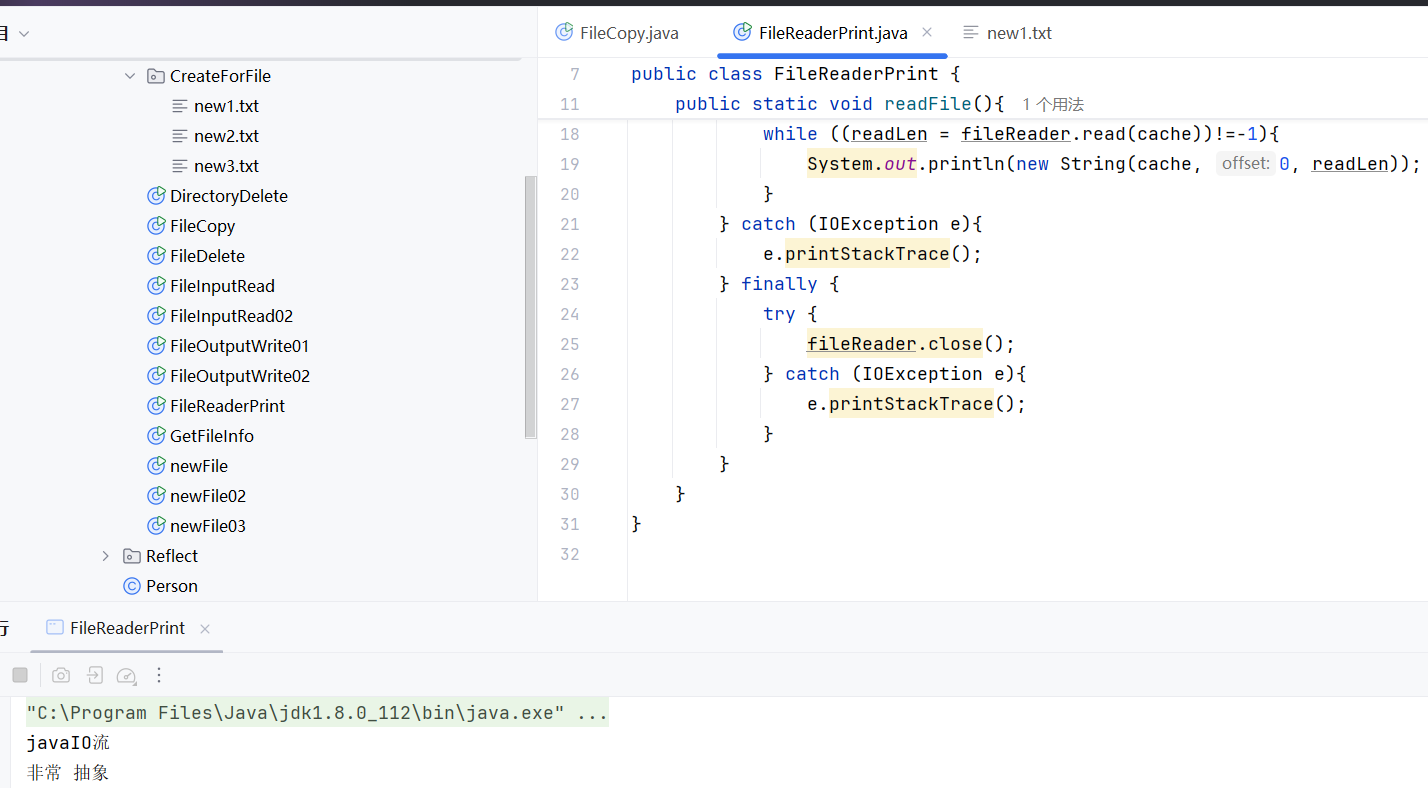
在之前利用字节流输出的中文都是乱码
参考
Java-IO流 | Drunkbaby’s Blog