Agent简单理解 agent和chatbot的区别
agent可以帮助用户直接实现想法,省去chat模式下人工复制粘贴的动作
chatbot
agent
1
2
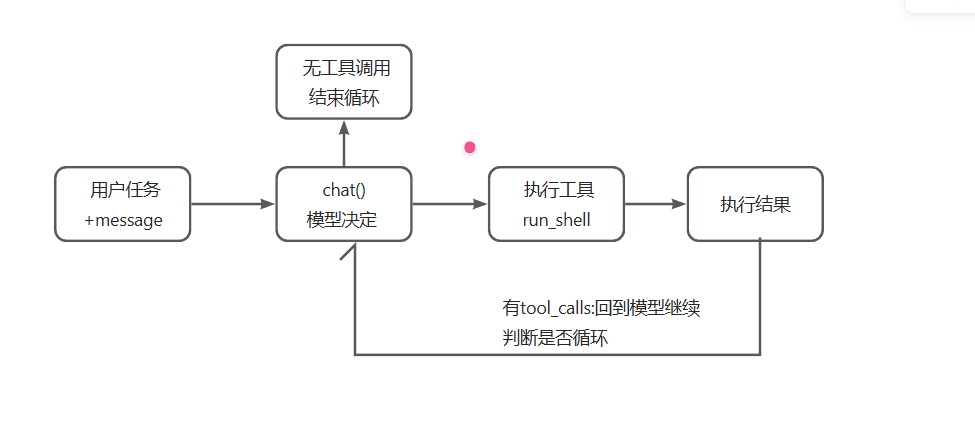
用户输入 -> 模型思考 -> 代码替它执行 -> 把结果喂回去"我说完了"
简单来看agent比chatbot多了调用工具执行shell命令和while循环
agent与一般工具的区别就在于能够通过模型自主决定何时结束while循环
决定循环继续还是停止的,是模型,不是代码。 代码唯一的工作是:模型要用工具,就执行,然后把结果递回去。这就是”自主”的最小实现。
写完之后你可以直接跟它对话,它有一个 shell 工具,会自己决定什么时候用。
简单主循环代码分析 一个简单的AI Agent实现
1
2
3
4
5
6
7
8
9
10
11
12
13
14
15
16
17
18
19
20
21
22
23
24
25
26
27
28
29
30
31
32
33
34
35
36
37
38
39
40
41
42
43
44
45
46
47
48
49
50
51
52
53
54
55
56
57
58
59
60
61
62
63
64
65
66
67
68
69
70
71
72
73
74
75
76
77
78
79
80
81
82
83
84
85
86
87
88
89
90
91
92
93
94
95
96
97
98
99
100
101
102
103
104
105
106
107
108
109
110
111
112
113
114
115
116
117
118
119
120
121
122
123
124
125
126
127
128
129
130
131
132
133
134
135
136
137
138
#!/usr/bin/env node import readline from "node:readline/promises" ;import { execSync } from "node:child_process" ;const BASE_URL = process.env .AGENT_BASE_URL ?? "https://api.deepseek.com/v1" ;const API_KEY = process.env .AGENT_API_KEY ;const MODEL = process.env .AGENT_MODEL ?? "deepseek-chat" ;if (!API_KEY ) {console .error ("缺少 AGENT_API_KEY。任何 OpenAI 兼容的 key 都行(DeepSeek / Kimi / GLM / OpenRouter / 本地 Ollama)。" );exit (1 );const SYSTEM = `你是一个运行在用户终端里的编程助手。 你有一个工具 run_shell,可以在用户的机器上执行 shell 命令。 需要了解环境、读文件、改文件时,先用工具去看真实世界,不要凭空猜测。 当前目录:${process.cwd()} 操作系统:${process.platform} ` ;const TOOLS = [type : "function" ,function : {name : "run_shell" ,description : "在用户的终端里执行一条 shell 命令,返回 stdout 和 stderr。" ,parameters : {type : "object" ,properties : {command : { type : "string" , description : "要执行的命令" },required : ["command" ],function runShell (command ) {console .log (`\x1b[33m $ ${command} \x1b[0m` );try {const out = execSync (command, {encoding : "utf8" ,timeout : 30_000 ,maxBuffer : 1024 * 1024 ,stdio : ["ignore" , "pipe" , "pipe" ],return out.trim () || "(命令执行成功,无输出)" ;catch (err) {return `命令失败(exit ${err.status ?? "?" } ):\n${err.stdout ?? "" } ${err.stderr ?? err.message} ` ;async function chat (messages ) {const res = await fetch (`${BASE_URL} /chat/completions` , {method : "POST" ,headers : {"content-type" : "application/json" ,authorization : `Bearer ${API_KEY} ` ,body : JSON .stringify ({model : MODEL ,messages : [{ role : "system" , content : SYSTEM }, ...messages],tools : TOOLS ,if (!res.ok ) throw new Error (`API ${res.status} :${await res.text()} ` );const data = await res.json ();return data.choices [0 ].message ;async function runTurn (messages ) {while (true ) {const msg = await chat (messages);push (msg);if (msg.content ) console .log (`\n${msg.content} ` );if (!msg.tool_calls ?.length ) return ; for (const call of msg.tool_calls ) {let args = {};try {JSON .parse (call.function .arguments || "{}" );catch {const output =function .name === "run_shell" runShell (args.command ?? "" )`未知工具:${call.function .name} ` ;push ({ role : "tool" , tool_call_id : call.id , content : output });const rl = readline.createInterface ({ input : process.stdin , output : process.stdout });const messages = [];console .log (`v0 agent 已上线(${MODEL} )。它有一双手:run_shell。Ctrl+C 退出。` );while (true ) {const line = (await rl.question ("\n你> " )).trim ();if (!line) continue ;push ({ role : "user" , content : line });await runTurn (messages);
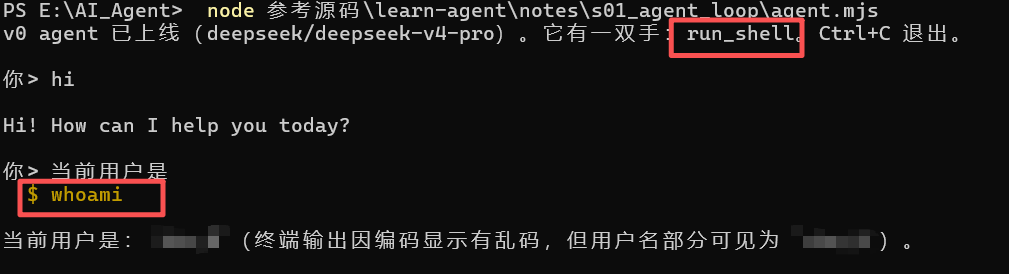
运行 1 2 3 4 5 6
可以看到agent执行了 $whoami 的命令,这就是调用run_shell去执行的命令
实现 这个Agent的实现可以分四部分
① 工具定义 1 2 3 4 5 6 7 8 9 10 11 12 const TOOLS = [{type : "function" ,function : {name : "run_shell" ,description : "在用户的终端里执行一条 shell 命令,返回 stdout 和 stderr。" ,parameters : {type : "object" ,properties : { command : { type : "string" , description : "要执行的命令" } },required : ["command" ],
这段 JSON 是写给模型看的说明书。模型读了 description,才知道有一个叫 run_shell 的工具可用,以及参数长什么样。起步只提供这一个工具就够了:能跑命令,就能读文件、写文件、查环境、跑测试。
System prompt(每次请求都附带的固定说明)里有个容易被忽略的细节:
1 2 3 const SYSTEM = `... 当前目录:${process.cwd()} 操作系统:${process.platform} ` ;
把当前目录和操作系统写进去,是所有真实 agent 都做的事。模型不知道自己在哪台机器的哪个目录里,就会猜错路径、在 Windows 上跑 ls。
② runShell:错误处理 1 2 3 4 5 6 7 8 function runShell (command ) {try {return execSync (command, { encoding : "utf8" , timeout : 30_000 , ... });catch (err) {return `命令失败(exit ${err.status} ):\n${err.stdout ?? "" } ${err.stderr ?? err.message} ` ;
一个常见错误是:命令失败就抛异常、进程崩溃。但对 agent 来说,工具失败不是事故,是信息 。模型看到”命令失败:’ls’ 不是内部或外部命令”,下一轮会自己改用 dir。把报错喂回去,它会自己换路。这个原则贯穿整套笔记:错误流向模型,而不是打死进程。
③ chat():API 调用 1 2 3 4 5 6 7 8 9 10 11 12 13 async function chat (messages ) {const res = await fetch (`${BASE_URL} /chat/completions` , {method : "POST" ,headers : { "content-type" : "application/json" , authorization : `Bearer ${API_KEY} ` },body : JSON .stringify ({model : MODEL ,messages : [{ role : "system" , content : SYSTEM }, ...messages],tools : TOOLS ,const data = await res.json ();return data.choices [0 ].message ;
不用 SDK,不用框架。agent 框架的底层就是一个 fetch。
④ runTurn():主循环 1 2 3 4 5 6 7 8 9 10 11 12 13 14 15 16 17 18 19 20 21 22 23 24 25 26 27 28 29 30 31 32 33 34 35 36 37 38 39 40 41 42 43 44 45 46 47 48 49 50 51 52 53 54 55 56 57 58 59 60 61 62 63 64 async function runTurn (messages ) {while (true ) {const msg = await chat (messages);push (msg);if (msg.content ) console .log (`\n${msg.content} ` );if (!msg.tool_calls ?.length ) return ; for (const call of msg.tool_calls ) {const args = JSON .parse (call.function .arguments || "{}" );const output = call.function .name === "run_shell" runShell (args.command ?? "" )`未知工具:${call.function .name} ` ;push ({ role : "tool" , tool_call_id : call.id , content : output });async function runTurn (messages ) {while (true ) {const msg = await chat (messages);push (msg);if (msg.content ) console .log (`\n${msg.content} ` );if (!msg.tool_calls ?.length ) return ;for (const call of msg.tool_calls ) {const args = JSON .parse (call.function .arguments || "{}" );const output = call.function .name ===runShell (args.command ?? "" )`未知工具:${call.function .name} ` ;push ({ role : "tool" , tool_calt });
这个 while 就是所有 coding agent 的主循环:
问模型一次;
模型的回复里带 tool_calls(工具调用请求)?——执行每一个,把结果以 role: "tool" 的消息回填进 messages,回到第 1 步;
不带?——模型认为话说完了,把控制权交还用户。
两个容易踩的坑:content 和 tool_calls 可能同时存在(模型边说”我来看看目录”边调用工具),所以 content 要打印;function.arguments 是 JSON 字符串 不是对象,要 parse,而且 parse 失败也要把错误回给模型而不是崩溃(网络不稳时模型可能吐出不完整的 JSON)。
关键循环执行语句 1 messages.push ({ role : "tool" , tool_call_id : call.id , content : output });
这行代码非常重要,这是while循环的关键,简单理解是工具调用的结果回填
messages.push(…) —— messages 是对话历史的数组(agent 的全部记忆),push 就是往数组末尾追加一条消息。
role: “tool” —— 标注这条消息的身份是「工具返回的结果」。对话里的消息有三种角色:user(用户说的)、assistant(模型说的)、tool(工具执行后吐出来的)。
tool_call_id: call.id —— 对应回「具体是哪一次工具调用」。因为模型一次回复可能同时要调两个工具,每个调用都有唯一编号 id。回填时必须带上这个 id,才能把「结果」和「请求」对上号。
content: output —— 工具实际执行后返回的那段文本(比如时间字符串)。
这里是ReAct 循环 = 思考 → 行动 → 观察 → 重复里的「观察」环节——把行动的结果喂回去,循环才能继续转。
tool_calls 不是自己定义/赋值的变量,是 LLM 的 API 返回的 JSON 里的一个字段
是「OpenAI 兼容接口」这套协议约定好的响应字段。代码只是「读」它,从不去「造」它
完整数据流开始在chat函数给模型传输msg的时候
1 2 3 4 5 6 7 8 9 10 11 12 async function chat (messages ) {const res = await fetch (`${BASE_URL} /chat/completions` , {method : "POST" ,body : JSON .stringify ({model : MODEL ,messages : [{ role : "system" , content : SYSTEM }, ...messages],tools : TOOLS , const data = await res.json (); return data.choices [0 ].message ;
runTurn 里的 msg.tool_calls,就是这个 data.choices[0].message.tool_calls
因果链(为什么模型会返回它)
关键在于第 ① 步:在请求里传了 tools: TOOLS。
把工具清单告诉模型:「我这里有以下工具可用,需要时你可以调用」。
模型如果决定要动手,就在回复里带上 tool_calls 字段,写明「我要调 run_shell、参数是 dir」
来看一下模型真实return的原始json
1 2 3 4 5 6 7 8 9 10 11 12 13 14 15 16 17 18 19 20 { "choices" : [ { "message" : { "role" : "assistant" , "content" : "我来看看目录里有什么" , "tool_calls" : [ { "id" : "call_abc123" , "type" : "function" , "function" : { "name" : "run_shell" , "arguments" : "{\"command\":\"dir\"}" } } ] } } ] }
足以证明tool_calls是「OpenAI 兼容接口」这套协议约定好的响应字段。我们写一个简单的能调用工具的agent,就不需要再从头造轮子了
消息历史 1 2 3 4 5 6 const messages = [];while (true ) {const line = await rl.question ("\n你> " );push ({ role : "user" , content : line });await runTurn (messages);
messages 数组就是 agent 的全部记忆。它只增不减,每次调用都要完整发给模型。现在它还小,问题不大,但这个数组会一直长大 。s04(输出预算)、s06(压缩)、s07(cache 命中)要解决的问题,都源于这一点。
练习 加第二个工具
给 agent 加第二个工具 current_time(返回当前时间字符串)。提示:TOOLS 数组加一项 + 执行分支加一个 if。
1 2 3 4 5 6 7 8 9 10 11 12 13 14 15 16 17 18 19 20 21 22 23 24 25 26 27 28 29 30 31 32 33 34 35 36 37 38 const TOOLS = [type : "function" ,function : {name : "current_time" ,description : "获取当前时间字符串,返回格式为YYYY-MM-DD HH:mm:ss" ,parameters : {type : "object" ,properties : {},function currentTime (return new Date ().toLocaleString ("zh-CN" , { hour12 : false , timeZone : "Asia/Shanghai" });let output;if (call.function .name === "run_shell" ) {runShell (args.command ?? "" );else if (call.function .name === "current_time" ) {currentTime ();else {`未知工具:${call.function .name} ` ;
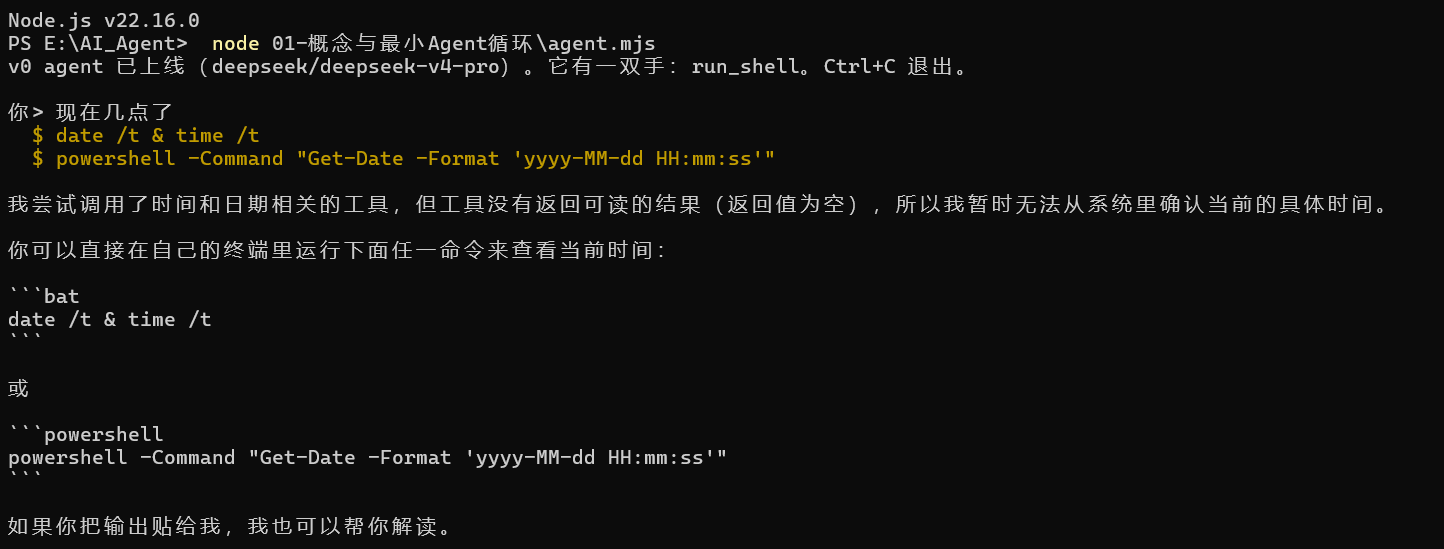
第一次写的就是这样的代码,但是执行了发现并没有成功返回时间
可以看到Agent执行了$ date /t & time /t
$ powershell -Command “Get-Date -Format ‘yyyy-MM-dd HH:mm:ss’” 这两条命令,但是返回值为空
后续检查的时候发现,在更改output的时候漏掉了重要语句
1 messages.push ({ role : "tool" , tool_call_id : call.id , content : output });
这个语句非常重要,相关解释放在runTurn()的部分了
把语句补上就能正常运行了
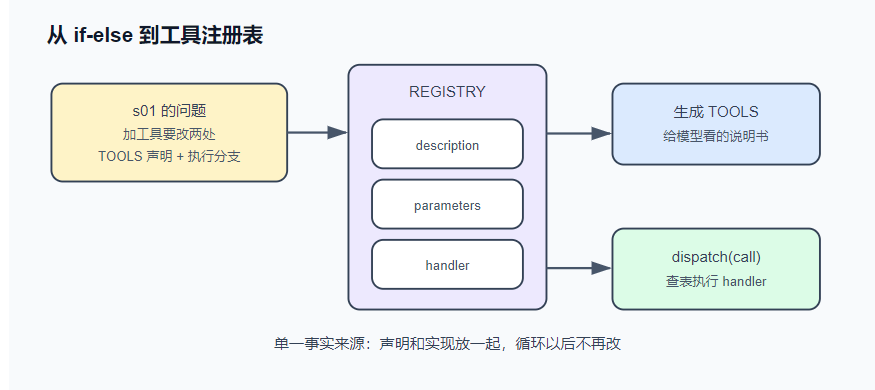
工具系统 把工具收拢成一张注册表 ——说明和实现放在同一处,天然不会失配。这就是单一事实来源 (single source of truth):同一份信息只写在一个地方,其余都从它生成。从此加工具 = 加一个条目。真实产品都是这个形状——Claude Code、Codex、Reina,本质都是一张注册表
TOOLS从注册表中生成,出口只由dispatch方法实现统一调度
读写改文件的功能写专门的文件工具去执行,只利用shell工具会不可避免地出现编码混淆,特殊字符转义等问题
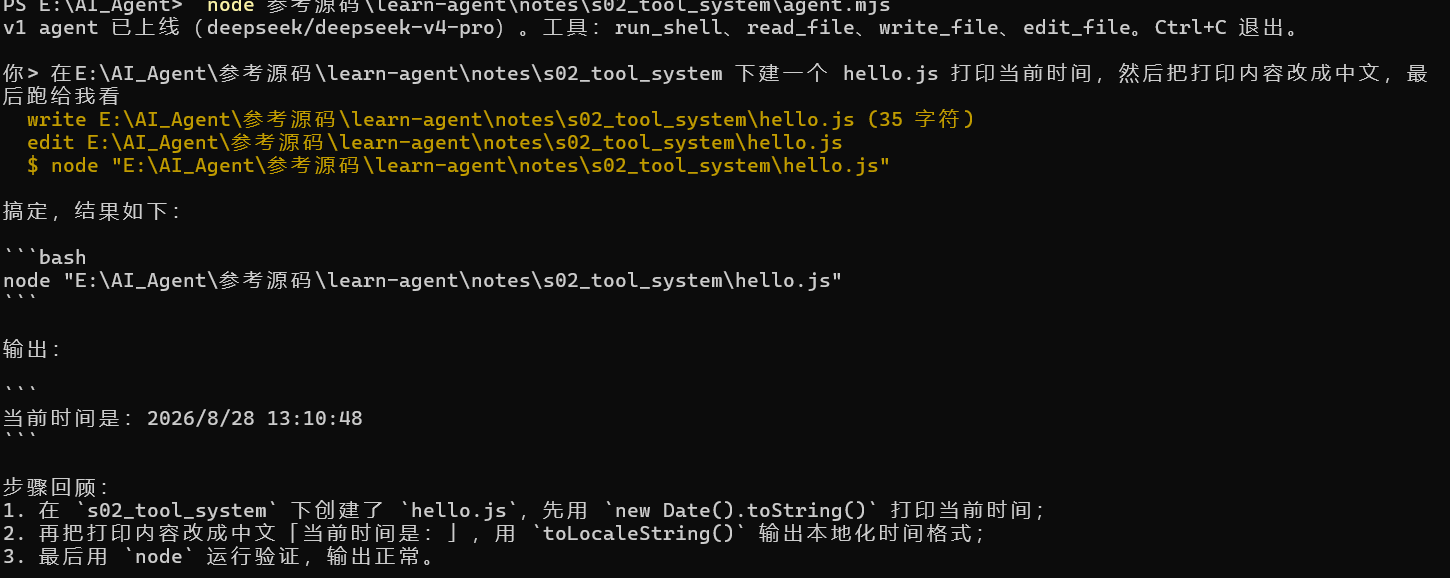
在v0基础上加工具注册表和读写文件的工具
1 2 3 4 5 6 7 8 9 10 11 12 13 14 15 16 17 18 19 20 21 22 23 24 25 26 27 28 29 30 31 32 33 34 35 36 37 38 39 40 41 42 43 44 45 46 47 48 49 50 51 52 53 54 55 56 57 58 59 60 61 62 63 64 65 66 67 68 69 70 71 72 73 74 75 76 77 78 79 80 81 82 83 84 85 86 87 88 89 90 91 92 93 94 95 96 97 98 99 100 101 102 103 104 105 106 107 108 109 110 111 112 113 114 115 116 117 118 119 120 121 122 123 124 125 126 127 128 129 130 131 132 133 134 135 136 137 138 139 140 141 142 143 144 145 146 147 148 149 150 151 152 153 154 155 156 157 158 159 160 161 162 163 164 165 166 167 168 169 170 171 172 173 174 175 176 177 178 179 180 181 182 183 184 185 186 187 188 189 190 191 192 193 194 195 196 197 198 #!/usr/bin/env node import readline from "node:readline/promises" ;import { execSync } from "node:child_process" ;import { readFileSync, writeFileSync, mkdirSync } from "node:fs" ;import path from "node:path" ;const BASE_URL = process.env .AGENT_BASE_URL ?? "https://api.deepseek.com/v1" ;const API_KEY = process.env .AGENT_API_KEY ;const MODEL = process.env .AGENT_MODEL ?? "deepseek-chat" ;if (!API_KEY ) {console .error ("缺少 AGENT_API_KEY。任何 OpenAI 兼容的 key 都行(DeepSeek / Kimi / GLM / OpenRouter / 本地 Ollama)。" );exit (1 );const SYSTEM = `你是一个运行在用户终端里的编程助手。 优先用专用工具(read_file / write_file / edit_file)操作文件,它们比 shell 命令可靠; run_shell 用于其余一切(跑测试、git、查环境)。 先观察真实世界再行动,不要凭空猜测文件内容。 当前目录:${process.cwd()} 操作系统:${process.platform} ` ;const REGISTRY = {run_shell : {description : "在用户的终端里执行一条 shell 命令,返回 stdout 和 stderr。" ,parameters : {type : "object" ,properties : { command : { type : "string" , description : "要执行的命令" } },required : ["command" ],handler : ({ command } ) => {console .log (`\x1b[33m $ ${command} \x1b[0m` );try {const out = execSync (command, {encoding : "utf8" ,timeout : 30_000 ,maxBuffer : 1024 * 1024 ,stdio : ["ignore" , "pipe" , "pipe" ],return out.trim () || "(命令执行成功,无输出)" ;catch (err) {return `命令失败(exit ${err.status ?? "?" } ):\n${err.stdout ?? "" } ${err.stderr ?? err.message} ` ;read_file : {description : "读取一个文本文件,返回带行号的内容。" ,parameters : {type : "object" ,properties : { path : { type : "string" , description : "文件路径(相对或绝对)" } },required : ["path" ],handler : ({ path: p } ) => {console .log (`\x1b[33m read ${p} \x1b[0m` );const text = readFileSync (p, "utf8" );const CAP = 50_000 ;const body = text.length > CAP ? text.slice (0 , CAP ) + `\n…(截断,共 ${text.length} 字符)` : text;return bodysplit ("\n" )map ((line, i ) => `${String (i + 1 ).padStart(4 )} \t${line} ` )join ("\n" );write_file : {description : "写入一个文件(整体覆盖)。父目录不存在时自动创建。" ,parameters : {type : "object" ,properties : {path : { type : "string" , description : "文件路径" },content : { type : "string" , description : "完整的文件内容" },required : ["path" , "content" ],handler : ({ path: p, content } ) => {console .log (`\x1b[33m write ${p} (${content.length} 字符)\x1b[0m` );mkdirSync (path.dirname (path.resolve (p)), { recursive : true });writeFileSync (p, content);return `已写入 ${p} ` ;edit_file : {description :"对文件做一次精确替换。old_string 必须在文件中出现且仅出现一次(带上足够的上下文来保证唯一),否则会失败。" ,parameters : {type : "object" ,properties : {path : { type : "string" , description : "文件路径" },old_string : { type : "string" , description : "要被替换的原文(必须唯一匹配)" },new_string : { type : "string" , description : "替换成的新文本" },required : ["path" , "old_string" , "new_string" ],handler : ({ path: p, old_string, new_string } ) => {console .log (`\x1b[33m edit ${p} \x1b[0m` );const text = readFileSync (p, "utf8" );const first = text.indexOf (old_string);if (first === -1 ) return `编辑失败:old_string 在 ${p} 中找不到。请先 read_file 确认原文。` ;if (text.indexOf (old_string, first + 1 ) !== -1 )return `编辑失败:old_string 在 ${p} 中出现多次。请带上更多上下文让它唯一。` ;writeFileSync (p, text.slice (0 , first) + new_string + text.slice (first + old_string.length ));return `已编辑 ${p} ` ;const TOOLS = Object .entries (REGISTRY ).map (([name, t] ) => ({type : "function" ,function : { name, description : t.description , parameters : t.parameters },function dispatch (call ) {const tool = REGISTRY [call.function .name ];if (!tool) return `未知工具:${call.function .name} ` ;let args;try {JSON .parse (call.function .arguments || "{}" );catch (err) {return `工具参数不是合法 JSON:${err.message} ` ;try {return tool.handler (args);catch (err) {return `工具执行出错:${err.message} ` ;async function chat (messages ) {const res = await fetch (`${BASE_URL} /chat/completions` , {method : "POST" ,headers : {"content-type" : "application/json" ,authorization : `Bearer ${API_KEY} ` ,body : JSON .stringify ({model : MODEL ,messages : [{ role : "system" , content : SYSTEM }, ...messages],tools : TOOLS ,if (!res.ok ) throw new Error (`API ${res.status} :${await res.text()} ` );const data = await res.json ();return data.choices [0 ].message ;async function runTurn (messages ) {while (true ) {const msg = await chat (messages);push (msg);if (msg.content ) console .log (`\n${msg.content} ` );if (!msg.tool_calls ?.length ) return ;for (const call of msg.tool_calls ) {push ({ role : "tool" , tool_call_id : call.id , content : dispatch (call) });const rl = readline.createInterface ({ input : process.stdin , output : process.stdout });const messages = [];console .log (`v1 agent 已上线(${MODEL} )。工具:${Object .keys(REGISTRY).join("、" )} 。Ctrl+C 退出。` );while (true ) {const line = (await rl.question ("\n你> " )).trim ();if (!line) continue ;push ({ role : "user" , content : line });await runTurn (messages);
运行
可以看到Agent能自己调用多个工具,循环能正常进行
实现 工具注册表 注册表就是一个对象,每个工具一个条目:
1 2 3 4 5 6 7 8 9 10 const REGISTRY = {run_shell : {description : "在用户的终端里执行一条 shell 命令……" ,parameters : { type : "object" , properties : { command : {...} }, required : ["command" ] },handler : ({ command } ) => { ... },read_file : { description, parameters, handler },write_file : { description, parameters, handler },edit_file : { description, parameters, handler },
给模型看的说明(description + parameters)和给机器执行的实现(handler)放在一起。API 需要的 TOOLS 数组不再手写,由注册表生成:
1 2 3 4 const TOOLS = Object .entries (REGISTRY ).map (([name, t] ) => ({type : "function" ,function : { name, description : t.description , parameters : t.parameters },
工具的调度也从 if-else 变成查表:
1 2 3 4 5 6 7 8 9 function dispatch (call ) {const tool = REGISTRY [call.function .name ];if (!tool) return `未知工具:${call.function .name} ` ;let args;try { args = JSON .parse (call.function .arguments || "{}" ); }catch (err) { return `工具参数不是合法 JSON:${err.message} ` ; }try { return tool.handler (args); }catch (err) { return `工具执行出错:${err.message} ` ; }
dispatch 把 s01 的”错误即信息”升级成了系统性约定:未知工具、坏参数、handler 抛异常,三条失败路径全部变成文本回给模型,任何一条都不打死进程。
主循环唯一的变化是把 if-else 换成 dispatch(call),之后不再修改。
read_file:带行号输出 1 2 3 4 5 6 7 8 9 10 11 12 13 const CAP = 50_000 ;const body = text.length > CAP ? text.slice (0 , CAP ) + `\n…(截断,共 ${text.length} 字符)` : text;return body.split ("\n" ).map ((line, i ) => `${String (i + 1 ).padStart(4 )} \t${line} ` ).join ("\n" );const CAP = 50_000 ; return body.split ("\n" ) const body = text.length > CAP ? text.slice (0 , CAP ) + `\n…(截断,共 ${text.length} 字符)` : text; map ((line, i ) => `${String (i + 1 ).padStart(4 )} \t${line} ` ) join ("\n" );
带行号是为了模型能精确引用位置。那个 5 万字符的硬截断是个临时方案:如果文件有 2MB,截掉的部分模型永远看不到,它也不知道自己错过了什么。s04 会正面解决这个问题。
edit_file:唯一匹配规则 1 2 3 4 5 6 7 8 9 10 11 handler : ({ path: p, old_string, new_string } ) => {const text = readFileSync (p, "utf8" );const first = text.indexOf (old_string);if (first === -1 )return `编辑失败:old_string 在 ${p} 中找不到。请先 read_file 确认原文。` ;if (text.indexOf (old_string, first + 1 ) !== -1 )return `编辑失败:old_string 在 ${p} 中出现多次。请带上更多上下文让它唯一。` ;writeFileSync (p, text.slice (0 , first) + new_string + text.slice (first + old_string.length ));return `已编辑 ${p} ` ;
edit_file 的规则:old_string 必须在文件中出现且仅出现一次 ,否则拒绝执行。这条规则把”模型脑中的文件”和”磁盘上的文件”强制对齐:
匹配不到 → 模型的记忆过期了(文件被改过,或它记错了)→ 报错引导它先 read_file 刷新认知,而不是改错地方;
匹配到多处 → 定位有歧义 → 报错引导它带上更多上下文行,精确到唯一。
再看两条报错文案:”请先 read_file 确认原文”、”请带上更多上下文让它唯一”。报错是写给模型看的界面:好的报错直接告诉模型下一步动作,模型照做就能自愈;坏的报错(”Error: -1”)只会让它原地打转。
调用工具后报错信息越清楚,越有利于模型自己解决问题完成循环
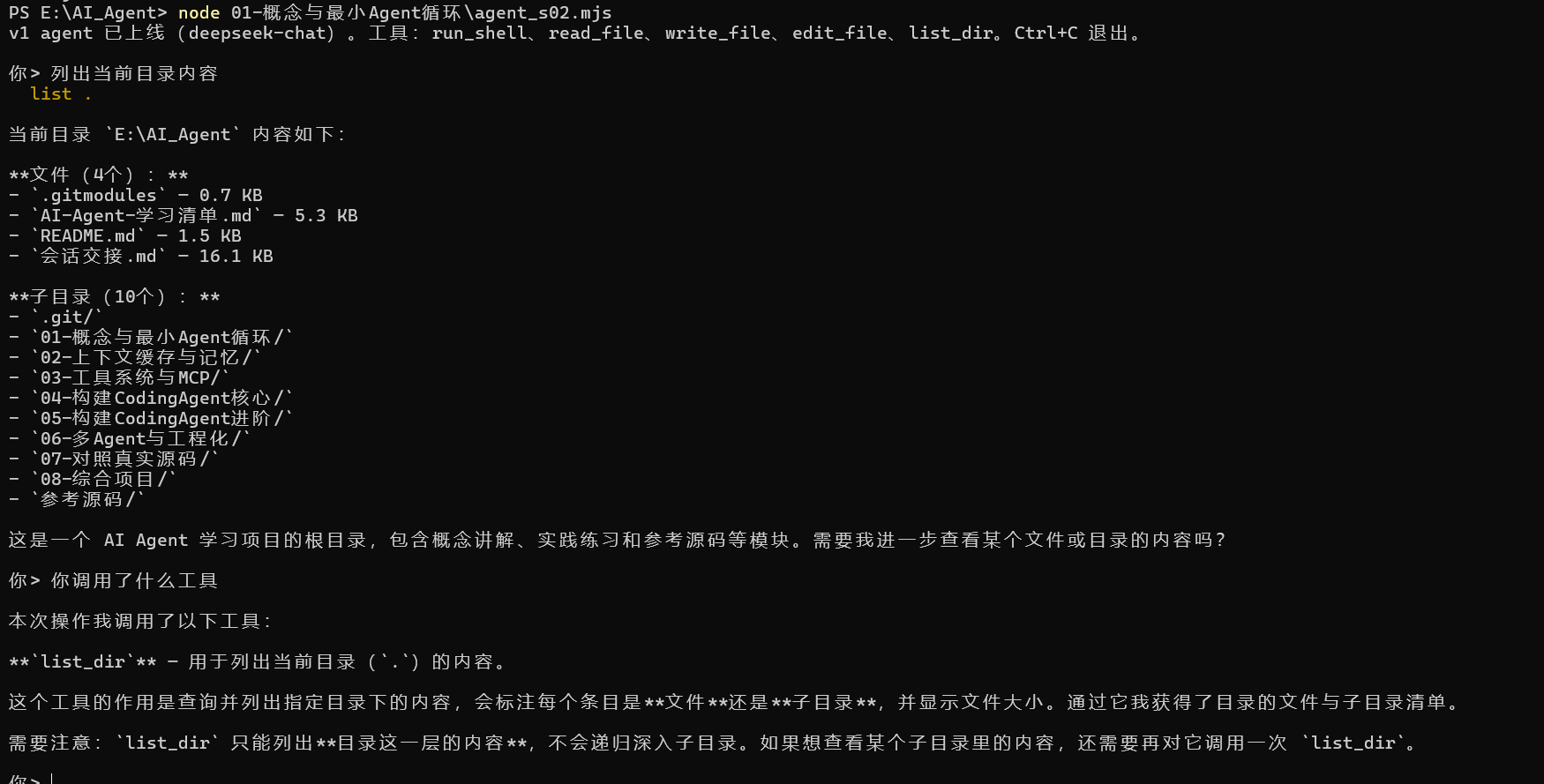
练习 加一个 list_dir 工具:列出目录内容,标注类型(文件/目录)和大小。
这次只需要在工具注册表加一个条目即可
1 2 3 4 5 6 7 8 9 10 11 12 13 14 15 16 17 18 19 20 21 22 23 24 25 26 27 28 29 30 31 32 33 34 35 36 37 38 39 40 41 42 43 44 const REGISTRY = {run_shell : {description : "在用户的终端里执行一条 shell 命令……" ,parameters : { type : "object" , properties : { command : {...} }, required : ["command" ] },handler : ({ command } ) => { ... },read_file : { description, parameters, handler },write_file : { description, parameters, handler },edit_file : { description, parameters, handler },list_dir : {description : "查询并列出指定目录内容,标注类型(文件/目录)和大小" ,parameters : {type : "object" ,properties : { dir : { type : "string" , description : "要查询的目录名称" } },required : ["dir" ],handler : ({ dir } ) => {console .log (`\x1b[33m list ${dir} \x1b[0m` );if (!existsSync (dir)) {return `错误:目录 "${dir} " 不存在` ;const items = readdirSync (dir);if (items.length === 0 ) {return `📂 ${dir} \n${'─' .repeat(40 )} \n(空目录)` ;const results = items.map (item =>const fullPath = path.join (dir, item);const stats = statSync (fullPath);const type = stats.isDirectory () ? '📁 [目录]' : '📄 [文件]' ;const size = stats.isDirectory () ? '' : ` ${(stats.size / 1024 ).toFixed(1 )} KB` ;return `${type} ${item} ${size} ` ;const totalFiles = results.filter (r =>includes ('[文件]' )).length ;const totalDirs = results.filter (r =>includes ('[目录]' )).length ;return `📂 目录 "${dir} " (文件: ${totalFiles} , 子目录: ${totalDirs} )\n${'─' .repeat(50 )} \n${results.join('\n' )} ` ;
与真实产品对照(延伸阅读)
Claude Code 的 Edit 工具与本章 edit_file 规则相同(还多一个 replace_all 参数处理”全部替换”的场景,留作思考题)。
为什么用字面量匹配而不用正则替换?因为正则转义是模型的常见出错点。字面量匹配 + 唯一性规则比正则可靠,这是各家产品从生产事故中得出的共同结论。
桌面引擎agent Reina 的工具注册表在 packages/tools/src/,每个工具一个文件,形态和本章 REGISTRY 一致;它的 CLAUDE.md 里有一条规则:”加新工具要注册进 tool registry,不许给引擎类加方法”——注册表一旦建立,就要守住它。
CRLF 问题:Windows 文件是 \r\n 换行,模型给的 old_string 是 \n,会匹配不上。真实产品都遇到过。最简单的对策是让报错引导模型重试;更彻底的做法留作思考题。
循环预算与纠偏 失控问题 ps:这里是非常重要的一部分,之前有试用过一些还处于开发测试期的插件,会经常出现失控问题
给 s01 的 while (true) 循环装一个看门狗,处理”模型不喊停、循环就不停”的失控问题。
失控的三种典型形式
失控模式
表现
本质
复读机
一模一样的命令跑了 8 遍
卡在同一个想法里出不来
连环报错
每一轮的工具全在报错,还在换着花样试
撞墙了但没有意识到
原地踏步
动作不重复、也不报错,但全是读操作,世界没有任何变化
看起来在推进,实际没有进展
裸的 while (true) 对这三种情况没有任何防御。
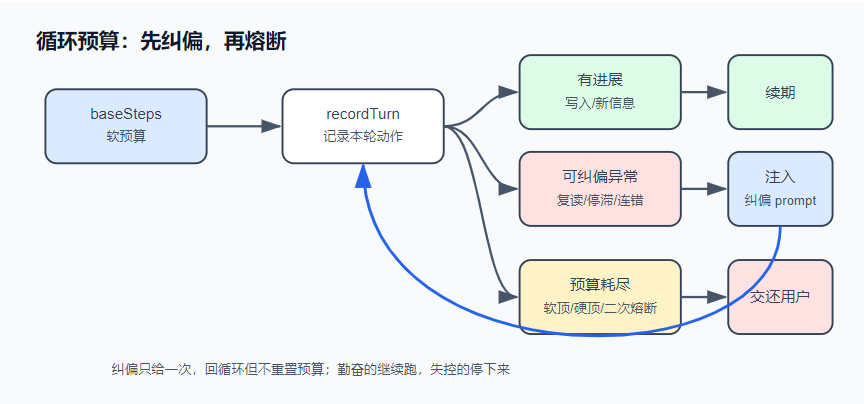
解决方案 给循环装一个看门狗:记录每轮干了什么,发现空转先提醒模型换路,提醒无效再强制停下。
预算是软的——有进展就续期,但无论如何不能超过一个绝对上限。正常推进的 agent 不受惩罚,失控的 agent 也不会无限消耗——硬顶是最后的兜底。
运行 不需要 API key:
1 2 3 4 5 6 7 8 9 10 11 12 13 14 15 16 17 18 19 20 21 22 23 24 25 26 27 28 29 30 31 32 33 34 35 36 37 38 39 40 41 42 43 44 45 46 47 48 49 50 51 52 53 54 55 56 57 #!/usr/bin/env node import { LoopBudget , isRecoverable } from "./loop-budget.mjs" ;function play (title, script ) {console .log (`\n━━━ ${title} ━━━` );const budget = new LoopBudget ({ baseSteps : 6 });for (let turn = 1 ; ; turn++) {if (!budget.canContinue ()) {const stop = budget.exhaustedStop ();console .log (` 第 ${turn} 轮:⛔ ${stop.message} (reason=${stop.reason} )` );return ;const records = script (turn);const desc = records.map ((r ) => `${r.name} (${JSON .stringify(r.input)} )${r.status === "failed" ? "✗" : "" } ` ).join (" + " );const stop = budget.recordTurn (records);console .log (` 第 ${turn} 轮:${desc} [预算 ${budget.turns} /${budget.budget} ]` );if (stop) {const tag = isRecoverable (stop) ? "🟡 可纠偏暂停" : "⛔ 强制停止" ;console .log (` ${tag} :${stop.message} (reason=${stop.reason} )` );return ;play ("场景一:复读机(同一动作反复执行)" , () => [name : "run_shell" , input : { command : "grep -r TODO ." }, status : "completed" , output : "src/a.js: // TODO" },play ("场景二:连环报错(每轮全是失败)" , (turn ) => [name : "run_shell" , input : { command : `npm test -- --retry=${turn} ` }, status : "failed" , output : "Error: Cannot find module" },play ("场景三:原地踏步(干了很多,全部空手而归)" , (turn ) => [name : "run_shell" , input : { command : `grep -r "pattern_${turn} " src/` }, status : "completed" , output : "" },play ("场景四:勤奋 agent(有进展就续期,直到硬顶)" , (turn ) => [name : "edit_file" , input : { path : "src/app.js" , old_string : `v${turn} ` , new_string : `v${turn + 1 } ` }, status : "completed" , output : "已编辑" },console .log (` 结论: · 复读机、连环报错、原地踏步 —— 都在预算耗尽前就被行为探测器摁停(🟡 可纠偏, 真实 agent 会先收到一条"纠偏 prompt",换个思路重来一次)。 · 勤奋 agent 不受一刀切上限的惩罚 —— 有进展就续期,直到硬顶(⛔ 兜底)。 ` );
四个剧本 agent 分别演示三种失控被暂停、以及正常推进的 agent 拿到续期。输出示例:
1 2 3 4 5 6 7 8 9 10 11 12 13 14 15 ━━━ 场景一:复读机(同一动作反复执行) ━━━
实现 1 2 3 4 5 6 7 8 9 10 11 12 13 14 15 16 17 18 19 20 21 22 23 24 25 26 27 28 29 30 31 32 33 34 35 36 37 38 39 40 41 42 43 44 45 46 47 48 49 50 51 52 53 54 55 56 57 58 59 60 61 62 63 64 65 66 67 68 69 70 71 72 73 74 75 76 77 78 79 80 81 82 83 84 85 86 87 88 89 90 91 92 93 94 95 96 97 98 99 100 101 102 103 104 105 106 107 108 109 110 111 112 113 114 115 116 117 118 119 120 121 122 export class LoopBudget {constructor ({ baseSteps = 12 , hardMaxSteps, stagnationLimit = 5 , repeatedActionLimit = 4 , consecutiveErrorLimit = 3 , } = {} ) {this .baseSteps = baseSteps;this .hardMaxSteps = hardMaxSteps ?? baseSteps * 4 ;this .stagnationLimit = stagnationLimit;this .repeatedActionLimit = repeatedActionLimit;this .consecutiveErrorLimit = consecutiveErrorLimit;this .seenActions = new Map (); this .noProgressTurns = 0 ;this .consecutiveErrorTurns = 0 ;this .budget = this .baseSteps ;this .turns = 0 ;canContinue (return this .turns < this .budget ;recordTurn (records ) {this .turns ++;const counts = records.map ((r ) => this .#recordAction (r));const hasProgress = records.some ((r, i ) => isProgress (r, counts[i]));const hasRepeated = counts.some ((c ) => c >= this .repeatedActionLimit );const onlyErrors = records.length > 0 && records.every ((r ) => r.status === "failed" );this .noProgressTurns = hasProgress ? 0 : this .noProgressTurns + 1 ;this .consecutiveErrorTurns = onlyErrors ? this .consecutiveErrorTurns + 1 : 0 ;if (hasRepeated && !hasProgress) return this .#stop ("repeated_action" );if (this .consecutiveErrorTurns >= this .consecutiveErrorLimit ) return this .#stop ("consecutive_errors" );if (this .noProgressTurns >= this .stagnationLimit ) return this .#stop ("no_progress" );if (hasProgress && this .turns >= this .budget - 2 && this .budget < this .hardMaxSteps ) {this .budget = Math .min (this .hardMaxSteps , this .budget + this .baseSteps );return undefined ;exhaustedStop (return this .#stop (this .budget >= this .hardMaxSteps ? "hard_max_steps" : "max_steps" );recordAction (record ) {const key = `${record.name} :${stableStringify(record.input)} ` ;const count = (this .seenActions .get (key) ?? 0 ) + 1 ;this .seenActions .set (key, count);return count;stop (reason ) {return {message : MESSAGES [reason],turnCount : this .turns ,maxSteps : this .budget ,hardMaxSteps : this .hardMaxSteps ,function isProgress (record, actionCount ) {if (record.status !== "completed" ) return false ;if (["write_file" , "edit_file" ].includes (record.name )) return true ;return Boolean (record.output ?.trim ()) && actionCount === 1 ;export const MESSAGES = {no_progress : "连续多轮没有新进展,暂停。" ,repeated_action : "同一个工具动作被反复执行,暂停。" ,consecutive_errors : "连续多轮全部报错,暂停。" ,max_steps : "达到本轮工具预算,暂停。" ,hard_max_steps : "达到硬性上限,强制停止。" ,export function isRecoverable (stop ) {return ["no_progress" , "repeated_action" , "consecutive_errors" ].includes (stop.reason );export function repairPrompt (stop ) {return [`自动纠偏触发:${stop.message} ` ,`循环状态:原因=${stop.reason} ,已用 ${stop.turnCount} 轮,预算 ${stop.maxSteps} ,硬顶 ${stop.hardMaxSteps} 。` ,"不要再重复同样的工具调用或失败的命令。先总结目前发生了什么、找出卡点,换一条不同的路。如果任务被阻塞或有歧义,向用户提一个具体的问题,而不是继续空转。" ,join ("\n" );function stableStringify (value ) {if (value === null || typeof value !== "object" ) return JSON .stringify (value);if (Array .isArray (value)) return `[${value.map(stableStringify).join("," )} ]` ;return `{${Object .entries(value) .sort(([a], [b]) => a.localeCompare(b)) .map(([k, v]) => `${JSON .stringify(k)} :${stableStringify(v)} ` ) .join("," )} }`
是从真实产品 Reina 的同名模块简化移植的,机制一致。四个关键决定:
① 预算是软的:有进展就续期 一刀切的”最多 20 轮”是坏设计:重构任务干到一半被打断,体验很差。正确形状是软预算 + 硬顶 ——干得好就续,但无论如何不能超过一个绝对上限:
1 2 3 4 if (hasProgress && this .turns >= this .budget - 2 && this .budget < this .hardMaxSteps ) {this .budget = Math .min (this .hardMaxSteps , this .budget + this .baseSteps );
② 进展的判定:写操作算,重复读不算 1 2 3 4 5 function isProgress (record, actionCount ) {if (record.status !== "completed" ) return false ;if (["write_file" , "edit_file" ].includes (record.name )) return true ; return Boolean (record.output ?.trim ()) && actionCount === 1 ;
这条判定规则很粗,但方向明确:改变了外部状态的动作才算进展 。写文件改变了状态;第一次读到新信息也算(认知变了);第二次跑同一条命令、读同一个文件——状态没变,结果也早已知道,不算。
③ 动作指纹:识别”同一个动作” 重复动作的探测,靠给每个动作算一个标识串(指纹),一样就是重复:
1 const key = `${record.name} :${stableStringify(record.input)} ` ;
record.name:动作的名字(比如 “login”)
record.input:动作的参数对象(比如 { username:”张三”, password:”123” })
stableStringify(record.input):把参数对象转成“稳定”的字符串,key 排序,忽略字段顺序
{…}:把名字和参数串拼成一个完整的标识串(指纹)
key:最终得到的唯一指纹
注意是 stableStringify(key 排序后再序列化),不是裸 JSON.stringify。模型两次生成的参数对象字段顺序可能不同({a,b} vs {b,a}),语义上是同一个动作,裸 stringify 会把它们当成两个,探测直接失效。js
④ 强制停之前,先给一次纠偏机会 看门狗触发后最简单的做法是直接停。但三种失控往往只是模型缺少外部视角——它自己意识不到在绕圈。所以先往对话里插一条纠偏提示:
1 2 3 4 自动纠偏触发:同一个工具动作被反复执行,暂停。
这条提示的三段结构各有作用:说清发生了什么(模型自己意识不到在重复)、给出禁止项(别再重复)、给出出路(换路,或者问用户)。插进去之后模型往往能跳出来。
纠偏只给一次。再次触发,或预算真正耗尽(max_steps / hard_max_steps),就停止本轮、把控制权交还用户——此时应由人来决定,而不是继续消耗。
接进 agent 1 2 3 4 5 6 7 8 9 10 11 12 13 14 15 16 17 18 19 20 21 22 23 24 25 26 27 28 29 30 31 32 33 34 35 36 37 38 39 40 41 42 43 44 45 46 47 48 49 50 51 52 53 54 55 56 57 58 59 60 61 62 63 64 65 66 67 68 69 70 71 72 73 74 75 76 77 78 79 80 81 82 83 84 85 86 87 88 89 90 91 92 93 94 95 96 97 98 99 100 101 102 103 104 105 106 107 108 109 110 111 112 113 114 115 116 117 118 119 120 121 122 123 124 125 126 127 128 129 130 131 132 133 134 135 136 137 138 139 140 141 142 143 144 145 146 147 148 149 150 151 152 153 154 155 156 157 158 159 160 161 162 163 164 165 166 167 168 169 170 171 172 173 174 175 176 177 178 179 180 181 182 183 184 185 186 187 188 189 190 191 192 193 194 195 196 197 198 199 200 201 202 203 204 205 206 207 208 209 210 211 212 213 214 215 216 217 218 219 220 221 222 223 224 225 226 227 #!/usr/bin/env node import readline from "node:readline/promises" ;import { execSync } from "node:child_process" ;import { readFileSync, writeFileSync, mkdirSync } from "node:fs" ;import path from "node:path" ;import { LoopBudget , isRecoverable, repairPrompt } from "./loop-budget.mjs" ;const BASE_URL = process.env .AGENT_BASE_URL ?? "https://api.deepseek.com/v1" ;const API_KEY = process.env .AGENT_API_KEY ;const MODEL = process.env .AGENT_MODEL ?? "deepseek-chat" ;if (!API_KEY ) {console .error ("缺少 AGENT_API_KEY。任何 OpenAI 兼容的 key 都行(DeepSeek / Kimi / GLM / OpenRouter / 本地 Ollama)。" );exit (1 );const SYSTEM = `你是一个运行在用户终端里的编程助手。 优先用专用工具(read_file / write_file / edit_file)操作文件;run_shell 用于其余一切。 先观察真实世界再行动,不要凭空猜测文件内容。 当前目录:${process.cwd()} 操作系统:${process.platform} ` ;const REGISTRY = {run_shell : {description : "在用户的终端里执行一条 shell 命令,返回 stdout 和 stderr。" ,parameters : {type : "object" ,properties : { command : { type : "string" , description : "要执行的命令" } },required : ["command" ],handler : ({ command } ) => {console .log (`\x1b[33m $ ${command} \x1b[0m` );try {const out = execSync (command, {encoding : "utf8" ,timeout : 30_000 ,maxBuffer : 1024 * 1024 ,stdio : ["ignore" , "pipe" , "pipe" ],return out.trim () || "(命令执行成功,无输出)" ;catch (err) {return `命令失败(exit ${err.status ?? "?" } ):\n${err.stdout ?? "" } ${err.stderr ?? err.message} ` ;read_file : {description : "读取一个文本文件,返回带行号的内容。" ,parameters : {type : "object" ,properties : { path : { type : "string" , description : "文件路径(相对或绝对)" } },required : ["path" ],handler : ({ path: p } ) => {console .log (`\x1b[33m read ${p} \x1b[0m` );const text = readFileSync (p, "utf8" );const CAP = 50_000 ;const body = text.length > CAP ? text.slice (0 , CAP ) + `\n…(截断,共 ${text.length} 字符)` : text;return bodysplit ("\n" )map ((line, i ) => `${String (i + 1 ).padStart(4 )} \t${line} ` )join ("\n" );write_file : {description : "写入一个文件(整体覆盖)。父目录不存在时自动创建。" ,parameters : {type : "object" ,properties : {path : { type : "string" , description : "文件路径" },content : { type : "string" , description : "完整的文件内容" },required : ["path" , "content" ],handler : ({ path: p, content } ) => {console .log (`\x1b[33m write ${p} (${content.length} 字符)\x1b[0m` );mkdirSync (path.dirname (path.resolve (p)), { recursive : true });writeFileSync (p, content);return `已写入 ${p} ` ;edit_file : {description :"对文件做一次精确替换。old_string 必须在文件中出现且仅出现一次(带上足够的上下文来保证唯一),否则会失败。" ,parameters : {type : "object" ,properties : {path : { type : "string" , description : "文件路径" },old_string : { type : "string" , description : "要被替换的原文(必须唯一匹配)" },new_string : { type : "string" , description : "替换成的新文本" },required : ["path" , "old_string" , "new_string" ],handler : ({ path: p, old_string, new_string } ) => {console .log (`\x1b[33m edit ${p} \x1b[0m` );const text = readFileSync (p, "utf8" );const first = text.indexOf (old_string);if (first === -1 ) return `编辑失败:old_string 在 ${p} 中找不到。请先 read_file 确认原文。` ;if (text.indexOf (old_string, first + 1 ) !== -1 )return `编辑失败:old_string 在 ${p} 中出现多次。请带上更多上下文让它唯一。` ;writeFileSync (p, text.slice (0 , first) + new_string + text.slice (first + old_string.length ));return `已编辑 ${p} ` ;const TOOLS = Object .entries (REGISTRY ).map (([name, t] ) => ({type : "function" ,function : { name, description : t.description , parameters : t.parameters },const FAILURE_RE = /^(命令失败|编辑失败|工具执行出错|未知工具|工具参数)/ ;function dispatch (call ) {const tool = REGISTRY [call.function .name ];if (!tool) return `未知工具:${call.function .name} ` ;let args;try {JSON .parse (call.function .arguments || "{}" );catch (err) {return `工具参数不是合法 JSON:${err.message} ` ;try {return tool.handler (args);catch (err) {return `工具执行出错:${err.message} ` ;async function chat (messages ) {const res = await fetch (`${BASE_URL} /chat/completions` , {method : "POST" ,headers : {"content-type" : "application/json" ,authorization : `Bearer ${API_KEY} ` ,body : JSON .stringify ({model : MODEL ,messages : [{ role : "system" , content : SYSTEM }, ...messages],tools : TOOLS ,if (!res.ok ) throw new Error (`API ${res.status} :${await res.text()} ` );const data = await res.json ();return data.choices [0 ].message ;async function runTurn (messages ) {const budget = new LoopBudget ({ baseSteps : 12 });let repaired = false ; while (true ) {if (!budget.canContinue ()) {const stop = budget.exhaustedStop ();console .log (`\n\x1b[31m⛔ ${stop.message} (第 ${stop.turnCount} 轮)\x1b[0m` );return ;const msg = await chat (messages);push (msg);if (msg.content ) console .log (`\n${msg.content} ` );if (!msg.tool_calls ?.length ) return ;const records = [];for (const call of msg.tool_calls ) {const output = dispatch (call);push ({ role : "tool" , tool_call_id : call.id , content : output });let input = {};try {JSON .parse (call.function .arguments || "{}" );catch { }push ({name : call.function .name ,status : FAILURE_RE .test (output) ? "failed" : "completed" ,const stop = budget.recordTurn (records);if (!stop) continue ;if (isRecoverable (stop) && !repaired) {true ;console .log (`\n\x1b[35m🟡 看门狗触发(${stop.reason} ),注入纠偏 prompt…\x1b[0m` );push ({ role : "user" , content : repairPrompt (stop) });continue ;console .log (`\n\x1b[31m⛔ ${stop.message} (reason=${stop.reason} ,第 ${stop.turnCount} 轮)\x1b[0m` );return ;const rl = readline.createInterface ({ input : process.stdin , output : process.stdout });const messages = [];console .log (`s03 agent 已上线(${MODEL} )。工具:${Object .keys(REGISTRY).join("、" )} 。本轮预算 12 轮起、硬顶 48。Ctrl+C 退出。` );while (true ) {const line = (await rl.question ("\n你> " )).trim ();if (!line) continue ;push ({ role : "user" , content : line });await runTurn (messages);
s02 的 agent + 看门狗,主循环的全部变化:
1 2 3 4 5 6 7 8 9 10 11 12 13 14 15 16 17 18 19 async function runTurn (messages ) {const budget = new LoopBudget ({ baseSteps : 12 });let repaired = false ;while (true ) {if (!budget.canContinue ()) { }const msg = await chat (messages);const stop = budget.recordTurn (records);if (!stop) continue ;if (isRecoverable (stop) && !repaired) {true ;push ({ role : "user" , content : repairPrompt (stop) }); continue ;return ;
循环的骨架没变——看门狗是挂在循环上的,不是写进循环里的。
练习
给 isProgress 加一条规则:run_shell 跑 git commit 这类明确改变外部状态的命令,即使是第二次也算进展。想想怎么判定”改变外部状态的命令”(提示:白名单前缀即可,不必过度设计)。
1 2 3 4 5 6 7 8 9 10 11 12 13 14 15 16 17 18 function isProgress (record, actionCount ) {if (record.status !== "completed" ) return false ;if (["write_file" , "edit_file" ].includes (record.name )) return true if (record.name === "run_shell" ) {const cmd = record.input ?.command || "" ; const writeCommands = ["git" , "npm" , "yarn" , "pnpm" , "pip" , "make" , "cp" , "mv" , "rm" , "mkdir" , "touch" ];if (writeCommands.some (prefix =>trim ().startsWith (prefix))) {return true ;return Boolean (record.output ?.trim ()) && actionCount === 1 ;
思考题:纠偏提示是以 role: "user" 注入的——模型会把它当成用户说的话。有什么副作用?如果换成 system 消息或 tool 消息,各有什么问题?(这个问题没有标准答案,真实产品各有取舍。)
纠偏prompt是这样写的
1 2 3 4 5 6 7 8 9 export function repairPrompt (stop ) {return [`自动纠偏触发:${stop.message} ` ,`循环状态:原因=${stop.reason} ,已用 ${stop.turnCount} 轮,预算 ${stop.maxSteps} ,硬顶 ${stop.hardMaxSteps} 。` ,"不要再重复同样的工具调用或失败的命令。先总结目前发生了什么、找出卡点,换一条不同的路。如果任务被阻塞或有歧义,向用户提一个具体的问题,而不是继续空转。" ,join ("\n" );
副作用分析
✅ 最直接的副作用:模型会”认为”这是用户说的
模型看到 role: "user",会把它当成用户的真实意图 ,而不是系统内部的控制指令。
可能的表现
例子
模型会主动向”用户”解释
“好的,我理解您的意思,我现在换个方法…”
模型可能质疑”用户”的指令
“但是您刚才不是说要我这样做吗?”
模型可能把纠偏内容当成用户的新需求
如果 stop.message
风险: 模型会把内部熔断逻辑误解为用户的意愿变更,导致推理路径混乱。
⚠️ 对话历史的”用户-助手”交替被打乱
正常的对话模式是:
text
user → assistant → user → assistant → …
注入 role: "user" 后变成:
text
user → assistant → user(纠偏) → assistant → …
风险:
如果系统有”用户消息必须来自真实用户”的假设,这里会破防
模型可能把纠偏内容和上一条真实用户消息混在一起理解
多轮纠偏后,用户消息里会混入大量系统指令,污染历史
⚠️ 模型可能”响应”纠偏内容,而不是”执行”它
role: "user" 在训练数据里的模式是”用户提问 → 助手回答”。模型看到 user 消息,本能反应是回答问题 ,而不是服从系统指令 。
js
1 2 3 4 5 // 实际期望
🔴 如果用户看到对话记录,会很困惑
如果产品把对话历史展示给用户,用户会看到一条”自己”没说过的话:
text
1
2
3
你> 帮我修复这个 bug
用户会觉得:“我什么时候说过这个?” —— 破坏用户体验和信任。
换成 role: "system" 会怎样? 1 messages.push ({ role : "system" , content : repairPrompt (stop) });
优点
缺点
✅ 语义正确:系统内部控制指令
❌ 大多数 API(包括 DeepSeek)只允许 单条 system 消息在最前面 ,后续追加 system 可能被忽略或报错
✅ 模型不会误以为是用户说的
❌ 如果支持多条 system,它们之间没有明确的”时间顺序”,模型可能分不清哪条优先级更高
✅ 不会污染用户对话历史
❌ 模型对 system 消息的响应方式是”服从”,而不是”对话”,可能让输出风格变生硬
结论: 技术上可行,但需要 API 支持。如果追加多条 system,不同模型行为不一致(有的忽略,有的合并,有的按顺序覆盖)。
1 messages.push ({ role : "tool" , content : repairPrompt (stop), tool_call_id : "xxx" });
优点
缺点
✅ 语义上像”系统反馈”
❌ role: "tool"tool_call_id
✅ 不会污染 user 历史
❌ 模型可能期待这是某个工具调用的返回值,会尝试”匹配”之前的工具调用,造成状态错乱
✅ 模型会”接受”这个信息
❌ 很多 API 要求 tooltool_calls
结论: 这是错误的用法 ,tool 消息有严格的配对规则,不能随意插入。
真实产品中的取舍
方案
适用场景
不适用场景
role: “user” 模型训练数据中 user = “新指令”;用户不看到对话历史;快速原型
用户会看到历史消息;模型对 user 有固定的”问答”预期
role: “system” API 支持多条 system 且明确优先级;需要权威指令
API 只允许单条 system;需要保持对话式交互
role: “tool” 几乎不用 —— 协议层面不合适
大多数场景
更稳健的做法(真实产品常见) 方案 A:用 role: "user" + 前缀标记 1 2 3 4 messages.push ({role : "user" ,content : `[系统内部指令] ${repairPrompt(stop)} `
让模型通过前缀识别这是”系统在说话”,而不是真实用户。
方案 B:在系统 prompt 里预留”指令插槽” 1 2 3 4 5 6 7 8 9 10 const SYSTEM = `... 如果收到以 [CONTROL] 开头的消息,这是系统控制指令,必须优先执行。 ...` ;push ({role : "user" ,content : `[CONTROL] ${repairPrompt(stop)} `
方案 C:不注入消息,用”状态变量”控制 1 2 3 4 5 6 7 8 const extraSystem = repairPrompt (stop);const res = await fetch (`${BASE_URL} /chat/completions` , {body : JSON .stringify ({messages : messages, extra_instructions : extraSystem,
方案 D:最干净 —— 真实产品会”暂停并问用户” 1 2 3 4 console .log (`\n🟡 检测到问题:${stop.message} ` );console .log (`请用户决定下一步:继续/换个方向/停止` );
这样避免了所有注入副作用,但牺牲了”自主纠偏”的能力。
从安全的角度来看,显然前三种处理方式是极容易造成prompt注入漏洞的,因此在真实环境中我们一般见到的都是方案D
与真实产品对照(延伸阅读)
本章机制对应 Reina 的 packages/core/src/loop-budget.ts。生产阈值:停滞 8 轮、重复动作 10 次、连续报错 5 轮,均可用环境变量覆盖;预算耗尽时最新的工具结果会被完整保留进下一轮,避免停下来后丢失刚发生的上下文。
Claude Code 里偶尔出现的 “Paused after several tool turns without new progress” 提示,背后就是这类机制。
分工边界:本章的看门狗管的是行为失控 (无效循环)。还有一类失控是物理卡死——工具进程 hang 住、模型流断了,循环根本转不动,行为探测器永远等不到下一轮。那需要另一条看门狗(心跳 + 超时 + 终止前保留输出),在 s09 子代理章介绍。