流式输出与中断 流式逐字输出,以及让中断过的会话能继续。
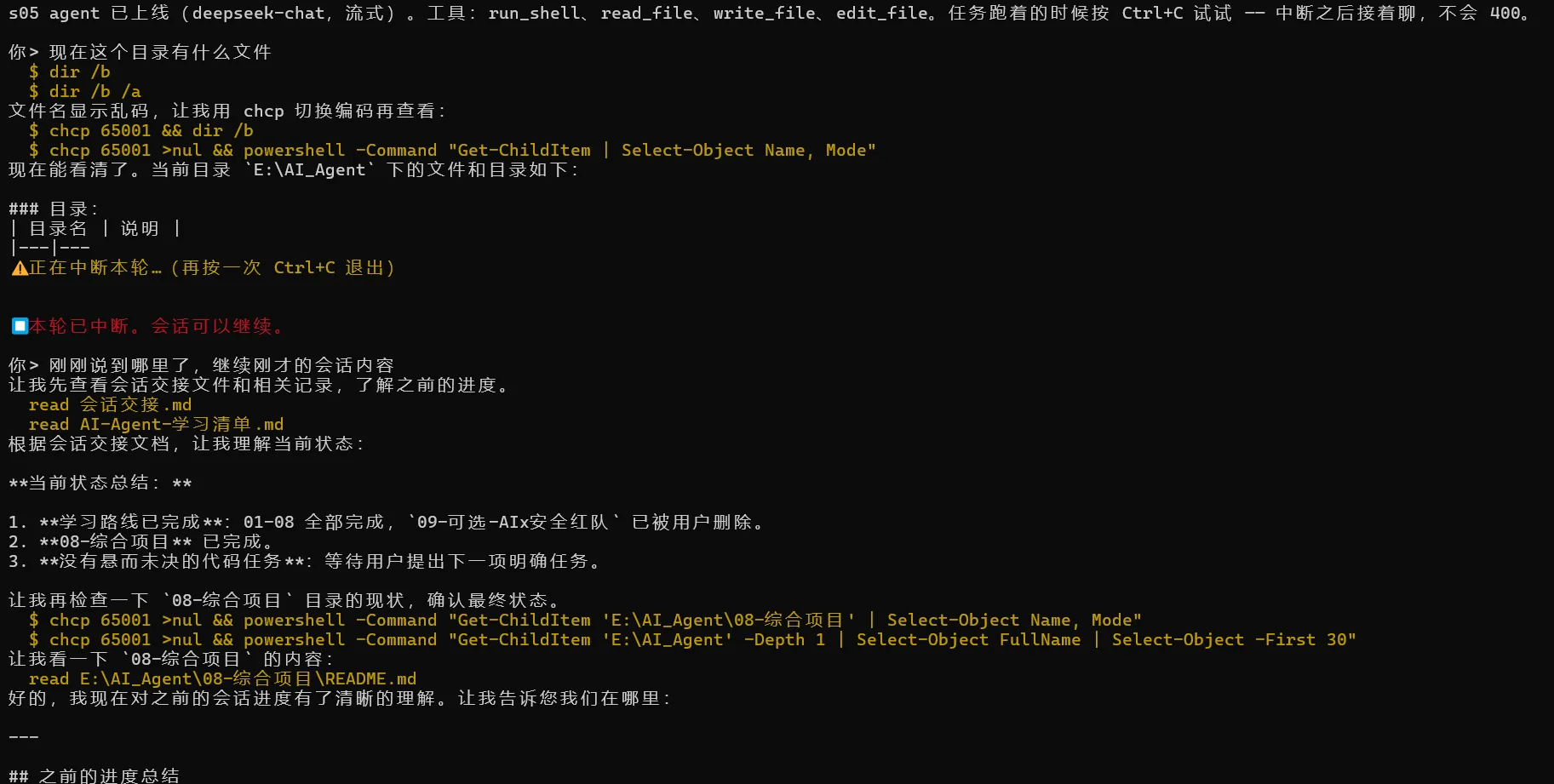
问题 你给 agent 一个多步任务,它闷头执行半分钟,屏幕上什么都没有——不知道是卡住了还是在干活。加上流式输出(逐字打印)后,多半还会加 Ctrl+C 中断——跑错方向的任务得能停。然后新问题出现:中断之后再发一条消息,API 直接报 400 拒收。
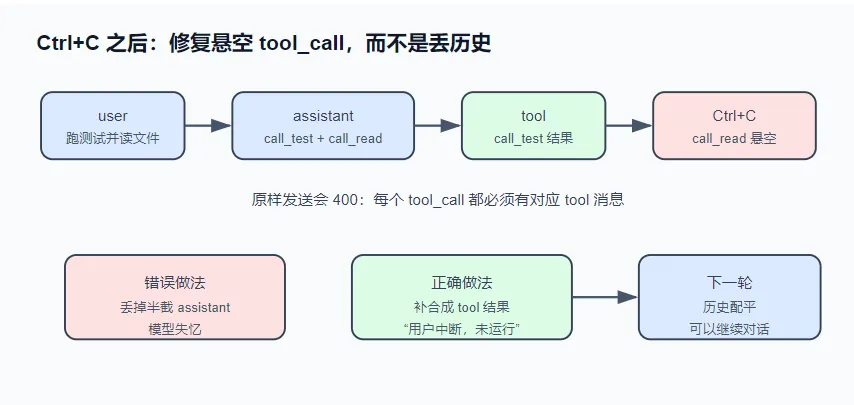
先补一个协议知识:模型想用工具时,会在回复(assistant 消息)里带一批 tool_calls,每个有唯一 id;协议要求每个 id 后面必须跟一条对应的 tool 消息(工具执行结果)。
看一下 Ctrl+C 那一刻的消息序列:
1
2
3
4
user: "把测试跑一遍,顺便看下 README"
call_read 没有对应结果——原样发出去,服务端拒收(400,报错原文见文末)。而且流是中途切断的,call_read 的参数可能停在 JSON 中间({"path":"READ)。怎么处理这个残缺序列,决定了中断后会话能否继续。
解决方案 流式侧:SSE 按行缓冲解析(凑齐完整的一行才处理一行),tool_calls 的分片按 index 装配,parse 留到拼完之后。中断侧:一个 AbortController 贯穿 HTTP 层与工具循环,已装配的半截消息照常保留在历史里;对 Ctrl+C 留下的悬空 tool_call,给每个没有结果的 tool_call 回填一条合成 tool 消息,把序列配平——会话就能继续。
把这段话翻译一下
流式侧(数据接收层)
问题:大模型是逐字(逐token)返回的,tool_calls(工具调用指令)可能被拆成多个网络包发回来。
做法:系统不着急解析零碎数据,而是按SSE(流式协议)的换行符缓存数据,凑齐一行再处理。同时,根据index(索引编号)把属于同一个工具调用的碎片拼装起来,等拼完整了再统一解析成JSON。这样做是为了防止读到一半的数据导致解析报错。
中断侧(请求取消层)
问题:用户按了Ctrl+C,前端会通过AbortController(浏览器/Node的终止信号)中断HTTP请求。此时,后端可能刚执行完第一个工具(call_test),正准备执行第二个工具(call_read)——这个call_read就成了“悬空”指令(有指令但没执行结果)。
做法:系统不暴力丢弃这半截assistant消息,而是保留它,并补一条合成的tool消息,内容写“用户中断,未运行”。
历史配平层(会话修复)
硬性规则:在OpenAI等API格式中,assistant消息里的每个tool_calls,后面必须跟对应数量的tool结果消息,否则接口会报400错误(参数错误)。
做法:通过补上合成的结果,让历史记录中的assistant指令和tool结果数量配平。这样,下一轮用户继续说话时,系统读取的历史是完整合法的,模型不会“失忆”或报错,对话就能无缝继续。
运行 不需要 API key:
1 node notes/s05_streaming_interrupt/demo.mjs
1
2
3
4
5
6
7
8
9
10
11
12
13
14
15
16
17
18
19
20
21
22
23
24
25
26
27
28
29
30
31
32
33
34
35
36
37
38
39
40
41
42
43
44
45
46
47
48
49
50
51
52
53
54
55
56
57
58
59
60
61
62
63
64
65
66
67
68
69
70
71
72
73
74
75
76
77
78
79
80
81
82
83
84
85
86
87
88
89
90
91
92
93
94
95
96
97
98
99
100
101
102
#!/usr/bin/env node import { sseJsonEvents, createAssembler, repairDanglingToolCalls, INTERRUPT_NOTE } from "./stream.mjs" ;console .log ("━━━ 场景一:SSE 分片装配(tool_calls 按 index 归队)━━━" );const events = [choices : [{ delta : { role : "assistant" } }] },choices : [{ delta : { content : "我来" } }] },choices : [{ delta : { content : "查一下。" } }] },choices : [{ delta : { tool_calls : [{ index : 0 , id : "call_ls" , type : "function" , function : { name : "run_shell" , arguments : "" } }] } }] },choices : [{ delta : { tool_calls : [{ index : 0 , function : { arguments : '{"comm' } }] } }] },choices : [{ delta : { tool_calls : [{ index : 1 , id : "call_read" , type : "function" , function : { name : "read_file" , arguments : '{"path":' } }] } }] },choices : [{ delta : { tool_calls : [{ index : 0 , function : { arguments : 'and":"ls' } }] } }] },choices : [{ delta : { tool_calls : [{ index : 1 , function : { arguments : '"a.txt"}' } }] } }] },choices : [{ delta : { tool_calls : [{ index : 0 , function : { arguments : ' -la"}' } }] } }] },choices : [{ delta : {}, finish_reason : "tool_calls" }] },const wire = events.map ((e ) => `data: ${JSON .stringify(e)} \n\n` ).join ("" ) + "data: [DONE]\n\n" ;const bytes = new TextEncoder ().encode (wire);const chunks = [];for (let i = 0 ; i < bytes.length ; i += 31 ) chunks.push (bytes.slice (i, i + 31 ));console .log (` 线路上:${events.length + 1 } 个事件被切成 ${chunks.length} 个原始分片,比如:` );const rawPreview = (u8 ) => JSON .stringify (new TextDecoder ("utf-8" , { fatal : false }).decode (u8));console .log (` 分片[0] = ${rawPreview(chunks[0 ])} ` );console .log (` 分片[1] = ${rawPreview(chunks[1 ])} ` );async function * fakeBody (for (const chunk of chunks) yield chunk;const assembler = createAssembler ();let live = "" ;for await (const event of sseJsonEvents (fakeBody ())) {feed (event); const msg = assembler.message ();console .log (` 实时打印的文本:${JSON .stringify(live)} ` );console .log (` 装配出的 tool_calls(arguments 拼完才 parse):` );for (const tc of msg.tool_calls ) {console .log (` ${tc.id} → ${tc.function .name} (${JSON .stringify(JSON .parse(tc.function .arguments ))} )` );console .log ("\n━━━ 场景二:Ctrl+C 撕裂的消息序列,修复后能继续对话 ━━━" );const messages = [role : "user" , content : "把测试跑一遍,顺便看下 README" },role : "assistant" ,content : "好,我先跑测试,再看 README。" ,tool_calls : [id : "call_test" , type : "function" , function : { name : "run_shell" , arguments : '{"command":"npm test"}' } },id : "call_read" , type : "function" , function : { name : "read_file" , arguments : '{"path":"READ' } }, role : "tool" , tool_call_id : "call_test" , content : "命令失败(exit 1):\n1 test failed" },const shape = (msgs ) =>map ((m ) => (m.role === "tool" ? `tool(${m.tool_call_id} )` : m.tool_calls ? `assistant+${m.tool_calls.length} calls` : m.role ))join (" → " );console .log (` 修复前:${shape(messages)} ` );console .log (` 悬空:call_read 没有 tool 结果;参数断裂:${JSON .stringify(messages[1 ].tool_calls[1 ].function .arguments )} ` );const filled = repairDanglingToolCalls (messages);console .log (` 修复后:${shape(messages)} (回填 ${filled} 条)` );console .log (` 合成结果:${JSON .stringify(messages.find((m) => m.tool_call_id === "call_read" ).content)} ` );console .log (` 参数修复:${JSON .stringify(messages[1 ].tool_calls[1 ].function .arguments )} ` );console .log (` 再跑一遍修复(应当无操作、幂等):回填 ${repairDanglingToolCalls(messages)} 条` );console .log (` 结论: · SSE 分片和事件边界无关 —— 按行缓冲 + TextDecoder(stream) 之后, 掐在任何位置的分片都能装回原样;tool_calls 靠 index 归队, arguments 是碎 JSON 字符串,拼完才能 parse。 · 中断很容易,中断后还能继续对话才是工程:悬空的 tool_call 回填 合成结果("${INTERRUPT_NOTE} "), 断裂的参数修成 {},消息序列重新配平 —— 下一句话不会撞上 400。 ` );
输出(SSE 字节流每 31 字节切一次,故意切在 data: 行和 JSON 中间):
1
2
3
4
5
6
7
8
9
10
11
12
13
14
15
16
17
18
19
20
21
22
23
24
━━━ 场景一:SSE 分片装配(tool_calls 按 index 归队)━━━11 个事件被切成 30 个原始分片,比如:0 ] = "data: {\"choices\":[{\"delta\":{\"ro" 1 ] = "le\":\"assistant\"}}]}\n\ndata: {\"ch" "我来查一下。" arguments 拼完才 parse):run_shell ({"command" :"ls -la" })read_file ({"path" :"a.txt" })Ctrl +C 撕裂的消息序列,修复后能继续对话 ━━━tool (call_test)"{\"path\":\"READ" tool (call_read) → tool (call_test)(回填 1 条)"(用户中断了执行,该工具未运行——不是工具失败,需要时可以重新调用)" "{}" 0 条SSE 分片和事件边界无关 —— 按行缓冲 + TextDecoder (stream) 之后,arguments 是碎 JSON 字符串,拼完才能 parse。"(用户中断了执行,该工具未运行——不是工具失败,需要时可以重新调用)" ),400 。
运行 AGENT_API_KEY=sk-xxx node notes/s05_streaming_interrupt/agent.mjs,是已经做了流式输出和中断消息处理的agent代码
1
2
3
4
5
6
7
8
9
10
11
12
13
14
15
16
17
18
19
20
21
22
23
24
25
26
27
28
29
30
31
32
33
34
35
36
37
38
39
40
41
42
43
44
45
46
47
48
49
50
51
52
53
54
55
56
57
58
59
60
61
62
63
64
65
66
67
68
69
70
71
72
73
74
75
76
77
78
79
80
81
82
83
84
85
86
87
88
89
90
91
92
93
94
95
96
97
98
99
100
101
102
103
104
105
106
107
108
109
110
111
112
113
114
115
116
117
118
119
120
121
122
123
124
125
126
127
128
129
130
131
132
133
134
135
136
137
138
139
140
141
142
143
144
145
146
147
148
149
150
151
152
153
154
155
156
157
158
159
160
161
162
163
164
165
166
167
168
169
170
171
172
173
174
175
176
177
178
179
180
181
182
183
184
185
186
187
188
189
190
191
192
193
194
195
196
197
198
199
200
201
202
203
204
205
206
207
208
209
210
211
212
213
214
215
216
217
218
219
220
221
222
223
224
225
226
227
228
229
230
231
232
233
234
235
236
237
238
239
240
241
242
243
244
245
246
247
248
249
250
251
252
253
254
255
256
257
258
259
260
261
262
263
264
265
266
267
268
269
270
271
272
273
274
275
276
277
278
279
280
281
282
283
284
285
286
287
288
289
290
291
292
293
294
295
296
297
298
299
300
301
302
303
304
305
306
307
308
309
310
311
312
313
314
315
316
317
318
319
320
321
322
323
324
325
326
327
328
329
330
331
332
333
334
335
336
337
338
339
340
341
342
343
344
345
346
347
348
349
350
351
352
353
354
355
356
357
358
359
360
361
362
363
364
365
366
367
368
369
370
371
372
373
374
375
376
377
378
379
380
381
382
383
384
385
386
387
388
389
390
391
392
393
394
395
396
397
398
399
400
401
402
403
404
405
406
407
408
409
#!/usr/bin/env node import readline from "node:readline/promises" ;import { execSync } from "node:child_process" ;import { readFileSync, writeFileSync, mkdirSync } from "node:fs" ;import path from "node:path" ;import { LoopBudget , isRecoverable, repairPrompt } from "./loop-budget.mjs" ;import { sseJsonEvents, createAssembler, repairDanglingToolCalls } from "./stream.mjs" ;const BASE_URL = process.env .AGENT_BASE_URL ?? "https://api.deepseek.com/v1" ;const API_KEY = process.env .AGENT_API_KEY ;const MODEL = process.env .AGENT_MODEL ?? "deepseek-chat" ;if (!API_KEY ) {console .error ("缺少 AGENT_API_KEY。任何 OpenAI 兼容的 key 都行(DeepSeek / Kimi / GLM / OpenRouter / 本地 Ollama)。" );exit (1 );const SYSTEM = `你是一个运行在用户终端里的编程助手。 优先用专用工具(read_file / write_file / edit_file)操作文件;run_shell 用于其余一切。 先观察真实世界再行动,不要凭空猜测文件内容。 当前目录:${process.cwd()} 操作系统:${process.platform} ` ;const REGISTRY = {run_shell : {description : "在用户的终端里执行一条 shell 命令,返回 stdout 和 stderr。" ,parameters : {type : "object" ,properties : { command : { type : "string" , description : "要执行的命令" } },required : ["command" ],handler : ({ command } ) => {console .log (`\x1b[33m $ ${command} \x1b[0m` );try {const out = execSync (command, {encoding : "utf8" ,timeout : 30_000 ,maxBuffer : 1024 * 1024 ,stdio : ["ignore" , "pipe" , "pipe" ],return out.trim () || "(命令执行成功,无输出)" ;catch (err) {return `命令失败(exit ${err.status ?? "?" } ):\n${err.stdout ?? "" } ${err.stderr ?? err.message} ` ;read_file : {description : "读取一个文本文件,返回带行号的内容。" ,parameters : {type : "object" ,properties : { path : { type : "string" , description : "文件路径(相对或绝对)" } },required : ["path" ],handler : ({ path: p } ) => {console .log (`\x1b[33m read ${p} \x1b[0m` );const text = readFileSync (p, "utf8" );const CAP = 50_000 ;const body = text.length > CAP ? text.slice (0 , CAP ) + `\n…(截断,共 ${text.length} 字符)` : text;return bodysplit ("\n" )map ((line, i ) => `${String (i + 1 ).padStart(4 )} \t${line} ` )join ("\n" );write_file : {description : "写入一个文件(整体覆盖)。父目录不存在时自动创建。" ,parameters : {type : "object" ,properties : {path : { type : "string" , description : "文件路径" },content : { type : "string" , description : "完整的文件内容" },required : ["path" , "content" ],handler : ({ path: p, content } ) => {console .log (`\x1b[33m write ${p} (${content.length} 字符)\x1b[0m` );mkdirSync (path.dirname (path.resolve (p)), { recursive : true });writeFileSync (p, content);return `已写入 ${p} ` ;edit_file : {description :"对文件做一次精确替换。old_string 必须在文件中出现且仅出现一次(带上足够的上下文来保证唯一),否则会失败。" ,parameters : {type : "object" ,properties : {path : { type : "string" , description : "文件路径" },old_string : { type : "string" , description : "要被替换的原文(必须唯一匹配)" },new_string : { type : "string" , description : "替换成的新文本" },required : ["path" , "old_string" , "new_string" ],handler : ({ path: p, old_string, new_string } ) => {console .log (`\x1b[33m edit ${p} \x1b[0m` );const text = readFileSync (p, "utf8" );const first = text.indexOf (old_string);if (first === -1 ) return `编辑失败:old_string 在 ${p} 中找不到。请先 read_file 确认原文。` ;if (text.indexOf (old_string, first + 1 ) !== -1 )return `编辑失败:old_string 在 ${p} 中出现多次。请带上更多上下文让它唯一。` ;writeFileSync (p, text.slice (0 , first) + new_string + text.slice (first + old_string.length ));return `已编辑 ${p} ` ;const TOOLS = Object .entries (REGISTRY ).map (([name, t] ) => ({type : "function" ,function : { name, description : t.description , parameters : t.parameters },const FAILURE_RE = /^(命令失败|编辑失败|工具执行出错|未知工具|工具参数)/ ;function dispatch (call ) {const tool = REGISTRY [call.function .name ];if (!tool) return `未知工具:${call.function .name} ` ;let args;try {JSON .parse (call.function .arguments || "{}" );catch (err) {return `工具参数不是合法 JSON:${err.message} ` ;try {return tool.handler (args);catch (err) {return `工具执行出错:${err.message} ` ;async function chat (messages, signal ) {const res = await fetch (`${BASE_URL} /chat/completions` , {method : "POST" ,headers : {"content-type" : "application/json" ,authorization : `Bearer ${API_KEY} ` ,body : JSON .stringify ({model : MODEL ,messages : [{ role : "system" , content : SYSTEM }, ...messages],tools : TOOLS ,stream : true ,if (!res.ok ) throw new Error (`API ${res.status} :${await res.text()} ` );const assembler = createAssembler ();let printed = false ;try {for await (const event of sseJsonEvents (res.body )) {const textDelta = assembler.feed (event);if (textDelta) {stdout .write (textDelta); true ;catch (err) {if (!signal.aborted ) throw err;if (printed) process.stdout .write ("\n" );return { message : assembler.message (), aborted : signal.aborted };let activeTurn = null ; function finishInterrupt (messages ) {const filled = repairDanglingToolCalls (messages);console .log (`\n\x1b[31m⏹ 本轮已中断${filled ? `,回填了 ${filled} 条合成工具结果` : "" } 。会话可以继续。\x1b[0m` ,async function runTurn (messages ) {const budget = new LoopBudget ({ baseSteps : 12 });let repaired = false ;const controller = new AbortController ();try {while (true ) {if (!budget.canContinue ()) {const stop = budget.exhaustedStop ();console .log (`\n\x1b[31m⛔ ${stop.message} (第 ${stop.turnCount} 轮)\x1b[0m` );return ;let result;try {await chat (messages, controller.signal );catch (err) {if (!controller.signal .aborted ) throw err;return finishInterrupt (messages); const { message : msg, aborted } = result;if (msg.content || msg.tool_calls ?.length ) messages.push (msg);if (aborted) return finishInterrupt (messages);if (!msg.tool_calls ?.length ) return ;const records = [];for (const call of msg.tool_calls ) {if (controller.signal .aborted ) break ;const output = dispatch (call);push ({ role : "tool" , tool_call_id : call.id , content : output });let input = {};try {JSON .parse (call.function .arguments || "{}" );catch { }push ({name : call.function .name ,status : FAILURE_RE .test (output) ? "failed" : "completed" ,if (controller.signal .aborted ) return finishInterrupt (messages);const stop = budget.recordTurn (records);if (!stop) continue ;if (isRecoverable (stop) && !repaired) {true ;console .log (`\n\x1b[35m🟡 看门狗触发(${stop.reason} ),注入纠偏 prompt…\x1b[0m` );push ({ role : "user" , content : repairPrompt (stop) });continue ;console .log (`\n\x1b[31m⛔ ${stop.message} (reason=${stop.reason} ,第 ${stop.turnCount} 轮)\x1b[0m` );return ;finally {null ;function onInterrupt (if (activeTurn && !activeTurn.signal .aborted ) {abort ();console .log ("\n\x1b[33m⚠ 正在中断本轮…(再按一次 Ctrl+C 退出)\x1b[0m" );else {console .log ("\n再见。" );exit (0 );const rl = readline.createInterface ({ input : process.stdin , output : process.stdout });on ("SIGINT" , onInterrupt);on ("SIGINT" , onInterrupt);const messages = [];console .log (`s05 agent 已上线(${MODEL} ,流式)。工具:${Object .keys(REGISTRY).join("、" )} 。` +`任务跑着的时候按 Ctrl+C 试试 —— 中断之后接着聊,不会 400。` ,while (true ) {const line = (await rl.question ("\n你> " )).trim ();if (!line) continue ;push ({ role : "user" , content : line });await runTurn (messages);export async function * sseJsonEvents (body ) {const decoder = new TextDecoder ();let buffer = "" ;for await (const chunk of body) {decode (chunk, { stream : true });let newline;while ((newline = buffer.indexOf ("\n" )) !== -1 ) {const line = buffer.slice (0 , newline).replace (/\r$/ , "" );slice (newline + 1 );if (!line.startsWith ("data:" )) continue ;const payload = line.slice (5 ).trim ();if (payload === "[DONE]" ) return ;yield JSON .parse (payload);export function createAssembler (let content = "" ;const toolCalls = []; let finishReason = null ;return {feed (event ) {const choice = event.choices ?.[0 ];if (!choice) return "" ; if (choice.finish_reason ) finishReason = choice.finish_reason ;const delta = choice.delta ?? {};const textDelta = delta.content ?? "" ;for (const tc of delta.tool_calls ?? []) {const slot = (toolCalls[tc.index ] ??= { id : "" , type : "function" , function : { name : "" , arguments : "" } });if (tc.id ) slot.id = tc.id ;if (tc.function ?.name ) slot.function .name += tc.function .name ;if (tc.function ?.arguments ) slot.function .arguments += tc.function .arguments ;return textDelta;message (const msg = { role : "assistant" , content };const calls = toolCalls.filter (Boolean );if (calls.length > 0 ) msg.tool_calls = calls;return msg;finishReason : () => finishReason,export const INTERRUPT_NOTE = "(用户中断了执行,该工具未运行——不是工具失败,需要时可以重新调用)" ;export function repairDanglingToolCalls (messages, note = INTERRUPT_NOTE ) {const answered = new Set (messages.filter ((m ) => m.role === "tool" ).map ((m ) => m.tool_call_id ));let repaired = 0 ;for (let i = messages.length - 1 ; i >= 0 ; i--) {const msg = messages[i];if (msg.role !== "assistant" || !msg.tool_calls ?.length ) continue ;for (const tc of msg.tool_calls ) {try {JSON .parse (tc.function .arguments || "{}" );catch {function .arguments = "{}" ;const missing = msg.tool_calls .filter ((tc ) => !answered.has (tc.id ));if (missing.length === 0 ) continue ;splice (i + 1 , 0 , ...missing.map ((tc ) => ({ role : "tool" , tool_call_id : tc.id , content : note })));length ;return repaired;
① SSE 解析:按行缓冲,而不是按 chunk 处理 SSE(Server-Sent Events)是流式输出的传输方式:stream: true 时服务端保持连接打开,把回答切成小片逐个推送,每片是文本流里的一行:
1
2
3
4
5
data: {"choices":[{"delta":{"content":"我来"}}]}
data: 开头是数据行,空行是分隔符,data: [DONE] 表示结束。看起来逐行 parse 即可,但你收到的单位不是”行”:网络传输切分数据时不管语义,一个 chunk 可能停在 data: {"cho 中间,甚至停在一个 UTF-8 多字节字符中间。所以必须按行缓冲,凑齐一行才处理一行(stream.mjs ):
1
2
3
4
5
6
7
8
buffer += decoder.decode (chunk, { stream : true }); let newline;while ((newline = buffer.indexOf ("\n" )) !== -1 ) { const line = buffer.slice (0 , newline).replace (/\r$/ , "" );slice (newline + 1 );if (!line.startsWith ("data:" )) continue ;
文本增量直接拼接即可。tool_calls 的增量是被切碎的 JSON 字符串:第一片带 id 和函数名,后续片只带参数的几个字符;并行调用时多个 call 的分片交错到达,靠 index 归位:
1
2
3
4
5
6
for (const tc of delta.tool_calls ?? []) {const slot = (toolCalls[tc.index ] ??= { id : "" , type : "function" , function : { name : "" , arguments : "" } });if (tc.id ) slot.id = tc.id ;if (tc.function ?.name ) slot.function .name += tc.function .name ;if (tc.function ?.arguments ) slot.function .arguments += tc.function .arguments ;
这段代码的大概含义是这样
先建一个空壳子
1 2 3 4 5 6 7 8 {"id" : "" ,"type" : "function" ,"function" : {"name" : "" ,"arguments" : ""
等其中的参数逐步传输拼接进来,最后一起JSON.parse
常见错误:每收到一片就 JSON.parse——必然失败,{"comm 不是合法 JSON。装配阶段只拼接,parse 留到拼完之后 。
③ 中断信号:一个 AbortController 贯穿 HTTP 层与工具循环 中断不能只设布尔标志——正在传输的 HTTP 流不会检查标志。把 AbortController 的 signal 传给 fetch,abort 时连接立即断开;断开会让读流代码抛错,确认是主动中断(signal.aborted)就吞掉错误,已装配的半截消息照常返回——用户看到的内容必须留在历史里,否则模型下一轮缺上下文。
中断也可能落在两次工具执行之间,每次派发前再检查:
1
2
3
4
for (const call of msg.tool_calls ) {if (controller.signal .aborted ) break ;
Ctrl+C 的策略:第一次中断本轮,第二次退出进程——“停下这一轮”和”退出程序”是两个意图,分开处理(readline 监听细节见文末)。
残缺序列有三种处理方式:
做法
结果
把半截 assistant 消息整个丢掉
不会 400,但用户看到的那半截回答不在历史里,下一轮模型缺失上下文
原样保留,直接发
400
保留 + 回填合成 tool 结果 序列配平,会话继续
回填就是给每个没有结果的 tool_call 补一条假的 tool 消息。文案是写给模型看的界面(s02),要说清两点:
1 (用户中断了执行,该工具未运行——不是工具失败,需要时可以重新调用)
说”不是失败”,模型不会误判为工具故障而绕路;说”可以重新调用”,用户说”继续”时它知道从哪接。顺带把断在 JSON 中间的参数改为 {}(部分后端会校验它)。修复函数幂等——对完好序列无操作,重复执行安全。
整体来看流机制和中断处理的具体实现 1 2 3 4 5 6 7 8 9 10 11 12 13 14 15 16 17 18 19 20 async function chat (messages, signal ) {const res = await fetch (..., {stream : true , const assembler = createAssembler (); let printed = false ;for await (const event of sseJsonEvents (res.body )) {const textDelta = assembler.feed (event); if (textDelta) {stdout .write (textDelta); true ;if (printed) process.stdout .write ("\n" );return { message : assembler.message (), aborted : signal.aborted };
关键新概念:
**sseJsonEvents**:手工解析 data: {...} 格式的 SSE 事件流**createAssembler**:把零散的 delta 碎片拼成完整消息**signal**:AbortController 的信号,用于中断 HTTP 请求返回值从”完整消息”变成了”消息 + 是否中断”
1 2 3 4 5 6 7 8 9 10 11 12 13 14 15 16 17 18 19 20 21 22 23 24 25 26 27 28 29 30 31 32 33 34 35 36 37 38 39 40 41 42 43 let activeTurn = null ; function finishInterrupt (messages ) {const filled = repairDanglingToolCalls (messages);console .log (`⏹ 本轮已中断${filled ? `,回填了 ${filled} 条合成工具结果` : "" } ` );async function runTurn (messages ) {const controller = new AbortController ();try {while (true ) {let result;try {await chat (messages, controller.signal );catch (err) {if (!controller.signal .aborted ) throw err;return finishInterrupt (messages); const { message : msg, aborted } = result;if (msg.content || msg.tool_calls ?.length ) messages.push (msg);if (aborted) return finishInterrupt (messages); for (const call of msg.tool_calls ) {if (controller.signal .aborted ) break ; const output = dispatch (call);push ({ role : "tool" , tool_call_id : call.id , content : output });if (controller.signal .aborted ) return finishInterrupt (messages);finally {null ;
中断处理流程:
用户按 Ctrl+C → onInterrupt() 被触发
activeTurn.abort() 中断 HTTP 请求chat() 中的 signal.aborted 变为 true,流被掐断进入 finishInterrupt() → 调用 repairDanglingToolCalls(messages)
修复完成后,控制权返回主循环,用户可以继续输入
1 2 3 4 5 6 7 8 9 10 11 12 13 14 15 16 17 18 19 20 21 22 23 24 25 26 27 28 29 30 31 32 33 34 export function repairDanglingToolCalls (messages, note = INTERRUPT_NOTE ) {const answered = new Set (filter ((m ) => m.role === "tool" ).map ((m ) => m.tool_call_id )let repaired = 0 ;for (let i = messages.length - 1 ; i >= 0 ; i--) {const msg = messages[i];if (msg.role !== "assistant" || !msg.tool_calls ?.length ) continue ;for (const tc of msg.tool_calls ) {try {JSON .parse (tc.function .arguments || "{}" );catch {function .arguments = "{}" ; const missing = msg.tool_calls .filter ((tc ) => !answered.has (tc.id ));if (missing.length === 0 ) continue ;splice (i + 1 , 0 , ...missing.map ((tc ) => ({role : "tool" ,tool_call_id : tc.id ,content : note length ;return repaired;
这个函数其实就是填充了之前我们提到过的JSON代码壳子,能返回完整的json去parse,让模型正常处理数据
举例说明 :
中断前的历史:
1 2 3 [0] user: "读一下 package.json"
中断后调用 repairDanglingToolCalls 后:
1 2 3 4 [0] user: "读一下 package.json"
这样历史就”配平”了,下一轮调用 API 不会再报 400 错误。
练习
中断有时过重——用户只是想补一句”顺便用 –verbose 跑”,不想丢弃正在生成的回答。codex 和 Reina 都支持 steer:不打断当前流,把用户插话排队,等本轮迭代提交后作为下一条 user 消息注入。给本章 agent 加上这个能力:轮次进行中输入的文字不触发中断、进入队列(提示:难点在插入位置——工具结果和插话的先后顺序,想想为什么插在 tool 结果之后比之前安全)。
有研究过中断机制在代码层面的逻辑,显然这里插入会话时是在 tool 结果之后比较安全的。这里输入的流转是
1 2 3 4 5 6 7 用户输入->模型分析->tool_ calls,content->调用tool->返回填充好的tools调用结果(JSON代码块)_ calls: [...] }, // 模型决定调用工具_ call_ id: "call_ 123", content: "..." }, // 工具执行结果
在这一轮完成后插入用户的补充需求是比较合理的。如果在tool 结果之前插入会导致导致严重的会话逻辑错乱,模型没有人那么智能,他们是按照固定的程序执行的
OpenAI/DeepSeek 等 API 有一个严格约束:**assistant** 消息中的 **tool_calls** 必须紧跟着对应的 **tool** 结果消息 ,中间不能插入其他角色。
1 2 3 4 5 6 7 8 9 10 # ✅ 正确配平
大部分 API 后端会直接返回 400 错误 ,因为违反了”tool 消息必须紧跟 assistant 消息”的协议要求。
在代码层面的改动思路主要是
在runTurn主循环函数添加插入会话函数,要在本轮任务执行完成后插入用户消息队列的输入
把当前代码中 readline.question() 同步阻塞设计(任务执行时无法接受输入),改为异步输入模式
这里其实我不是很会写,就直接把ai写好的东西贴出来吧
1 2 3 4 5 6 7 8 9 10 11 12 13 14 15 16 17 18 19 20 21 22 23 24 25 26 27 28 29 30 31 32 33 34 35 36 37 38 39 40 41 42 43 44 45 46 47 48 49 50 51 52 53 54 55 56 57 58 59 60 61 62 63 64 65 66 67 68 69 70 71 72 73 74 75 76 77 78 79 80 81 82 83 84 85 86 87 88 89 90 91 92 93 94 95 96 97 98 99 100 101 102 103 104 105 106 107 108 109 110 111 112 113 114 115 116 117 118 119 120 121 122 123 124 125 126 127 128 129 130 131 132 133 134 135 136 137 138 139 140 141 142 143 144 145 146 147 148 149 150 151 152 153 154 155 156 157 158 159 160 161 162 163 164 165 166 167 168 169 170 171 172 173 174 175 176 177 178 179 180 181 182 183 184 185 186 187 188 189 190 191 192 193 194 195 196 197 198 199 200 201 202 203 204 205 206 207 208 209 210 211 212 213 214 215 216 217 218 219 220 221 222 223 224 225 226 227 228 229 230 231 232 233 234 235 236 237 238 239 240 241 242 243 244 245 246 247 248 249 250 251 252 253 254 255 256 257 258 259 260 261 262 263 264 265 266 267 268 269 270 271 272 273 274 275 276 277 278 279 280 281 282 283 284 285 286 287 288 289 290 291 292 293 294 295 296 297 298 299 300 301 302 303 304 305 306 307 308 309 310 311 312 313 314 315 316 317 318 319 320 321 322 323 324 325 326 327 328 329 330 331 332 333 334 335 336 337 338 339 340 341 342 343 344 345 346 347 348 349 350 351 352 353 354 355 356 357 358 359 360 361 362 363 364 365 366 367 368 369 370 371 372 373 374 375 376 377 378 379 380 381 382 383 384 385 386 387 388 389 390 391 392 393 394 395 396 397 398 399 400 401 402 403 404 405 406 407 408 409 410 411 412 413 414 415 416 417 418 419 420 421 422 423 424 425 426 427 428 export class SteerQueue {constructor (this .pending = []; this .isSteering = false ; this .isActiveTurn = false ; turnStart (this .isActiveTurn = true ;turnEnd (this .isActiveTurn = false ;enqueue (content ) {const msg = { role : "user" , content : content.trim () };if (this .isActiveTurn ) {this .pending .push (msg);console .log (`\x1b[36m⏳ 已排队(${this .pending.length} 条),将在本轮结束后处理\x1b[0m` );return { queued : true , msg };else {console .log (`\x1b[32m▶ 立即处理\x1b[0m` );return { queued : false , msg };flush (if (this .pending .length === 0 ) return { messages : [], hasMore : false };const msgs = this .pending .splice (0 );console .log (`\x1b[35m📨 注入 ${msgs.length} 条排队消息\x1b[0m` );return { messages : msgs, hasMore : true };hasPending (return this .pending .length > 0 ;count (return this .pending .length ;/usr/ bin/env nodeimport readline from "node:readline/promises" ;import { execSync } from "node:child_process" ;import { readFileSync, writeFileSync, mkdirSync } from "node:fs" ;import path from "node:path" ;import { LoopBudget , isRecoverable, repairPrompt } from "./loop-budget.mjs" ;import { sseJsonEvents, createAssembler, repairDanglingToolCalls } from "./stream.mjs" ;import { SteerQueue } from "./steer.mjs" ;const BASE_URL = process.env .AGENT_BASE_URL ?? "https://api.deepseek.com/v1" ;const API_KEY = process.env .AGENT_API_KEY ;const MODEL = process.env .AGENT_MODEL ?? "deepseek-chat" ;if (!API_KEY ) {console .error ("缺少 AGENT_API_KEY。" );exit (1 );const SYSTEM = `你是一个运行在用户终端里的编程助手。 优先用专用工具(read_file / write_file / edit_file)操作文件;run_shell 用于其余一切。 先观察真实世界再行动,不要凭空猜测文件内容。 当前目录:${process.cwd()} 操作系统:${process.platform} ` ;const REGISTRY = {run_shell : {description : "在用户的终端里执行一条 shell 命令,返回 stdout 和 stderr。" ,parameters : {type : "object" ,properties : { command : { type : "string" , description : "要执行的命令" } },required : ["command" ],handler : ({ command } ) => {console .log (`\x1b[33m $ ${command} \x1b[0m` );try {const out = execSync (command, {encoding : "utf8" ,timeout : 30_000 ,maxBuffer : 1024 * 1024 ,stdio : ["ignore" , "pipe" , "pipe" ],return out.trim () || "(命令执行成功,无输出)" ;catch (err) {return `命令失败(exit ${err.status ?? "?" } ):\n${err.stdout ?? "" } ${err.stderr ?? err.message} ` ;read_file : {description : "读取一个文本文件,返回带行号的内容。" ,parameters : {type : "object" ,properties : { path : { type : "string" , description : "文件路径(相对或绝对)" } },required : ["path" ],handler : ({ path: p } ) => {console .log (`\x1b[33m read ${p} \x1b[0m` );const text = readFileSync (p, "utf8" );const CAP = 50_000 ;const body = text.length > CAP ? text.slice (0 , CAP ) + `\n…(截断,共 ${text.length} 字符)` : text;return bodysplit ("\n" )map ((line, i ) => `${String (i + 1 ).padStart(4 )} \t${line} ` )join ("\n" );write_file : {description : "写入一个文件(整体覆盖)。父目录不存在时自动创建。" ,parameters : {type : "object" ,properties : {path : { type : "string" , description : "文件路径" },content : { type : "string" , description : "完整的文件内容" },required : ["path" , "content" ],handler : ({ path: p, content } ) => {console .log (`\x1b[33m write ${p} (${content.length} 字符)\x1b[0m` );mkdirSync (path.dirname (path.resolve (p)), { recursive : true });writeFileSync (p, content);return `已写入 ${p} ` ;edit_file : {description :"对文件做一次精确替换。old_string 必须在文件中出现且仅出现一次(带上足够的上下文来保证唯一),否则会失败。" ,parameters : {type : "object" ,properties : {path : { type : "string" , description : "文件路径" },old_string : { type : "string" , description : "要被替换的原文(必须唯一匹配)" },new_string : { type : "string" , description : "替换成的新文本" },required : ["path" , "old_string" , "new_string" ],handler : ({ path: p, old_string, new_string } ) => {console .log (`\x1b[33m edit ${p} \x1b[0m` );const text = readFileSync (p, "utf8" );const first = text.indexOf (old_string);if (first === -1 ) return `编辑失败:old_string 在 ${p} 中找不到。请先 read_file 确认原文。` ;if (text.indexOf (old_string, first + 1 ) !== -1 )return `编辑失败:old_string 在 ${p} 中出现多次。请带上更多上下文让它唯一。` ;writeFileSync (p, text.slice (0 , first) + new_string + text.slice (first + old_string.length ));return `已编辑 ${p} ` ;const TOOLS = Object .entries (REGISTRY ).map (([name, t] ) => ({type : "function" ,function : { name, description : t.description , parameters : t.parameters },const FAILURE_RE = /^(命令失败|编辑失败|工具执行出错|未知工具|工具参数)/ ;function dispatch (call ) {const tool = REGISTRY [call.function .name ];if (!tool) return `未知工具:${call.function .name} ` ;let args;try {JSON .parse (call.function .arguments || "{}" );catch (err) {return `工具参数不是合法 JSON:${err.message} ` ;try {return tool.handler (args);catch (err) {return `工具执行出错:${err.message} ` ;async function chat (messages, signal ) {const res = await fetch (`${BASE_URL} /chat/completions` , {method : "POST" ,headers : {"content-type" : "application/json" ,authorization : `Bearer ${API_KEY} ` ,body : JSON .stringify ({model : MODEL ,messages : [{ role : "system" , content : SYSTEM }, ...messages],tools : TOOLS ,stream : true ,if (!res.ok ) throw new Error (`API ${res.status} :${await res.text()} ` );const assembler = createAssembler ();let printed = false ;try {for await (const event of sseJsonEvents (res.body )) {const textDelta = assembler.feed (event);if (textDelta) {stdout .write (textDelta);true ;catch (err) {if (!signal.aborted ) throw err;if (printed) process.stdout .write ("\n" );return { message : assembler.message (), aborted : signal.aborted };async function runTurn (messages, steer ) {const budget = new LoopBudget ({ baseSteps : 12 });let repaired = false ;const controller = new AbortController ();turnStart ();try {while (true ) {if (steer.hasPending ()) {const { messages : queued, hasMore } = steer.flush ();if (queued.length > 0 ) {push (...queued);continue ;if (!budget.canContinue ()) {const stop = budget.exhaustedStop ();console .log (`\n\x1b[31m⛔ ${stop.message} (第 ${stop.turnCount} 轮)\x1b[0m` );return ;let result;try {await chat (messages, controller.signal );catch (err) {if (!controller.signal .aborted ) throw err;return finishInterrupt (messages, steer);const { message : msg, aborted } = result;if (msg.content || msg.tool_calls ?.length ) messages.push (msg);if (aborted) {return finishInterrupt (messages, steer);if (!msg.tool_calls ?.length ) {if (steer.hasPending ()) {const { messages : queued, hasMore } = steer.flush ();if (queued.length > 0 ) {push (...queued);continue ;return ;const records = [];for (const call of msg.tool_calls ) {if (controller.signal .aborted ) break ;const output = dispatch (call);push ({ role : "tool" , tool_call_id : call.id , content : output });let input = {};try {JSON .parse (call.function .arguments || "{}" );catch { }push ({name : call.function .name ,status : FAILURE_RE .test (output) ? "failed" : "completed" ,if (steer.hasPending ()) {console .log (`\x1b[36m⏸ 检测到排队消息,暂停工具执行,先处理插话\x1b[0m` );if (steer.hasPending ()) {const { messages : queued, hasMore } = steer.flush ();if (queued.length > 0 ) {push (...queued);continue ; if (controller.signal .aborted ) {return finishInterrupt (messages, steer);const stop = budget.recordTurn (records);if (!stop) continue ;if (isRecoverable (stop) && !repaired) {true ;console .log (`\n\x1b[35m🟡 看门狗触发(${stop.reason} ),注入纠偏 prompt…\x1b[0m` );push ({ role : "user" , content : repairPrompt (stop) });continue ;console .log (`\n\x1b[31m⛔ ${stop.message} (reason=${stop.reason} ,第 ${stop.turnCount} 轮)\x1b[0m` );return ;finally {turnEnd ();function finishInterrupt (messages, steer ) {const filled = repairDanglingToolCalls (messages);console .log (`\n\x1b[31m⏹ 本轮已中断${filled ? `,回填了 ${filled} 条合成工具结果` : "" } 。会话可以继续。\x1b[0m` ,if (steer.hasPending ()) {console .log (`\x1b[36m📨 有 ${steer.count()} 条排队消息,将在下次轮次中处理\x1b[0m` );const rl = readline.createInterface ({ input : process.stdin , output : process.stdout });const messages = [];const steer = new SteerQueue ();let isRunning = false ;function onInterrupt (if (isRunning) {console .log ("\n\x1b[33m📝 Steer 模式已激活——直接输入你的补充指令,将在本轮结束后处理\x1b[0m" );console .log ("\x1b[33m (再按一次 Ctrl+C 强制退出)\x1b[0m" );else {console .log ("\n再见。" );exit (0 );on ("SIGINT" , onInterrupt);on ("SIGINT" , onInterrupt);on ("line" , async (input) => {const text = input.trim ();if (!text) return ;const result = steer.enqueue (text);if (result.queued ) {console .log (`\x1b[36m📌 已排队(当前队列 ${steer.count()} 条)\x1b[0m` );return ;if (isRunning) {return ;push (result.msg );true ;try {await runTurn (messages, steer);finally {false ;if (steer.hasPending ()) {console .log (`\x1b[36m📨 有 ${steer.count()} 条排队消息待处理,输入任意内容触发处理\x1b[0m` );console .log (`\x1b[32ms05-steer agent 已上线(${MODEL} ,流式 + 排队插话)。\x1b[0m` console .log (`\x1b[33m💡 轮次运行中按 Ctrl+C 进入 Steer 模式,直接输入补充指令即可排队\x1b[0m` );console .log (`\x1b[33m 再次按 Ctrl+C 强制退出\x1b[0m` );await new Promise (() => {});
这里主要改动的是主循环函数和主入口(输入处理代码)
实测的时候发现代码处理还是有一些问题,第一次按下ctrl+C无法停止输出
思考题:合成结果的文案,”(用户中断了执行,该工具未运行)” 与 codex 风格的单词 “aborted”,各会把模型引向什么行为?构造一个”中断后用户说『继续』”的场景,推演两种文案下模型的下一步动作差异。
"(用户中断了执行,该工具未运行)"“User interrupted execution, tool was not run”
中立陈述 :告诉模型发生了什么,但不引导模型做任何事
"aborted"“aborted”
状态标签 :像一个错误码/状态码,暗示”这个操作异常终止了”
使用”aborted”,模型是无法理解当前场景具体发生了什么事。实测中发现,使用”aborted”时,在按下ctrl+c中断后,再跟ai说继续,ai不能理解具体要继续什么事情
与真实产品对照(延伸阅读) 先补几个正文省略的细节。悬空 tool_call 的报错原文:OpenAI 大意是 “An assistant message with ‘tool_calls’ must be followed by tool messages responding to each ‘tool_call_id’”;Anthropic 的版本是 “tool_use ids were found without tool_result blocks”。”parse 留到拼完之后”之所以顺手,是因为 s02 的分层里 dispatch 本来就在那时才 parse——分层带来的便利。还有一个 readline 细节:终端在 readline 手里时处于 raw 模式,Ctrl+C 不产生进程信号,而是触发 rl 的 'SIGINT' 事件——所以 rl.on("SIGINT") 和 process.on("SIGINT")(非 TTY 时)都要监听。
Reina(本系列对照的生产级 agent)的对应机制在 packages/providers/src/tool-pairing.ts:normalizeToolPairing 做双向配平 ——除了本章的”悬空 call 合成占位输出”(合成文案同样说明”可能被中断丢失,需要时重跑”),还处理反方向的”孤儿结果”:一条 tool 结果找不到发起它的 call,同样会被后端拒收(”No tool call found for function call output with call_id …”)。codex 的做法是把孤儿直接丢弃;Reina 把它降级为普通文本消息——因为 Reina 的孤儿消息里常含有真实信息,直接丢弃会损失内容。这套修复在生产里静默执行,但 REINA_STRICT_TOOL_PAIRING=1 时会直接抛错——配平失守说明上游某个不变量被破坏,开发环境里应当尽早暴露。
引擎侧的中断在 packages/core/src/engine.ts:interrupt() 除了 abort,还会立刻换上一个新的 AbortController 并清空待处理队列——这曾引出一个隐蔽 bug:换新之后,工具批次里尚未执行的调用读到的是新 controller 的未中断 signal,会照常执行;所以 Reina 在批次内每次派发前检查的是 session.interrupted 标志位,而不是 signal。另外中断不只有 Ctrl+C 一种:进程崩溃、断电也是中断——recoverInterruptedTurn() 在重新加载会话时检测”卡在 running 状态的工具调用”,统一标记失败并回填错误文案。这依赖会话落盘,见 s08。
上下文压缩 历史只增不减,迟早超过模型一次能读的上限。本章实现压缩器,并解决它自带的隐蔽问题。
本章代码 = s03 的最小 agent 循环 + compaction.mjs 压缩器(每轮结束检查触发)。
问题 你让 agent”把 utils/date.js 的 formatDate 改成支持时区,改完跑测试”。五十多轮工具调用后,API 突然拒收:This model's maximum context length is 131072 tokens...——历史只增不减,超过了模型一次能读的上限(上下文窗口)。
解法是压缩:把旧消息换成摘要。但压缩自带一个隐蔽问题:摘要是模型写的,转述必然走样——第一次压缩,你的指令变成”用户在重构日期工具函数”;再压一次,变成”用户在优化项目代码”——最后 agent 停下来问你想做什么。它没报错,只是把指令转述丢了。
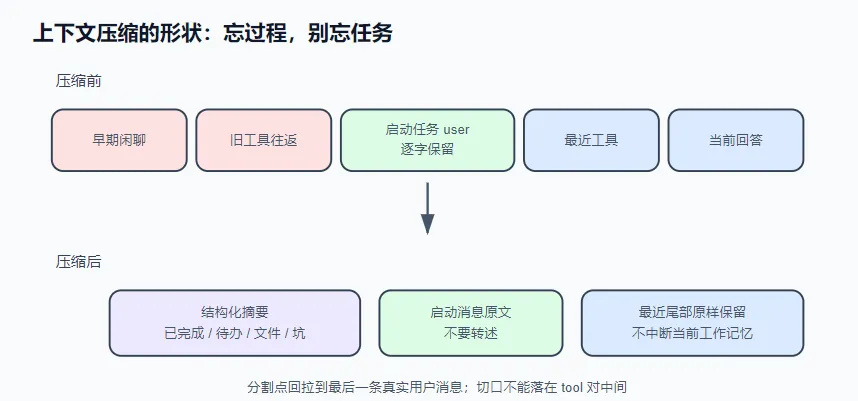
解决方案 压缩不是”全部换成摘要”:用模型生成的结构化摘要替换中段历史,同时逐字保留启动本轮任务的用户消息、原样保留最近的尾部(模型正在用的工作记忆)。既然转述会走样,有些内容必须逐字 保留过压缩。
触发时机用服务商报告的 usage 判断,不自己数 token;摘要让模型按栏目填写,不是笼统总结;摘要模型调用失败时降级为纯字符串处理的提取式摘要——压缩不能因摘要失败而毁掉会话。
运行 免 key 演示:
1 node notes/s06_compaction/demo.mjs
1 2 3 4 5 6 7 8 9 10 11 12 13 14 15 16 17 18 19 20 21 22 23 24 25 26 27 28 29 30 31 32 33 34 35 36 37 38 39 40 41 42 43 44 45 46 47 48 49 50 51 52 53 54 55 56 57 58 59 60 61 62 63 64 65 66 67 68 69 70 71 72 73 74 75 76 77 78 79 80 81 82 83 84 85 86 87 88 89 90 91 92 93 94 95 96 97 98 99 100 101 102 103 104 105 106 107 108 109 110 111 112 113 114 115 116 117 118 119 120 121 122 123 124 125 126 127 128 129 130 131 132 133 134 135 136 137 138 139 140 141 142 143 144 #!/usr/bin/env node import { shouldCompact, compactSplitIndex, compactMessages } from "./compaction.mjs" ;const LAUNCH = "帮我把 utils/date.js 里的 formatDate 改成支持时区参数 tz,默认 UTC;改完跑 npm test,把挂掉的用例也修好。" ;let seq = 0 ;function toolRound (name, args, output ) {const id = `c${++seq} ` ;return [role : "assistant" , content : "" , tool_calls : [{ id, type : "function" , function : { name, arguments : JSON .stringify (args) } }] },role : "tool" , tool_call_id : id, content : output },const messages = [role : "user" , content : "这个仓库的测试是怎么组织的?大概讲讲。" },toolRound ("run_shell" , { command : "ls tests" }, "date.test.js\nhttp.test.js\nutils.test.js\n" + "fixture-….json\n" .repeat (40 )),toolRound ("read_file" , { path : "package.json" }, ' 1\t{ "scripts": { "test": "node --test tests/" } }\n' + " …\n" .repeat (50 )),role : "assistant" , content : "测试用 node --test 跑 tests/ 目录,按模块分文件,fixture 放同目录 JSON。……(此处省略三段介绍)" },role : "user" , content : LAUNCH },toolRound ("run_shell" , { command : "rg -n formatDate src utils" }, "utils/date.js:12: export function formatDate(ts) {\ntests/date.test.js:8: formatDate(0)" ),toolRound ("read_file" , { path : "utils/date.js" }, " 12\texport function formatDate(ts) {\n 13\t return new Date(ts).toISOString().slice(0, 10);\n" + " …\n" .repeat (60 )),toolRound ("read_file" , { path : "tests/date.test.js" }, " 8\tassert.equal(formatDate(0), '1970-01-01');\n" + " …\n" .repeat (40 )),toolRound ("edit_file" , { path : "utils/date.js" , old_string : "function formatDate(ts) {" , new_string : "function formatDate(ts, tz = 'UTC') {" }, "已编辑 utils/date.js" ),toolRound ("run_shell" , { command : "npm test" }, "FAIL tests/date.test.js\n ✕ formats with timezone (invalid tz)\n" + " at …\n" .repeat (30 )),toolRound ("read_file" , { path : "utils/date.js" }, " 12\texport function formatDate(ts, tz = 'UTC') {\n" + " …\n" .repeat (60 )),toolRound ("edit_file" , { path : "utils/date.js" , old_string : "toISOString().slice(0, 10)" , new_string : "new Intl.DateTimeFormat('en-CA', { timeZone: tz }).format(d)" }, "已编辑 utils/date.js" ),toolRound ("run_shell" , { command : "npm test" }, "FAIL tests/date.test.js\n ✕ legacy format (expected '1970-01-01', got '1970-01-01,')\n" + " at …\n" .repeat (30 )),toolRound ("edit_file" , { path : "tests/date.test.js" , old_string : "formatDate(0)" , new_string : "formatDate(0, 'UTC')" }, "已编辑 tests/date.test.js" ),toolRound ("run_shell" , { command : "npm test" }, "PASS tests/date.test.js (12 tests)\n" + " ✓ …\n" .repeat (12 )),const LAUNCH_IDX = messages.findIndex ((m ) => m.content === LAUNCH );const preview = (m ) =>role === "assistant" && m.tool_calls ?.length `assistant → ${m.tool_calls[0 ].function .name} (${m.tool_calls[0 ].function .arguments .slice(0 , 40 )} …)` `${m.role.padEnd(9 )} ${(m.content ?? "" ).replace(/\s+/g, " " ).slice(0 , 50 )} …` ;console .log ("━━━ 场景一:触发判定(usage 对照 128k 窗口,阈值 75%) ━━━" );for (const usage of [prompt_tokens : 58_000 , completion_tokens : 1_200 , total_tokens : 59_200 },prompt_tokens : 98_400 , completion_tokens : 1_800 , total_tokens : 100_200 },const d = shouldCompact ({ usage, contextWindow : 128_000 , triggerPercent : 75 , messageCount : messages.length });console .log (` usage.total_tokens=${usage.total_tokens} → ${d.compact ? "🗜️ 触发压缩" : "✅ 不压" } :${d.why} ` );console .log ("\n━━━ 场景二:切片决策(保什么 / 压什么 / 启动消息逐字保留) ━━━" );const naive = messages.length - 8 ;const keepFrom = compactSplitIndex (messages, { keepRecent : 8 });console .log (` 共 ${messages.length} 条消息。只看"尾部保底 8 条",该从第 ${naive} 条切——` );console .log (` 但那样启动任务的用户消息(第 ${LAUNCH_IDX} 条)就会被摘要转述掉。` );console .log (` 分割点回拉到最后一条真实用户消息:实际 keepFrom = ${keepFrom} 。逐条判决:` );forEach ((m, i ) => {const mark = i < keepFrom ? "🗜️ 压缩" : i === LAUNCH_IDX ? "📌 保留 ←启动消息,逐字" : "📌 保留" ;console .log (` [${String (i).padStart(2 )} ] ${mark} ${preview(m)} ` );const fakeSummarize = async ("1. 任务目标:用户原话——\"这个仓库的测试是怎么组织的?大概讲讲。\"(该任务已完成并已回答)" ,"2. 已完成:确认测试用 node --test 跑 tests/ 目录,按模块分文件。" ,"3. 未完成:无(此段落只覆盖被压缩的旧任务)。" ,"4. 涉及文件与命令:package.json、tests/;ls tests。" ,"5. 关键决定与坑:无。" ,join ("\n" );const ok = await compactMessages (messages, { summarize : fakeSummarize, keepRecent : 8 });console .log (`\n 压缩完成:${messages.length} 条 → ${ok.messages.length} 条(压掉 ${ok.dropped} 条,降级=${ok.degraded} )` );console .log (" 压缩后的消息形状:" );console .log (` [0] 摘要消息(role=user): ${ok.messages[0 ].content.replace(/\s+/g, " " ).slice(0 , 56 )} …` );console .log (` [1] ${preview(ok.messages[1 ])} ← 启动消息,一字未动` );console .log (` [2..${ok.messages.length - 1 } ] 当前任务的全部工具往返,原样保留` );console .log ("\n —— 回拉不是无限的:把上限压到 1000 字符再切一次 ——" );const bounded = compactSplitIndex (messages, { keepRecent : 8 , maxAnchorChars : 1000 });console .log (` 当前任务的历史超出上限,放弃回拉,keepFrom = ${bounded} (启动消息进了压缩区)。` );console .log (" 此时兜底的是摘要 prompt 第 1 栏:\"逐字引用用户原话,禁止转述\"。" );console .log ("\n━━━ 场景三:摘要模型挂了(超时/限流),压缩绝不能毁掉会话 ━━━" );const fallback = await compactMessages (messages, {summarize : async () => { throw new Error ("429 rate limited" ); },keepRecent : 8 ,console .log (` 摘要调用抛出 429 → 自动降级为提取式摘要(degraded=${fallback.degraded} ),会话照常继续。` );console .log (" 降级摘要节选:" );for (const line of fallback.summary .split ("\n" ).slice (0 , 5 )) console .log (` ${line} ` );console .log (` …(共 ${fallback.summary.split("\n" ).length} 行)` );console .log ("\n━━━ 场景四:回退/分支后,压缩产物(摘要)是丢是留? ━━━" );const followUp = { role : "user" , content : "顺手把 parseDate 也支持一下 tz 参数。" };const transcript = [...messages, followUp]; const modelView = [...ok.messages , followUp]; const chars = (msgs ) => msgs.reduce ((n, m ) => n + (m.content ?.length ?? 0 ), 0 );const naiveFork = transcript.slice (0 , transcript.indexOf (followUp));console .log (` 幼稚分支(丢弃摘要,从文字稿重建):${naiveFork.length} 条原文,约 ${chars(naiveFork)} 字符` );console .log (" → 原文水位和压缩前一样高,下一轮触发判定立刻再压一次:白付一次摘要调用," );console .log (" 且新摘要 ≠ 旧摘要(保留的细节会洗牌)——用户看到\"从哪回退都触发压缩\"。" );const cut = modelView.indexOf (followUp);const reuseFork = modelView.slice (0 , cut);console .log (` 复用分支(裁剪压缩后视图):${reuseFork.length} 条,约 ${chars(reuseFork)} 字符([0] 仍是摘要消息)` );console .log (" → 落在\"摘要 + 尾部\"水位,零额外压缩。" );const earliest = messages[0 ];console .log (` 反例:回退到第 0 条("${earliest.content.slice(0 , 18 )} …"):` );console .log (` 它在压缩后视图里${modelView.includes(earliest) ? "找得到" : "找不到" } ⇒ 旧摘要概括了刚被撤回的"未来",` );console .log (" 复用会把撤回的内容从摘要里泄漏回去 ⇒ 这种情况才丢弃摘要、用原文重建。" );console .log (" 判据一句话:切点消息在压缩后视图里找得到就保留摘要并裁剪视图;找不到才重建。" );
四个场景:触发判定、切片决策、摘要失败降级、回退/分支后压缩产物的去留。
1 2 3 4 5 6 7 8 9 10 11 12 13 14 15 16 17 18 19 20 21 22 23 24 25 26 27 28 29 30 31 32 33 34 35 36 37 38 39 40 41 42 43 44 45 46 47 48 49 50 51 52 53 54 55 56 57 58 59 60 61 62 63 64 65 66 67 PS E:\AI_Agent> node 参考源码\learn-agent\notes\s06_compaction\demo.mjs"尾部保底 8 条" ,该从第 19 条切——"command" :"ls tests" }…)"path" :"package.json" }…)"scripts" : { "test" : "node --test tests/" } }…test 跑 tests/ 目录,按模块分文件,fixture 放同目录 JS…"command" :"rg -n formatDate src utils" }…)export function formatDate(ts) {…"path" :"utils/date.js" }…)export function formatDate(ts) { 13 return new…"path" :"tests/date.test.js" }…)'1970-01-01' ); … … …"path" :"utils/date.js" ,"old_string" :"fu…) [14] 📌 保留 tool 已编辑 utils/date.js… [15] 📌 保留 assistant → run_shell({" command ":" npm test "}…) [16] 📌 保留 tool FAIL tests/date.test.js ✕ formats with timezone (i… [17] 📌 保留 assistant → read_file({" path":" utils/date.js"}…) [18] 📌 保留 tool 12 export function formatDate(ts, tz = 'UTC') { …… [19] 📌 保留 assistant → edit_file({" path":" utils/date.js"," old_string":" to…)"command" :"npm test" }…)"path" :"tests/date.test.js" ,"old_string…) [24] 📌 保留 tool 已编辑 tests/date.test.js… [25] 📌 保留 assistant → run_shell({" command ":" npm test "}…) [26] 📌 保留 tool PASS tests/date.test.js (12 tests) ✓ … ✓ … ✓ … ✓ …… 压缩完成:27 条 → 22 条(压掉 6 条,降级=false) 压缩后的消息形状: [0] 摘要消息(role=user): [上下文压缩] 更早的 6 条对话已被压缩,以下摘要是它们仅存的记忆: 1. 任务目标:用户原话——" 这个仓库的…"逐字引用用户原话,禁止转述" 。true ),会话照常继续。"从哪回退都触发压缩" 。"摘要 + 尾部" 水位,零额外压缩。"这个仓库的测试是怎么组织的?大概讲讲…" ):"未来" ,
场景四的解读
这个场景讲的是对话压缩(摘要)机制在遇到“回退/分支”操作时,该怎么处理已有摘要,核心就解决一个问题:回退后,之前花钱生成的摘要还能不能用?
\1. 先搞懂几个概念
压缩/摘要:对话太长时,AI会把早期对话浓缩成一段摘要,省得超字数,也省调用费。
“压缩后视图”:当前对话的状态 = 一段摘要 + 最近几条完整原文。
“原文重建”:丢弃摘要,只用最原始的对话记录重新拼出上下文。
\2. 两种处理方式的对比(核心剧情)
假设你从某条消息回退,产生了分支:
\3. 反例:什么时候必须丢弃?
你回退到了第0条消息(最开头的那句“这个仓库的测试是怎么组织的?大概讲讲…”)。
这条消息太老了,早就不在“压缩后视图”的尾部里了,只存在于旧摘要的概括中。
如果这时候还“复用摘要”,就等于把已经被概括进去的、后面发生的对话内容,偷偷带回到回退后的新分支里——这会造成信息泄漏(还没发生的“未来”被剧透回去了)。
所以这种情况必须丢弃摘要,用原文重建。
\4. 判据(一句话总结)
回退到的那个切点消息,如果在“压缩后视图”(摘要+尾部原文)里能找到,就保留摘要、裁剪视图;如果找不到,才丢弃摘要、从原文重建。
接上真实模型:
1 2 3 4 5 6 7 8 9 10 11 12 13 14 15 16 17 18 19 20 21 22 23 24 25 26 27 28 29 30 31 32 33 34 35 36 37 38 39 40 41 42 43 44 45 46 47 48 49 50 51 52 53 54 55 56 57 58 59 60 61 62 63 64 65 66 67 68 69 70 71 72 73 74 75 76 77 78 79 80 81 82 83 84 85 86 87 88 89 90 91 92 93 94 95 96 97 98 99 100 101 102 103 104 105 106 107 108 109 110 111 112 113 114 115 116 117 118 119 120 121 122 123 124 125 126 127 128 129 130 131 132 133 134 135 136 137 138 139 140 141 142 143 144 145 146 147 148 149 150 151 152 153 154 155 156 157 158 159 160 161 162 163 164 165 166 167 168 169 170 171 172 173 174 175 176 177 178 179 180 181 182 183 184 185 186 187 188 189 190 191 192 193 194 195 196 197 198 199 200 201 202 203 204 205 206 207 208 209 210 211 212 213 214 215 216 217 218 219 220 221 222 223 224 225 226 227 228 229 230 231 232 233 234 235 236 237 238 239 240 241 242 243 244 245 246 247 248 249 250 251 252 253 254 255 256 257 258 259 260 261 262 263 264 265 266 267 268 269 270 271 272 273 274 275 276 277 278 279 280 281 282 283 284 285 286 287 AGENT_API_KEY=sk-xxx node notes/s06_compaction/agent.mjs# 可选:AGENT_CONTEXT_WINDOW=128000 AGENT_COMPACT_PERCENT=75 # !/usr/bin/env node
窗口大小在标准协议里没有字段可查,只能自己配置(见文末)。想观察压缩,把 AGENT_COMPACT_PERCENT 调到 5,让它连续读几个大文件。切片决策输出节选(真实运行):
我这里没有触发场景二三四,只触发了场景一,贴一个其他师傅跑的
1 2 3 4 5 6 7 8 9 10 11 12 13 ━━━ 场景二:切片决策(保什么 / 压什么 / 启动消息逐字保留) ━━━"尾部保底 8 条" ,该从第 19 条切——"command" :"rg -n formatDate src utils" }…)false )true ),会话照常继续。
实现 核心的压缩上下文的mjs文件
1 2 3 4 5 6 7 8 9 10 11 12 13 14 15 16 17 18 19 20 21 22 23 24 25 26 27 28 29 30 31 32 33 34 35 36 37 38 39 40 41 42 43 44 45 46 47 48 49 50 51 52 53 54 55 56 57 58 59 60 61 62 63 64 65 66 67 68 69 70 71 72 73 74 75 76 77 78 79 80 81 82 83 84 85 86 87 88 89 90 91 92 93 94 95 96 97 98 99 100 101 102 103 104 105 106 107 108 109 110 111 112 113 114 115 116 117 118 119 120 121 122 123 124 125 126 127 128 129 130 131 132 133 134 135 136 137 138 139 140 141 142 143 144 145 146 147 148 149 150 151 152 153 154 155 156 157 158 159 160 161 162 163 export function shouldCompact ({ usage, contextWindow, triggerPercent = 75 , messageCount, minMessages = 12 } ) {if (!usage) return { compact : false , why : "还没有任何 API 响应,无从判断" };if (messageCount < minMessages) {return { compact : false , why : `消息太少(${messageCount} < ${minMessages} ),压了也腾不出几个 token` };const used = usage.total_tokens ?? (usage.prompt_tokens ?? 0 ) + (usage.completion_tokens ?? 0 );const threshold = Math .floor ((contextWindow * triggerPercent) / 100 );if (used < threshold) {return { compact : false , why : `${used} / ${contextWindow} tokens(阈值 ${threshold} ),还有余量` , used, threshold };return { compact : true , why : `${used} tokens 已超过阈值 ${threshold} (窗口的 ${triggerPercent} %)` , used, threshold };const SYNTHETIC_USER_PREFIXES = ["[上下文压缩]" , "自动纠偏触发:" ];const isRealUser = (m ) =>role === "user" && !SYNTHETIC_USER_PREFIXES .some ((p ) => String (m.content ?? "" ).startsWith (p));export function compactSplitIndex (messages, { keepRecent = 8 , maxAnchorChars = 40_000 } = {} ) {if (messages.length <= keepRecent) return 0 ;let keepFrom = messages.length - keepRecent;const lastUser = messages.findLastIndex (isRealUser);if (lastUser >= 0 && lastUser < keepFrom) {const anchoredChars = charsOf (messages.slice (lastUser));if (anchoredChars <= maxAnchorChars) keepFrom = lastUser;while (keepFrom > 0 && messages[keepFrom].role === "tool" ) keepFrom--;if (keepFrom <= 1 ) return 0 ; return keepFrom;export const SUMMARY_PROMPT = `你的任务是把一段即将被丢弃的对话压缩成结构化摘要。这份摘要是后续对话仅存的记忆,宁可啰嗦不可遗漏。只输出纯文本,不要调用任何工具。 必须包含以下小节: 1. 任务目标:用户让你做什么。逐字引用用户原话,禁止转述。 2. 已完成:做了哪些事、各自的结论。 3. 未完成 / 待办:接下来该做什么,按优先级排。 4. 涉及的文件与关键命令:完整路径和完整命令,逐字保留。 5. 关键决定与踩过的坑:为什么选了这条路,哪些路已被证明走不通。` ;export function toSummarySource (middle ) {const lines = [];for (const m of middle) {if (m.role === "tool" ) {push (`[工具结果] ${clip(m.content, 1500 )} ` );else if (m.role === "assistant" ) {if (m.content ) lines.push (`[assistant] ${clip(m.content, 1500 )} ` );for (const call of m.tool_calls ?? []) {push (`[assistant 调用工具] ${call.function .name} (${clip(call.function .arguments , 300 )} )` );else {push (`[${m.role} ] ${clip(m.content, 2000 )} ` );return lines.join ("\n" );export function extractiveSummary (middle ) {const lines = ["(自动降级:摘要模型调用失败,以下为逐条提取的对话骨架)" ];for (const m of middle) {if (m.role === "tool" ) lines.push (`- 工具结果: ${clip(oneLine(m.content), 160 )} ` );else if (m.role === "assistant" && m.tool_calls ?.length ) {push (`- assistant 调用: ${m.tool_calls.map((c) => c.function .name).join("、" )} ` );else if (m.content ) lines.push (`- ${m.role} : ${clip(oneLine(m.content), 240 )} ` );return lines.join ("\n" );export async function compactMessages (messages, { summarize, keepRecent = 8 , maxAnchorChars = 40_000 } = {} ) {const keepFrom = compactSplitIndex (messages, { keepRecent, maxAnchorChars });if (keepFrom <= 0 ) return { compacted : false , messages };const middle = messages.slice (0 , keepFrom);const tail = messages.slice (keepFrom);let summary;let degraded = false ;try {await summarize (toSummarySource (middle)))?.trim ();if (!summary) throw new Error ("摘要为空" );catch {true ;extractiveSummary (middle);const summaryMessage = {role : "user" ,content : `[上下文压缩] 更早的 ${middle.length} 条对话已被压缩,以下摘要是它们仅存的记忆:\n\n${summary} \n\n从中断处直接继续任务。不要复述摘要,不要重新自我介绍。` ,return { compacted : true , messages : [summaryMessage, ...tail], dropped : middle.length , degraded, summary };function charsOf (messages ) {return messages.reduce ((n, m ) => n + (m.content ?.length ?? 0 ), 0 );function clip (text, max ) {if (typeof text !== "string" ) return "" ;return text.length <= max ? text : `${text.slice(0 , max)} …(截断)` ;function oneLine (text ) {return String (text ?? "" ).replace (/\s+/g , " " ).trim ();
① 触发时机:用服务商报告的 usage,不自己数 token 第一反应是自己算 token 数。但你没有服务商的分词器,本地估算(tiktoken 也一样)只是近似,中文误差可超 15%。估少了会在真实窗口边界撞出 context too long,来不及压缩。
正确做法零成本:每次响应都带 usage,是服务商报告的准确数字。total_tokens 约等于下一轮要携带的全部历史,超过窗口阈值(默认 75%)就压缩:
1 2 3 4 5 const used = usage.total_tokens ?? (usage.prompt_tokens ?? 0 ) + (usage.completion_tokens ?? 0 );const threshold = Math .floor ((contextWindow * triggerPercent) / 100 );if (used >= threshold) ;
留 25% 余量:压缩本身还要调一次模型、摘要也占空间,得在仍有余地时动手。
流式数据传输过程是这样的
1 2 3 4 5 6 7 8 9 10 11 12 13 14 HTTP/1.1 200 OK"id" :"chatcmpl-xxx" ,"object" :"chat.completion.chunk" ,"choices" :[{"delta" :{"role" :"assistant" ,"content" :"你" },"index" :0}]}"id" :"chatcmpl-xxx" ,"object" :"chat.completion.chunk" ,"choices" :[{"delta" :{"content" :"好" },"index" :0}]}"id" :"chatcmpl-xxx" ,"object" :"chat.completion.chunk" ,"choices" :[{"delta" :{"content" :"!" },"index" :0}]}"id" :"chatcmpl-xxx" ,"object" :"chat.completion.chunk" ,"choices" :[{"delta" :{},"finish_reason" :"stop" }],"usage" :{"prompt_tokens" :10,"completion_tokens" :3,"total_tokens" :13}}
② 压缩的形状:三段式,启动消息逐字保留 压缩不是”全部换成摘要”。正确形状是三段:
1 2 3 4 [system] ← 不动(它本来就不在 messages 里)
尾部是模型的工作记忆,压掉等于打断手头操作。启动消息逐字保留 是本章核心:压缩总在工具循环中途触发,”最近 N 条”全是工具结果,原始指令恰好落在被压缩区——被转述后,模型从此在转述版指令上工作(真实产品踩过同坑)。
实现是把分割点回拉到最后一条真实用户消息:
1 2 3 4 5 6 7 8 9 10 11 12 13 14 15 16 let keepFrom = messages.length - keepRecent;const lastUser = messages.findLastIndex (isRealUser);if (lastUser >= 0 && lastUser < keepFrom) {if (charsOf (messages.slice (lastUser)) <= maxAnchorChars) {while (keepFrom > 0 && messages[keepFrom].role === "tool" ) keepFrom--;
注意 isRealUser:历史里的 user 消息不全是用户说的——s03 看门狗注入的纠偏消息、上次压缩留下的摘要也是 role:"user"。锚点停在它们身上,指令仍会丢,所以按已知前缀([上下文压缩]、自动纠偏触发:)排除合成消息。
回拉有上限:启动消息若在几百条之前,全保留就腾不出空间——超限时放弃,由下一条兜底。
③ 摘要 prompt:按栏目填写,不是笼统总结 “总结一下上面的对话”得到的是泛泛叙述,丢的恰好是接续任务最需要的信息。让模型按栏目填写,每栏对应压缩后第一轮会用到的内容:
1 2 3 4 5 1. 任务目标:用户让你做什么。逐字引用用户原话,禁止转述。
第 1 栏的”逐字引用”是决定②的双保险:即使启动消息因超长没能逐字保留,原话也还在摘要里。第 5 栏容易被忽略:不记录走不通的路,模型会把失败路径重走一遍。
④ 摘要失败时的降级 摘要要调一次模型,而调用可能限流、超时、断网。此刻会话已接近窗口上限,下轮再试来不及——压缩不能因摘要失败而毁掉会话 。所以要一条不会失败的降级路径:提取式摘要,纯字符串处理,截每条消息首尾拼成骨架:
1 2 3 4 5 6 7 try {await summarize (toSummarySource (middle));catch {true ; extractiveSummary (middle);
有损的记忆也比崩溃的会话好。
⑤ 回退与分支:压缩产物随切点走,不是易失缓存 聊天产品迟早要做”撤回 / 从这条消息创建分支”。此时会话有两份历史:完整文字稿(渲染层展示用,从未被压缩)和模型视图(压缩后的 [摘要 + 尾部],新消息双写进两份)。回退最顺手的实现,是从完整文字稿重建、把摘要当派生缓存清掉——反正超阈值还会再压。这个”反正”就是坑:会话长到压缩过,裁到切点的原文 几乎必然仍超阈值,于是每次回退/分支都白付一次摘要调用,用户看到的是”从哪回退都触发压缩”。更隐蔽的是重摘要不幂等:新摘要保留的细节和旧摘要不同,回退一次,agent 的记忆就洗牌一次。
判据只有一句话:切点消息在压缩后视图里找得到 ⇒ 旧摘要只覆盖切点之前的内容 ⇒ 摘要随分支保留,把压缩后视图按切点裁剪即可;找不到(撤回进了被压缩区)⇒ 旧摘要概括了刚被撤回的”未来”,复用会把撤回的内容泄漏回去 ⇒ 这种情况才丢弃摘要、用原文重建 :
1 2 3 4 5 6 7 8 const cut = modelView.findIndex ((m ) => m.id === cutMessageId);if (cut >= 0 ) {modelView = modelView.slice (0 , cut); summary = session.summary ; else {modelView = undefined ; summary = undefined ;
前者是高频路径——用户几乎总是撤回最近几条;后者才需要付重摘要的钱。值得一提 codex 的架构让这条判据不需要写出来:它的 fork 是对持久化事件流做前缀截断,而压缩本身就是流里的一条 Compacted 事件(带着替换历史)——切点在它之后,它自然留在前缀里;切点在它之前,它自然被截掉。快照式的 fork(复制状态对象、清空派生字段)没有这份免费午餐,两条分支都得手写,而且很容易全部写成第二条。
把这段话翻译的通俗易懂一点来看就是这样
场景设定 假设你有一个聊天界面,用户聊了100轮,中间触发过压缩(早期对话变成了摘要)。
现在系统里存着两份历史:
副本
内容
用途
完整文字稿
所有原始消息,一字不差
界面展示(渲染层)
模型视图
[摘要] + [最近20条原文]发给 AI 模型用的(压缩后的)
用户发新消息时,两条都写(完整稿存着备查,模型视图用来跑 AI)。
问题:用户要”回退到第50条消息,从这里开个新分支” 最粗暴的做法(坑) “从完整文字稿重建、把摘要当派生缓存清掉——反正超阈值还会再压”
翻译:
回退?简单!把压缩摘要删了,从完整文字稿重新搭模型视图
反正如果内容太多,压缩逻辑会自动再压一次
为什么是坑?
白花钱:回退到第50条,原文还有50条那么多,必然超过压缩阈值 → 立刻又触发一次压缩 → 白白多花一次摘要调用费
记忆洗牌:新生成的摘要和旧摘要不一样(AI 每次总结细节不同)。用户回退一次,AI 对早期对话的”记忆”就变一次 → 体验很差
用户体验:用户发现”怎么我无论回退到哪,都要卡一下(压缩)”
正确做法(判据) 切点消息在压缩后视图里找得到 ⇒ 保留摘要;找不到 ⇒ 丢弃摘要
情况A:回退到最近的消息(高频场景)
1 2 压缩后视图 = [摘要(覆盖1-80条)] + [81,82,83,84,85] ← 尾部5条
判断: 第83条在压缩后视图里 ✅ 找得到
操作:
1 2 branch.modelView = modelView.slice (0 , cut); summary = session.summary ;
结果: 零额外开销,瞬间完成。用户撤回最近几条消息是最常见操作,这个路径覆盖了90%+的场景。
情况B:回退到很早的消息(低频场景)
1 2 压缩后视图 = [摘要(覆盖1-80条)] + [81,82,83,84,85]
判断: 第20条在压缩后视图里 ❌ 找不到(它被压缩进摘要里了)
操作:
1 2 3 branch.modelView = undefined ; summary = undefined ;
结果: 需要重新生成摘要,花一次调用费。但这是低频操作(很少有人回退到很早期的消息),可以接受。
为什么情况B必须丢弃摘要? “旧摘要概括了刚被撤回的’未来’,复用会把撤回的内容泄漏回去”
举例:
原始对话:1-100条,摘要概括了1-80条(包括”用户说要分析代码”)
用户回退到第20条,撤回了21-100条(包括”分析代码”这个后续指令)
如果复用旧摘要,摘要里仍然包含”用户说要分析代码” → 这相当于把被撤回的未来内容带到了新分支 → 信息泄漏
所以必须丢弃旧摘要,从第20条原文重新开始。
设计亮点 1. Codex 架构的”免费午餐” “codex 的架构让这条判据不需要写出来”
Codex 的做法: 对话历史是一串不可变事件流,压缩本身也是一条事件(Compacted),记录了”我用摘要替换了1-80条”。
回退到第20条 → 对事件流做前缀截断,Compacted 事件在截断点之后 → 自动被截掉
回退到第83条 → Compacted 在截断点之前 → 自动保留
判据自动生效,不需要写一行代码。
1 2 3 4 5 6 7 8 9 10 11 12 13 对话历史 = 一条一条追加的事件流(不可变)_ call: read_ file_ call: read_ file
关键点: Compacted(压缩)本身也是一条事件,记录着”我用摘要替换了哪些历史”。
2. 快照式架构的”坑” “快照式的 fork(复制状态对象、清空派生字段)没有这份免费午餐”
你的项目架构: 每次分支都复制一份完整状态(session 对象),摘要和模型视图是派生字段。
1 2 3 4 5 6 messages : [...], summary : "摘要内容" , modelView : [summary, ...尾部消息]
没有事件流那种”自动截断”的能力
必须手写判据决定摘要留还是丢
很容易全部写成”丢弃摘要”(因为最简单),导致所有回退都触发重新压缩
一句话总结 回退时,如果切点在压缩后的可见区(摘要+尾部)里 → 复用摘要,零成本;如果切点被压缩进摘要里了 → 丢弃摘要,从原文重建(因为复用会泄漏被撤回的内容)。前者是日常操作,后者是低频操作。
完整流程图 1 2 3 4 5 6 7 8 用户回退到消息 X
练习 1. 本章每次压缩都从头生成摘要。改成滚动摘要:把上一次的摘要作为输入传给摘要模型,并在 prompt 里加一条”上一份摘要中仍然相关的部分逐字复制,不要改写”。想想为什么”逐字复制”比”合并改写”更重要(提示:和启动消息逐字保留是同一个道理——转述会累积走样)。 逐字复制是压缩上下文形成摘要机制的关键,上一轮的摘要是由准确的SUMMARY_PROMPT指导下生成的结果,已经是压缩过的,如果不逐字复制难免产生未知结果,例如只是转述或者概述,任务描述在一次次滚动中逐渐模糊
为什么 “逐字复制” 比 “合并改写” 重要?
防止信息衰减 :在“传话游戏”中,每一次“合并改写”都是对已有信息的一次有损转述。多轮后,任务目标会变得模糊。保护关键指令 :SUMMARY_PROMPT 的第一条要求就是“逐字引用用户原话”。如果旧摘要中的关键指令(例如“用 Python 实现一个 Web 服务器”)被改写成“写一个后端程序”,任务的核心就丢失了。
重构 compactMessages 为滚动模式
你需要修改 compaction.mjs 中的 compactMessages 函数,增加 previousSummary 参数,并调整摘要生成逻辑。
1 2 3 4 5 6 7 8 9 10 11 12 13 14 15 16 17 18 19 20 21 22 23 24 25 26 27 28 29 30 31 32 33 34 35 36 37 38 39 40 41 42 export async function compactMessages ( messages, { summarize, keepRecent = 8 , maxAnchorChars = 40000 , previousSummary = null // 新增:接收上一次的摘要内容 } = {} const keepFrom = compactSplitIndex (messages, { keepRecent, maxAnchorChars });if (keepFrom <= 0 ) return { compacted : false , messages };const middle = messages.slice (0 , keepFrom);const tail = messages.slice (keepFrom);let summary;let degraded = false ;try {const sourceForSummary = buildRollingSummarySource ({newContent : toSummarySource (middle),await summarize (sourceForSummary))?.trim ();if (!summary) throw new Error ("摘要为空" );catch {true ;extractiveSummary (middle, previousSummary); const summaryMessage = {role : "user" ,content : `[上下文压缩] 更早的 ${middle.length} 条对话已被压缩,以下摘要是它们仅存的记忆:\n\n${summary} \n\n从中断处直接继续任务。不要复述摘要,不要重新自我介绍。` ,return { compacted : true , messages : [summaryMessage, ...tail], dropped : middle.length , degraded, summary };
辅助函数:构建滚动摘要的输入源
你需要一个函数来组织传给摘要模型的内容,核心是将上一份摘要作为”只读”的参考材料 ,而不是让它参与改写。
1 2 3 4 5 6 7 8 9 10 11 12 13 14 15 16 function buildRollingSummarySource ({ previousSummary, newContent } ) {let source = '' ;if (previousSummary) {`【上一轮压缩生成的摘要(必须逐字保留其中仍适用的部分)】\n` ;`${previousSummary} \n\n` ;`【以下是最新一轮被压缩的对话内容】\n` ;return source;
调用方(agent.mjs)的改动
在 maybeCompact 函数中,你需要持久化摘要 ,以便在下次压缩时传入。
1 2 3 4 5 6 7 8 9 10 11 12 13 14 15 16 17 18 19 20 21 22 23 24 25 26 27 28 29 30 31 32 33 34 35 let lastSummary = null ;async function maybeCompact (messages, usage ) {const decision = shouldCompact ({contextWindow : CONTEXT_WINDOW ,triggerPercent : COMPACT_PERCENT ,messageCount : messages.length ,if (!decision.compact ) return ;console .log (`\n\x1b[36m🗜️ 触发压缩:${decision.why} \x1b[0m` );const result = await compactMessages (messages, { summarize : summarizeViaModel,previousSummary : lastSummary if (!result.compacted ) {console .log ("\x1b[36m 可压的前缀太小,本次跳过。\x1b[0m" );return ;summary ; splice (0 , messages.length , ...result.messages );console .log (`\x1b[36m🗜️ 压缩完成:压掉 ${result.dropped} 条${result.degraded ? "(摘要降级为提取式)" : "" } ,现存 ${messages.length} 条。\x1b[0m` ,
2. 压缩后的摘要消息每轮都会重发一遍。它的内容是稳定的吗?如果你在摘要里加上”压缩于 {当前时间}”,会发生什么?(这与成本有关,下一章展开。) 1.压缩后的摘要内容是稳定的吗?
答案是:绝对不稳定(非确定性)。
即使输入完全相同的对话历史,大模型在两次独立压缩中生成的摘要几乎不可能 完全相同。原因有三:
概率采样 :LLM生成时即使temperature=0,浮点运算误差和不同硬件(GPU/CPU)也可能导致logits微妙差异,进而影响选词。信息重排损失 :压缩本质是“有损编码”。每轮新消息加入后,模型对旧信息的“重要性评分”会动态变化。上一轮认为重要的细节(如“用户提到喜欢蓝色”),在新消息(“但后来买了红色”)出现后,可能被下一轮压缩直接丢弃。累积漂移 :如果压缩的是“压缩后的摘要+新消息”,那么摘要中的微小错误会在下一轮被当作事实参与压缩,导致错误逐级放大(幻觉固化)。
\2. 如果在摘要里加上“压缩于 {当前时间}”,会发生什么?
会发生三件极具启发意义的事:
现象
具体后果
① 伪稳定性 时间戳作为“锚点文字”被固定下来,后续压缩时模型会倾向于保留这个固定短语。你会误以为摘要稳定了,但实际上只有时间戳本身稳定 ,它前后的实质内容依然在漂移。
② 污染注意力权重 模型会把这个时间戳视为“特殊标记”,在注意力计算中分配一部分权重给它。这会挤占 对实际业务关键信息(如用户ID、核心诉求)的注意力,导致摘要质量轻微下降。
③ 暴露重复发送的致命伤 如果每轮都重发带新时间戳的摘要,模型会认为“时间变化”是重要信息。当你问“我们聊了多久”时,模型可能会根据摘要里的多个时间戳算出错误时长,甚至把“压缩时间”误解为“事件发生时间”。
更危险的隐含问题
“每轮都重发”这个行为本身,比摘要不稳定更致命。
假设每轮上下文长度是10k tokens,压缩后是1k。你把1k摘要+新用户问题发过去,模型回复后,你又把新的1k摘要 (基于旧摘要生成)发过去。
这会导致:
信息熵递减 :每一轮压缩都会丢失约5%-15%的细节(取决于模型)。经过10轮,原始信息保留率可能低于 0.910≈35%0.910≈35%。自我引用循环 :摘要开始描述“上一版的摘要说了什么”,而非原始对话事实。
Prompt 缓存 本章讲怎么保持请求开头稳定以命中前缀缓存,以及怎么测量命中率。
本章代码 = s03 的最小 agent 循环 + 每轮打印 token 用量与缓存命中率(免 key 演示:字节级找出缓存断点 + 只靠 usage 数字的浪费计数器)。
问题 跑一个 30 轮的任务,账单会吓你一跳:agent 每轮都把越来越长的对话历史全量重发,第 1 轮发 2k token,第 30 轮就是 100k,累计发送的输入是历史长度的几十倍——花钱大头全在输入侧。
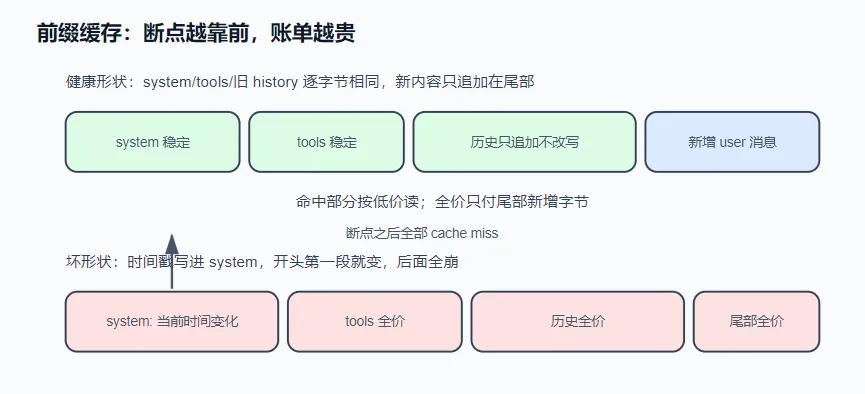
功能相同的两个实现,账单可以差出近 7 倍——不命中缓存的原因往往只是 system prompt 里的一行 当前时间:...。
解决方案 服务商为此提供了前缀缓存 :这次请求的开头和上次逐字节相同的部分,单价降到约十分之一。原理:模型收到请求后要把整个 prompt 从头算一遍(prefill,占输入侧几乎全部算力);开头和上次相同时,中间结果(KV cache)可直接复用,几乎不花算力。第 30 轮请求里前 99% 与上一轮相同——命中打一折,不命中全价。以 30 轮、每轮 60k、累计输入 1.8M token 为例:
全部未命中:1.8M × 全价;
稳定 95% 命中:1.8M × (5% × 全价 + 95% × 一折) ≈ 0.145 × 全价,省 85%。
(DeepSeek/OpenAI 的缓存自动生效;Anthropic 要显式打 cache_control 断点,否则命中率恒为 0,计价见文末。)做法是三条纪律保持前缀逐字节稳定,加一套仪表测量命中率。
运行 免 key 演示:
1 node notes/s07_prompt_cache/demo.mjs
1 2 3 4 5 6 7 8 9 10 11 12 13 14 15 16 17 18 19 20 21 22 23 24 25 26 27 28 29 30 31 32 33 34 35 36 37 38 39 40 41 42 43 44 45 46 47 48 49 50 51 52 53 54 55 56 57 58 59 60 61 62 63 64 65 66 67 68 69 70 71 72 73 74 75 76 77 78 79 80 81 82 83 84 85 86 87 88 89 90 91 92 93 94 95 96 97 98 99 100 101 102 103 104 105 106 107 108 109 110 111 112 113 114 115 116 117 118 119 120 121 122 123 124 125 126 127 128 129 130 131 132 133 134 135 136 137 138 139 140 141 142 143 144 145 146 147 148 149 150 151 152 153 #!/usr/bin/env node const TOOLS = JSON .stringify ([name : "run_shell" , description : "执行一条 shell 命令" },name : "read_file" , description : "读取一个文本文件" },function serializeRequest (system, messages ) {const parts = [`[system]\n${system} ` , `[tools]\n${TOOLS} ` ];for (const m of messages) parts.push (`[${m.role} ]\n${m.content} ` );return parts.join ("\n\n" );function commonPrefixLength (a, b ) {let i = 0 ;while (i < a.length && i < b.length && a[i] === b[i]) i++;return i;function report (label, prev, cur ) {const n = commonPrefixLength (prev, cur);const reused = ((n / prev.length ) * 100 ).toFixed (1 );console .log (` ${label} :公共前缀 ${n} 字符(上一轮请求共 ${prev.length} 字符 → 可复用 ${reused} %)` );if (n < prev.length ) {const from = Math .max (0 , n - 16 );console .log (` 断点上下文: …${JSON .stringify(prev.slice(from , n + 12 ))} vs …${JSON .stringify(cur.slice(from , n + 12 ))} ` );else {console .log (" 断点在上一轮请求的末尾之后——新增的只有追加的消息,这就是理想形状。" );return n;const TOOL_OUTPUT_1 = ' 1\t{\n 2\t "scripts": {\n 3\t "test": "vitest run",\n 4\t "build": "tsc -p ."\n 5\t }\n' + ' …\t(省略 60 行依赖列表)\n' .repeat (12 );const round1 = [role : "assistant" , content : '(调用 read_file {"path":"package.json"})' },role : "tool" , content : TOOL_OUTPUT_1 },const round2 = [role : "assistant" , content : '(调用 run_shell {"command":"npx vitest list"})' },role : "tool" , content : "test/date.test.ts\ntest/http.test.ts\ntest/utils.test.ts" },let tick = 0 ;const clock = (`10:23:0${++tick} ` ;console .log ("━━━ 实验 A:时间戳写进 system ━━━" );const badSystem = (`当前时间:${clock()} 。你是一个运行在用户终端里的编程助手。先观察真实世界再行动。` ;const userA = { role : "user" , content : "看看 package.json 里有哪些 scripts,然后告诉我怎么跑测试。" };const a1 = serializeRequest (badSystem (), [userA]);const a2 = serializeRequest (badSystem (), [userA, ...round1]);const a3 = serializeRequest (badSystem (), [userA, ...round1, ...round2]);report ("第 1↔2 轮" , a1, a2);report ("第 2↔3 轮" , a2, a3);console .log (" 断点永远卡在时间戳的秒位上 → 后面的 tools、全部历史,每一轮都按全价重算。" );console .log ("\n━━━ 实验 B:system 稳定,时间戳放进用户消息尾部 ━━━" );const goodSystem = "你是一个运行在用户终端里的编程助手。先观察真实世界再行动。" ;const userB = { role : "user" , content : `看看 package.json 里有哪些 scripts,然后告诉我怎么跑测试。\n\n[本地时间:${clock()} ]` };const b1 = serializeRequest (goodSystem, [userB]);const b2 = serializeRequest (goodSystem, [userB, ...round1]);const b3 = serializeRequest (goodSystem, [userB, ...round1, ...round2]);report ("第 1↔2 轮" , b1, b2);report ("第 2↔3 轮" , b2, b3);console .log (" 时间没有消失——它随那条用户消息进了历史,但从此一个字节都不再变。" );console .log ("\n━━━ 实验 C:第 3 轮\"好心\"截短旧的工具输出 ━━━" );const trimmedRound1 = [0 ],role : "tool" , content : TOOL_OUTPUT_1 .slice (0 , 80 ) + "…(为省上下文截短)" },const c3 = serializeRequest (goodSystem, [userB, ...trimmedRound1, ...round2]);const brk = report ("第 2↔3 轮" , b2, c3);console .log (` 断点从请求末尾跳回第 ${brk} 字符(那条工具输出的中间)——` );console .log (` 之后的 ${c3.length - brk} 字符全部退回全价。省了几十个字符的上下文,赔掉的是整段后续历史的缓存。` );console .log (" 真想省:要么当初就别让大输出进历史(s04 输出预算),要么整段压缩换摘要(s06)。" );console .log ("\n━━━ 实验 D:浪费计数器——只靠 usage 数字,量化每次击穿并归因 ━━━" );const TTL_MS = 5 * 60 * 1000 ; const NOISE = 1024 ; function trackCacheUsage (prev, usage, now ) {const reported = usage.cacheRead + usage.cacheWrite > 0 ;const next = { promptTokens : usage.prompt , at : now, reportedCache : (prev?.reportedCache ?? false ) || reported };if (!prev || (!reported && !prev.reportedCache )) return { next };const missed = Math .min (prev.promptTokens , usage.prompt ) - usage.cacheRead ;if (missed <= NOISE ) return { next };const idleMs = now - prev.at ;return { next, miss : { missed, idleMs, ttlExpired : idleMs > TTL_MS } };const rounds = [label : "第 1 轮(会话开始) " , gap : 0 , prompt : 8200 , cacheRead : 0 , cacheWrite : 8200 },label : "第 2 轮(15 秒后) " , gap : 15e3 , prompt : 11400 , cacheRead : 8200 , cacheWrite : 3200 },label : "第 3 轮(20 秒后) " , gap : 20e3 , prompt : 14100 , cacheRead : 11400 , cacheWrite : 2700 },label : "第 4 轮(用户开会,38 分钟后)" , gap : 38 * 60e3 , prompt : 16300 , cacheRead : 0 , cacheWrite : 16300 },label : "第 5 轮(10 秒后) " , gap : 10e3 , prompt : 18000 , cacheRead : 16300 , cacheWrite : 1700 },label : "第 6 轮(12 秒后,有人截短了老工具输出)" , gap : 12e3 , prompt : 17600 , cacheRead : 5100 , cacheWrite : 12500 },let state, now = 0 , waste = 0 , misses = 0 ;for (const r of rounds) {gap ;const { next, miss } = trackCacheUsage (state, r, now);if (!miss) { console .log (` ${r.label} :✓ 正常` ); continue ; }missed ; misses++;const idle = miss.idleMs >= 60e3 ? `${Math .round(miss.idleMs / 60e3 )} 分钟` : `${Math .round(miss.idleMs / 1e3 )} 秒` ;const verdict = miss.ttlExpired "闲置超过 TTL → 缓存被服务商淘汰(正常损耗,人回来了它就回来)" "TTL 没过 → 前缀被改写了!去查 append-only(实验 C 的病)" ;console .log (` ${r.label} :✗ 浪费 ${miss.missed} tok · 闲置 ${idle} · ${verdict} ` );console .log (` 会话累计:浪费 ${waste} tok / ${misses} 次 —— 放到 UI 上就是一行 "Cache waste"。` );console .log (" 注意第 4 轮和第 6 轮的数字长得几乎一样(cacheRead 掉下去了)," );console .log (" 没有 idle 归因就分不清'正常损耗'和'代码有病'——量化的意义就在这一步。" );
它会直接算出缓存断点位置(真实运行输出):
1 2 3 4 5 6 7 8 9 10 11 12 13 14 15 16 17 18 19 20 21 22 23 24 25 26 27 28 29 30 31 ━━━ 实验 A:时间戳写进 system ━━━"em]\n当前时间:10:23:01。你是一个运行在用户终" vs …"em]\n当前时间:10:23:02。你是一个运行在用户终" "em]\n当前时间:10:23:02。你是一个运行在用户终" vs …"em]\n当前时间:10:23:03。你是一个运行在用户终" "好心" 截短旧的工具输出 ━━━" \"build\": \"tsc -p .\"\n 5\t" vs …" \"build\": \"tsc…(为省上下文截短)\n\n" "Cache waste" 。'正常损耗' 和'代码有病' ——量化的意义就在这一步。
接上真实模型:
1 AGENT_API_KEY=sk-xxx node notes/s07_prompt_cache/agent.mjs
1 2 3 4 5 6 7 8 9 10 11 12 13 14 15 16 17 18 19 20 21 22 23 24 25 26 27 28 29 30 31 32 33 34 35 36 37 38 39 40 41 42 43 44 45 46 47 48 49 50 51 52 53 54 55 56 57 58 59 60 61 62 63 64 65 66 67 68 69 70 71 72 73 74 75 76 77 78 79 80 81 82 83 84 85 86 87 88 89 90 91 92 93 94 95 96 97 98 99 100 101 102 103 104 105 106 107 108 109 110 111 112 113 114 115 116 117 118 119 120 121 122 123 124 125 126 127 128 129 130 131 132 133 134 135 136 137 138 139 140 141 142 143 144 145 146 147 148 149 150 151 152 153 154 155 156 157 158 159 160 161 162 163 164 165 166 167 168 169 170 171 172 173 174 175 176 177 178 179 180 181 182 183 184 185 186 187 188 189 190 191 192 193 194 195 196 197 198 199 200 201 202 203 204 205 206 207 208 209 210 211 212 213 214 215 216 217 218 219 220 221 222 223 224 225 226 227 228 229 230 231 232 233 234 235 236 237 238 239 240 241 242 243 244 245 246 247 248 249 250 251 252 253 254 255 256 257 258 259 260 261 262 263 264 265 266 267 268 269 270 271 272 #!/usr/bin/env node import readline from "node:readline/promises" ;import { execSync } from "node:child_process" ;import { readFileSync, writeFileSync, mkdirSync } from "node:fs" ;import path from "node:path" ;import { LoopBudget , isRecoverable, repairPrompt } from "./loop-budget.mjs" ;const BASE_URL = process.env .AGENT_BASE_URL ?? "https://api.deepseek.com/v1" ;const API_KEY = process.env .AGENT_API_KEY ;const MODEL = process.env .AGENT_MODEL ?? "deepseek-cache" ;if (!API_KEY ) {console .error ("缺少 AGENT_API_KEY。任何 OpenAI 兼容的 key 都行(DeepSeek / Kimi / GLM / OpenRouter / 本地 Ollama)。" );exit (1 );const SYSTEM = `你是一个运行在用户终端里的编程助手。 优先用专用工具(read_file / write_file / edit_file)操作文件;run_shell 用于其余一切。 先观察真实世界再行动,不要凭空猜测文件内容。 当前目录:${process.cwd()} 操作系统:${process.platform} ` ;const REGISTRY = {run_shell : {description : "在用户的终端里执行一条 shell 命令,返回 stdout 和 stderr。" ,parameters : {type : "object" ,properties : { command : { type : "string" , description : "要执行的命令" } },required : ["command" ],handler : ({ command } ) => {console .log (`\x1b[33m $ ${command} \x1b[0m` );try {const out = execSync (command, {encoding : "utf8" ,timeout : 30_000 ,maxBuffer : 1024 * 1024 ,stdio : ["ignore" , "pipe" , "pipe" ],return out.trim () || "(命令执行成功,无输出)" ;catch (err) {return `命令失败(exit ${err.status ?? "?" } ):\n${err.stdout ?? "" } ${err.stderr ?? err.message} ` ;read_file : {description : "读取一个文本文件,返回带行号的内容。" ,parameters : {type : "object" ,properties : { path : { type : "string" , description : "文件路径(相对或绝对)" } },required : ["path" ],handler : ({ path: p } ) => {console .log (`\x1b[33m read ${p} \x1b[0m` );const text = readFileSync (p, "utf8" );const CAP = 50_000 ;const body = text.length > CAP ? text.slice (0 , CAP ) + `\n…(截断,共 ${text.length} 字符)` : text;return bodysplit ("\n" )map ((line, i ) => `${String (i + 1 ).padStart(4 )} \t${line} ` )join ("\n" );write_file : {description : "写入一个文件(整体覆盖)。父目录不存在时自动创建。" ,parameters : {type : "object" ,properties : {path : { type : "string" , description : "文件路径" },content : { type : "string" , description : "完整的文件内容" },required : ["path" , "content" ],handler : ({ path: p, content } ) => {console .log (`\x1b[33m write ${p} (${content.length} 字符)\x1b[0m` );mkdirSync (path.dirname (path.resolve (p)), { recursive : true });writeFileSync (p, content);return `已写入 ${p} ` ;edit_file : {description :"对文件做一次精确替换。old_string 必须在文件中出现且仅出现一次(带上足够的上下文来保证唯一),否则会失败。" ,parameters : {type : "object" ,properties : {path : { type : "string" , description : "文件路径" },old_string : { type : "string" , description : "要被替换的原文(必须唯一匹配)" },new_string : { type : "string" , description : "替换成的新文本" },required : ["path" , "old_string" , "new_string" ],handler : ({ path: p, old_string, new_string } ) => {console .log (`\x1b[33m edit ${p} \x1b[0m` );const text = readFileSync (p, "utf8" );const first = text.indexOf (old_string);if (first === -1 ) return `编辑失败:old_string 在 ${p} 中找不到。请先 read_file 确认原文。` ;if (text.indexOf (old_string, first + 1 ) !== -1 )return `编辑失败:old_string 在 ${p} 中出现多次。请带上更多上下文让它唯一。` ;writeFileSync (p, text.slice (0 , first) + new_string + text.slice (first + old_string.length ));return `已编辑 ${p} ` ;const TOOLS = Object .entries (REGISTRY ).map (([name, t] ) => ({type : "function" ,function : { name, description : t.description , parameters : t.parameters },const FAILURE_RE = /^(命令失败|编辑失败|工具执行出错|未知工具|工具参数)/ ;function dispatch (call ) {const tool = REGISTRY [call.function .name ];if (!tool) return `未知工具:${call.function .name} ` ;let args;try {JSON .parse (call.function .arguments || "{}" );catch (err) {return `工具参数不是合法 JSON:${err.message} ` ;try {return tool.handler (args);catch (err) {return `工具执行出错:${err.message} ` ;function readCacheUsage (usage = {} ) {const prompt = usage.prompt_tokens ?? 0 ;let hit;if (typeof usage.prompt_cache_hit_tokens === "number" ) hit = usage.prompt_cache_hit_tokens ;else if (typeof usage.prompt_tokens_details ?.cached_tokens === "number" ) hit = usage.prompt_tokens_details .cached_tokens ;if (hit === undefined ) return { prompt };const miss = typeof usage.prompt_cache_miss_tokens === "number" ? usage.prompt_cache_miss_tokens : prompt - hit;return { prompt, hit, miss };const sessionTotals = { prompt : 0 , hit : 0 };function printUsage (usage ) {const u = readCacheUsage (usage);if (u.hit === undefined ) {console .log (`\x1b[36m📊 prompt ${u.prompt} tokens(该服务商未返回缓存字段)\x1b[0m` );return ;prompt += u.prompt ;hit += u.hit ;const rate = u.prompt > 0 ? ((u.hit / u.prompt ) * 100 ).toFixed (1 ) : "0.0" ;const saved = u.prompt > 0 ? ((u.hit * 0.9 ) / u.prompt ) * 100 : 0 ;const total = sessionTotals.prompt > 0 ? ((sessionTotals.hit / sessionTotals.prompt ) * 100 ).toFixed (1 ) : "0.0" ;console .log (`\x1b[36m📊 prompt ${u.prompt} | 命中 ${u.hit} (${rate} %)| 未命中 ${u.miss} | 本轮输入费≈省 ${saved.toFixed(0 )} % | 会话累计命中 ${total} %\x1b[0m` ,async function chat (messages ) {const res = await fetch (`${BASE_URL} /chat/completions` , {method : "POST" ,headers : {"content-type" : "application/json" ,authorization : `Bearer ${API_KEY} ` ,body : JSON .stringify ({model : MODEL ,messages : [{ role : "system" , content : SYSTEM }, ...messages],tools : TOOLS ,if (!res.ok ) throw new Error (`API ${res.status} :${await res.text()} ` );const data = await res.json ();return { message : data.choices [0 ].message , usage : data.usage };async function runTurn (messages ) {const budget = new LoopBudget ({ baseSteps : 12 });let repaired = false ;while (true ) {if (!budget.canContinue ()) {const stop = budget.exhaustedStop ();console .log (`\n\x1b[31m⛔ ${stop.message} (第 ${stop.turnCount} 轮)\x1b[0m` );return ;const { message : msg, usage } = await chat (messages);printUsage (usage);push (msg);if (msg.content ) console .log (`\n${msg.content} ` );if (!msg.tool_calls ?.length ) return ;const records = [];for (const call of msg.tool_calls ) {const output = dispatch (call);push ({ role : "tool" , tool_call_id : call.id , content : output });let input = {};try {JSON .parse (call.function .arguments || "{}" );catch { }push ({name : call.function .name ,status : FAILURE_RE .test (output) ? "failed" : "completed" ,const stop = budget.recordTurn (records);if (!stop) continue ;if (isRecoverable (stop) && !repaired) {true ;console .log (`\n\x1b[35m🟡 看门狗触发(${stop.reason} ),注入纠偏 prompt…\x1b[0m` );push ({ role : "user" , content : repairPrompt (stop) });continue ;console .log (`\n\x1b[31m⛔ ${stop.message} (reason=${stop.reason} ,第 ${stop.turnCount} 轮)\x1b[0m` );return ;const rl = readline.createInterface ({ input : process.stdin , output : process.stdout });const messages = [];console .log (`s07 agent 已上线(${MODEL} )。每轮打印缓存命中率——盯着第二轮开始的 📊 行看。Ctrl+C 退出。` );while (true ) {const line = (await rl.question ("\n你> " )).trim ();if (!line) continue ;push ({ role : "user" , content : line });await runTurn (messages);
给它一个多轮任务(比如”看看这个目录的结构,再读一下最大的那个文件”),观察每轮统计行:第一轮命中 0%,之后应迅速升到 90%+。再做对照实验:把 SYSTEM 第一行改成 `当前时间:${new Date().toISOString()}`,重跑同样的任务——命中率归零,直接看到这笔差价。
实现 ① 三条纪律:保持前缀逐字节稳定 请求的开头依次是 system prompt、tools(工具定义)、历史消息,三条纪律分别对应:
system prompt 逐轮字节稳定 。时间戳、随机数、”剩余预算 7 轮”这类每轮会变的内容会破坏缓存——变化在最开头,之后的 tools + 全部历史都按全价重算。会变的信息挪到最后一条用户消息:尾部本来就是新字节。tools 数组顺序稳定 。工具定义和 system 一起序列化在请求最前部。不要运行时排序、按条件增删、往 description 里拼动态内容。messages 只追加,不改写 (append-only)。任何一个字节被改动,缓存就断在那里,之后全部退回全价。常见错误是好心截短旧的工具输出——省几十 token,赔掉整段后续缓存(demo 实验 C)。
这三条纪律难的不是做到,而是在后续迭代中不被悄悄破坏——缓存击穿是静默的 ,没有报错,只体现在账单上。真实产品用回归测试守住它,见文末。
② 测量:读取 usage 里的命中数据 不打印命中率,就无法验证纪律是否生效。服务商在 usage(响应附带的用量字段)里报了账,但字段名不统一:
1 2 3 4 5 let hit;if (typeof usage.prompt_cache_hit_tokens === "number" ) hit = usage.prompt_cache_hit_tokens ;else if (typeof usage.prompt_tokens_details ?.cached_tokens === "number" ) hit = usage.prompt_tokens_details .cached_tokens ;
本章 agent 每轮打印一行统计(格式示意;第一轮命中 0% 正常——要有上一次请求才有可复用前缀):
1 📊 prompt 48213 | 命中 47616(98.8%)| 未命中 597 | 本轮输入费≈省 89% | 会话累计命中 91.2%
健康的 agent 从第二轮起命中率应在 90% 以上,且随任务变长越来越高。异常时对照下表排查:
现场
诊断
每一轮都是 0%
前缀在最开头就断了——system 或 tools 里混进了每轮变化的字节(时间戳最常见)
一直 95%+,某轮突然跌到 50%
历史中段被改写了——检查是否有代码在回头修剪旧消息(违反 append-only)
压缩后的第一轮跌到接近 0%
预期行为:s06 把历史整段重写,缓存必然失效一次(system + tools 那一小段还能命中),用一次全价换之后每轮更短的前缀
命中率正常但账单没降
确认服务商确实支持前缀缓存并读对了字段——读不到字段时本章 agent 会明确提示,而不是打印一个假的 0
往尾部追加的机制天然无害(如 s03 看门狗的纠偏消息),危险的只有回头改写。
③ 记账:把每次击穿折成 token 数,并归因 ②的统计行和排查表有一个前提:有人在看 。但缓存击穿是静默、偶发的——TTL 过期只在用户走开又回来的那一轮出现,一个改写历史的 bug 可能只在特定分支触发。没人会每轮盯着命中率,等发现时只剩一张说不清原因的账单。
所以在每轮统计之上再加一层会话级记账 。它不需要请求原文(demo 实验 A–C 那种字节对比是实验室条件,生产里没人保留每轮几十万字符的 payload),只吃 provider 每轮报回的 usage 数字,靠一个推断补出”应然”:上一轮的整个 prompt 刚被算过一遍,这一轮它的每个 token 都应该是缓存读 。差值就是被重计费的浪费:
1 miss = min (上一轮 promptTokens, 这一轮 promptTokens) - 这一轮 cacheRead
配三条防误报纪律,缺一个数字就不可信:
噪声地板 :断点/块粒度天然造成小额差异(文末”粒度与序列化细节”),1k token 以下不计;首轮与不报账的服务商不计 :第一轮没有参照;从不报缓存字段的服务商,cacheRead=0 说明不了任何事——但只要它报过一次,之后的 0 就是真未命中(用一个”报过账”的粘性标记区分两者);压缩边界重置 :s06 把历史整段重写,那次击穿是买来的 (用一次全价换之后更短的前缀),记进浪费会把预期成本和意外事故混在一起——压缩时把追踪器清零。
最后一步是归因。浪费数字本身分不清”正常损耗”还是”代码有病”,能分清的是闲置时长 :距上一轮超过 TTL(Anthropic 默认 5 分钟),是缓存被服务商淘汰,人回来了它自然回来;没超 TTL 就是前缀被改写了,直接去查 append-only(②表格第二行的现场,现在有了数字和时间戳)。demo 实验 D 里第 4 轮和第 6 轮的 usage 数字长得几乎一样,判词完全相反——归因就差在 idleMs(闲置时长) 这一个维度上。
累计值(总浪费 token 数 + 击穿次数)放进会话状态持久化,在 UI 上常驻一行。它和②的关系是仪表盘和示波器的关系:②告诉你为什么 断(对着排查表看现场),③告诉你断了多少钱 (不看的时候也在记)。
TTL的具体含义:
TTL(Time To Live,生存时间) 指的是服务商(如 Anthropic、DeepSeek)在缓存系统中为自动缓存(Auto-caching)设置的过期时间。
具体含义
当你连续发送多个请求时,服务商会把 system prompt + tools 定义 + 历史对话前缀 缓存起来。但这个缓存不是永久有效的——它有有效期。
Anthropic 默认 TTL = 5 分钟,意思是:
如果你在 5 分钟内发起下一轮请求 → 缓存命中 ✅
如果你在 5 分钟后才发起下一轮请求 → 缓存已过期被清空,需要重新计算 ❌
DeepSeek 也有类似的机制,只是具体 TTL 值可能不同(通常也是几分钟量级)。
练习 加 /cost 命令 给本章 agent 加一个 /cost 命令:按你所用服务商的真实价目(命中价、未命中价、输出价)把会话累计花费折算成钱,并对比”如果全部未命中”的假想账单。成本可见,纪律才可验证。
这个可以根据从服务商获取到的usage计算,扩展sessionTotals,加两个函数计算真实花费和”如果全部未命中”的假想账单。但是核心问题是这个/cost命令应该加在哪里
看一下ai给出的关于/cost命令的处理。没想到这么简单,只是在主循环里加了if (isCostCommand(line))判断用户输入是否有/cost
全部改动
\1. 新增价目表配置(文件头部)
1 2 3 4 5 6 7 8 9 10 11 const PRICING = {hitPerMTok : 0.014 , missPerMTok : 0.14 , outputPerMTok : 0.28 ,
\2. 扩展会话统计(替换现有的sessionTotals)
1 2 3 4 5 6 7 8 9 10 11 12 13 14 15 16 17 18 19 20 21 22 23 const sessionStats = {prompt : 0 , hit : 0 , miss : 0 , output : 0 , turns : 0 , function calculateCost (stats ) {const hitCost = (stats.hit / 1_000_000 ) * PRICING .hitPerMTok ;const missCost = (stats.miss / 1_000_000 ) * PRICING .missPerMTok ;const outputCost = (stats.output / 1_000_000 ) * PRICING .outputPerMTok ;return hitCost + missCost + outputCost;function calculateNoCacheCost (stats ) {const allMissCost = ((stats.hit + stats.miss ) / 1_000_000 ) * PRICING .missPerMTok ;const outputCost = (stats.output / 1_000_000 ) * PRICING .outputPerMTok ;return allMissCost + outputCost;
\3. 修改 printUsage 函数(累积统计数据)
1 2 3 4 5 6 7 8 9 10 11 12 13 14 15 16 17 18 19 20 21 22 23 24 25 26 27 28 29 30 31 32 33 34 35 function printUsage (usage ) {const u = readCacheUsage (usage);output += usage.completion_tokens ?? 0 ;turns += 1 ;if (u.hit === undefined ) {prompt += u.prompt ;miss += u.prompt ;console .log (`\x1b[36m📊 prompt ${u.prompt} tokens(该服务商未返回缓存字段)\x1b[0m` );return ;prompt += u.prompt ;hit += u.hit ;miss += u.miss ;const rate = u.prompt > 0 ? ((u.hit / u.prompt ) * 100 ).toFixed (1 ) : "0.0" ;const totalRate = sessionStats.prompt > 0 hit / sessionStats.prompt ) * 100 ).toFixed (1 ) "0.0" ;const hitPrice = (u.hit / 1_000_000 ) * PRICING .hitPerMTok ;const missPrice = (u.miss / 1_000_000 ) * PRICING .missPerMTok ;const noCachePrice = ((u.hit + u.miss ) / 1_000_000 ) * PRICING .missPerMTok ;const savedPct = noCachePrice > 0 100 ).toFixed (0 )"0" ;console .log (`\x1b[36m📊 prompt ${u.prompt} | 命中 ${u.hit} (${rate} %)| 未命中 ${u.miss} | 本轮节省 ${savedPct} % | 会话累计命中 ${totalRate} %\x1b[0m` ,
\4. 新增 /cost 命令处理
1 2 3 4 5 6 7 8 9 10 11 12 13 14 15 16 17 18 19 20 21 22 23 24 25 26 27 28 29 30 function showCost (const actual = calculateCost (sessionStats);const noCache = calculateNoCacheCost (sessionStats);const saved = noCache - actual;const savedPct = noCache > 0 ? ((saved / noCache) * 100 ).toFixed (1 ) : "0.0" ;console .log (`\x1b[1;36m ╔═══════════════════════════════════════════════════════════╗ ║ 📊 会话账单 ║ ╠═══════════════════════════════════════════════════════════╣ ║ 总输入 tokens: ${String (sessionStats.prompt).padStart(8 )} ║ ║ 其中命中: ${String (sessionStats.hit).padStart(8 )} (${((sessionStats.hit/sessionStats.prompt)*100 ).toFixed(1 )} %) ║ ║ 其中未命中: ${String (sessionStats.miss).padStart(8 )} ║ ║ 总输出 tokens: ${String (sessionStats.output).padStart(8 )} ║ ║ 总轮数: ${String (sessionStats.turns).padStart(8 )} ║ ╠═══════════════════════════════════════════════════════════╣ ║ 实际花费: $${actual.toFixed(6 ).padStart(10 )} ║ ║ 若无缓存: $${noCache.toFixed(6 ).padStart(10 )} ║ ║ ─────────────────────────────────────────────────────── ║ ║ 💰 节省: $${saved.toFixed(6 ).padStart(10 )} (${savedPct} %) ║ ╚═══════════════════════════════════════════════════════════╝ \x1b[0m` );function isCostCommand (line ) {return line.trim ().toLowerCase () === '/cost' ;
\5. 修改主循环
1 2 3 4 5 6 7 8 9 10 11 12 13 while (true ) {const line = (await rl.question ("\n你> " )).trim ();if (!line) continue ;if (isCostCommand (line)) {showCost ();continue ;push ({ role : "user" , content : line });await runTurn (messages);
\6. 更新 runTurn 中的 usage 累积
完整文件
1 2 3 4 5 6 7 8 9 10 11 12 13 14 15 16 17 18 19 20 21 22 23 24 25 26 27 28 29 30 31 32 33 34 35 36 37 38 39 40 41 42 43 44 45 46 47 48 49 50 51 52 53 54 55 56 57 58 59 60 61 62 63 64 65 66 67 68 69 70 71 72 73 74 75 76 77 78 79 80 81 82 83 84 85 86 87 88 89 90 91 92 93 94 95 96 97 98 99 100 101 102 103 104 105 106 107 108 109 110 111 112 113 114 115 116 117 118 119 120 121 122 123 124 125 126 127 128 129 130 131 132 133 134 135 136 137 138 139 140 141 142 143 144 145 146 147 148 149 150 151 152 153 154 155 156 157 158 159 160 161 162 163 164 165 166 167 168 169 170 171 172 173 174 175 176 177 178 179 180 181 182 183 184 185 186 187 188 189 190 191 192 193 194 195 196 197 198 199 200 201 202 203 204 205 206 207 208 209 210 211 212 213 214 215 216 217 218 219 220 221 222 223 224 225 226 227 228 229 230 231 232 233 234 235 236 237 238 239 240 241 242 243 244 245 246 247 248 249 250 251 252 253 254 255 256 257 258 259 260 261 262 263 264 265 266 267 268 269 270 271 272 273 274 275 276 277 278 279 280 281 282 283 284 285 286 287 288 289 290 291 292 293 294 295 296 297 298 299 300 301 302 303 304 305 306 307 308 309 310 311 312 313 314 315 316 317 318 319 320 321 322 323 324 325 326 327 328 329 330 331 332 333 334 335 336 337 338 339 340 341 342 343 344 345 346 347 348 349 350 351 352 353 354 355 356 357 358 359 360 361 362 363 364 365 366 367 #!/usr/bin/env node import readline from "node:readline/promises" ;import { execSync } from "node:child_process" ;import { readFileSync, writeFileSync, mkdirSync } from "node:fs" ;import path from "node:path" ;import { LoopBudget , isRecoverable, repairPrompt } from "./loop-budget.mjs" ;const BASE_URL = process.env .AGENT_BASE_URL ?? "https://api.deepseek.com/v1" ;const API_KEY = process.env .AGENT_API_KEY ;const MODEL = process.env .AGENT_MODEL ?? "deepseek-cache" ;if (!API_KEY ) {console .error ("缺少 AGENT_API_KEY。任何 OpenAI 兼容的 key 都行(DeepSeek / Kimi / GLM / OpenRouter / 本地 Ollama)。" );exit (1 );const PRICING = {hitPerMTok : 0.014 , missPerMTok : 0.14 , outputPerMTok : 0.28 , const SYSTEM = `你是一个运行在用户终端里的编程助手。 优先用专用工具(read_file / write_file / edit_file)操作文件;run_shell 用于其余一切。 先观察真实世界再行动,不要凭空猜测文件内容。 当前目录:${process.cwd()} 操作系统:${process.platform} ` ;const REGISTRY = {run_shell : {description : "在用户的终端里执行一条 shell 命令,返回 stdout 和 stderr。" ,parameters : {type : "object" ,properties : { command : { type : "string" , description : "要执行的命令" } },required : ["command" ],handler : ({ command } ) => {console .log (`\x1b[33m $ ${command} \x1b[0m` );try {const out = execSync (command, {encoding : "utf8" ,timeout : 30_000 ,maxBuffer : 1024 * 1024 ,stdio : ["ignore" , "pipe" , "pipe" ],return out.trim () || "(命令执行成功,无输出)" ;catch (err) {return `命令失败(exit ${err.status ?? "?" } ):\n${err.stdout ?? "" } ${err.stderr ?? err.message} ` ;read_file : {description : "读取一个文本文件,返回带行号的内容。" ,parameters : {type : "object" ,properties : { path : { type : "string" , description : "文件路径(相对或绝对)" } },required : ["path" ],handler : ({ path: p } ) => {console .log (`\x1b[33m read ${p} \x1b[0m` );const text = readFileSync (p, "utf8" );const CAP = 50_000 ;const body = text.length > CAP ? text.slice (0 , CAP ) + `\n…(截断,共 ${text.length} 字符)` : text;return bodysplit ("\n" )map ((line, i ) => `${String (i + 1 ).padStart(4 )} \t${line} ` )join ("\n" );write_file : {description : "写入一个文件(整体覆盖)。父目录不存在时自动创建。" ,parameters : {type : "object" ,properties : {path : { type : "string" , description : "文件路径" },content : { type : "string" , description : "完整的文件内容" },required : ["path" , "content" ],handler : ({ path: p, content } ) => {console .log (`\x1b[33m write ${p} (${content.length} 字符)\x1b[0m` );mkdirSync (path.dirname (path.resolve (p)), { recursive : true });writeFileSync (p, content);return `已写入 ${p} ` ;edit_file : {description :"对文件做一次精确替换。old_string 必须在文件中出现且仅出现一次(带上足够的上下文来保证唯一),否则会失败。" ,parameters : {type : "object" ,properties : {path : { type : "string" , description : "文件路径" },old_string : { type : "string" , description : "要被替换的原文(必须唯一匹配)" },new_string : { type : "string" , description : "替换成的新文本" },required : ["path" , "old_string" , "new_string" ],handler : ({ path: p, old_string, new_string } ) => {console .log (`\x1b[33m edit ${p} \x1b[0m` );const text = readFileSync (p, "utf8" );const first = text.indexOf (old_string);if (first === -1 ) return `编辑失败:old_string 在 ${p} 中找不到。请先 read_file 确认原文。` ;if (text.indexOf (old_string, first + 1 ) !== -1 )return `编辑失败:old_string 在 ${p} 中出现多次。请带上更多上下文让它唯一。` ;writeFileSync (p, text.slice (0 , first) + new_string + text.slice (first + old_string.length ));return `已编辑 ${p} ` ;const TOOLS = Object .entries (REGISTRY ).map (([name, t] ) => ({type : "function" ,function : { name, description : t.description , parameters : t.parameters },const FAILURE_RE = /^(命令失败|编辑失败|工具执行出错|未知工具|工具参数)/ ;function dispatch (call ) {const tool = REGISTRY [call.function .name ];if (!tool) return `未知工具:${call.function .name} ` ;let args;try {JSON .parse (call.function .arguments || "{}" );catch (err) {return `工具参数不是合法 JSON:${err.message} ` ;try {return tool.handler (args);catch (err) {return `工具执行出错:${err.message} ` ;function readCacheUsage (usage = {} ) {const prompt = usage.prompt_tokens ?? 0 ;let hit;if (typeof usage.prompt_cache_hit_tokens === "number" ) hit = usage.prompt_cache_hit_tokens ;else if (typeof usage.prompt_tokens_details ?.cached_tokens === "number" ) hit = usage.prompt_tokens_details .cached_tokens ;if (hit === undefined ) return { prompt };const miss = typeof usage.prompt_cache_miss_tokens === "number" ? usage.prompt_cache_miss_tokens : prompt - hit;return { prompt, hit, miss };const sessionStats = {prompt : 0 , hit : 0 , miss : 0 , output : 0 , turns : 0 , function calculateCost (stats ) {const hitCost = (stats.hit / 1_000_000 ) * PRICING .hitPerMTok ;const missCost = (stats.miss / 1_000_000 ) * PRICING .missPerMTok ;const outputCost = (stats.output / 1_000_000 ) * PRICING .outputPerMTok ;return hitCost + missCost + outputCost;function calculateNoCacheCost (stats ) {const allMissCost = ((stats.hit + stats.miss ) / 1_000_000 ) * PRICING .missPerMTok ;const outputCost = (stats.output / 1_000_000 ) * PRICING .outputPerMTok ;return allMissCost + outputCost;function isCostCommand (line ) {return line.trim ().toLowerCase () === '/cost' ;function showCost (const actual = calculateCost (sessionStats);const noCache = calculateNoCacheCost (sessionStats);const saved = noCache - actual;const savedPct = noCache > 0 ? ((saved / noCache) * 100 ).toFixed (1 ) : "0.0" ;const hitRate = sessionStats.prompt > 0 hit / sessionStats.prompt ) * 100 ).toFixed (1 ) "0.0" ;console .log (`\x1b[1;36m ╔═══════════════════════════════════════════════════════════╗ ║ 📊 会话账单 ║ ╠═══════════════════════════════════════════════════════════╣ ║ 总输入 tokens: ${String (sessionStats.prompt).padStart(8 )} ║ ║ 其中命中: ${String (sessionStats.hit).padStart(8 )} (${hitRate} %) ║ ║ 其中未命中: ${String (sessionStats.miss).padStart(8 )} ║ ║ 总输出 tokens: ${String (sessionStats.output).padStart(8 )} ║ ║ 总轮数: ${String (sessionStats.turns).padStart(8 )} ║ ╠═══════════════════════════════════════════════════════════╣ ║ 实际花费: $${actual.toFixed(6 ).padStart(10 )} ║ ║ 若无缓存: $${noCache.toFixed(6 ).padStart(10 )} ║ ║ ─────────────────────────────────────────────────────── ║ ║ 💰 节省: $${saved.toFixed(6 ).padStart(10 )} (${savedPct} %) ║ ╚═══════════════════════════════════════════════════════════╝ \x1b[0m` );function printUsage (usage ) {const u = readCacheUsage (usage);output += usage.completion_tokens ?? 0 ;turns += 1 ;if (u.hit === undefined ) {prompt += u.prompt ;miss += u.prompt ;console .log (`\x1b[36m📊 prompt ${u.prompt} tokens(该服务商未返回缓存字段)\x1b[0m` );return ;prompt += u.prompt ;hit += u.hit ;miss += u.miss ;const rate = u.prompt > 0 ? ((u.hit / u.prompt ) * 100 ).toFixed (1 ) : "0.0" ;const totalRate = sessionStats.prompt > 0 hit / sessionStats.prompt ) * 100 ).toFixed (1 ) "0.0" ;const hitPrice = (u.hit / 1_000_000 ) * PRICING .hitPerMTok ;const missPrice = (u.miss / 1_000_000 ) * PRICING .missPerMTok ;const noCachePrice = ((u.hit + u.miss ) / 1_000_000 ) * PRICING .missPerMTok ;const savedPct = noCachePrice > 0 100 ).toFixed (0 )"0" ;console .log (`\x1b[36m📊 prompt ${u.prompt} | 命中 ${u.hit} (${rate} %)| 未命中 ${u.miss} | 本轮节省 ${savedPct} % | 会话累计命中 ${totalRate} %\x1b[0m` ,async function chat (messages ) {const res = await fetch (`${BASE_URL} /chat/completions` , {method : "POST" ,headers : {"content-type" : "application/json" ,authorization : `Bearer ${API_KEY} ` ,body : JSON .stringify ({model : MODEL ,messages : [{ role : "system" , content : SYSTEM }, ...messages],tools : TOOLS ,if (!res.ok ) throw new Error (`API ${res.status} :${await res.text()} ` );const data = await res.json ();return { message : data.choices [0 ].message , usage : data.usage };async function runTurn (messages ) {const budget = new LoopBudget ({ baseSteps : 12 });let repaired = false ;while (true ) {if (!budget.canContinue ()) {const stop = budget.exhaustedStop ();console .log (`\n\x1b[31m⛔ ${stop.message} (第 ${stop.turnCount} 轮)\x1b[0m` );return ;const { message : msg, usage } = await chat (messages);printUsage (usage);push (msg);if (msg.content ) console .log (`\n${msg.content} ` );if (!msg.tool_calls ?.length ) return ;const records = [];for (const call of msg.tool_calls ) {const output = dispatch (call);push ({ role : "tool" , tool_call_id : call.id , content : output });let input = {};try {JSON .parse (call.function .arguments || "{}" );catch { }push ({name : call.function .name ,status : FAILURE_RE .test (output) ? "failed" : "completed" ,const stop = budget.recordTurn (records);if (!stop) continue ;if (isRecoverable (stop) && !repaired) {true ;console .log (`\n\x1b[35m🟡 看门狗触发(${stop.reason} ),注入纠偏 prompt…\x1b[0m` );push ({ role : "user" , content : repairPrompt (stop) });continue ;console .log (`\n\x1b[31m⛔ ${stop.message} (reason=${stop.reason} ,第 ${stop.turnCount} 轮)\x1b[0m` );return ;const rl = readline.createInterface ({ input : process.stdin , output : process.stdout });const messages = [];console .log (`s07 agent 已上线(${MODEL} )。每轮打印缓存命中率——盯着第二轮开始的 📊 行看。Ctrl+C 退出。` );console .log (`输入 /cost 查看会话账单。` );while (true ) {const line = (await rl.question ("\n你> " )).trim ();if (!line) continue ;if (isCostCommand (line)) {showCost ();continue ;push ({ role : "user" , content : line });await runTurn (messages);
思考题1 s06 的压缩把历史整段重写,缓存必然失效一次。压缩的阈值(75%)和缓存之间存在一个权衡:压得越早,缓存失效越频繁;压得越晚,每轮承担的未命中风险越大。如果服务商的缓存保留时间很短(Anthropic 默认 TTL 只有 5 分钟;DeepSeek 是小时级的闲置淘汰),这个权衡又会怎么变?(s09 讲子代理时会再回到”前缀即资产”这个视角。)
TTL 短(Anthropic 5 分钟)→ 晚压缩更优 为什么?
核心洞察 :TTL 越短,你”未命中”的概率本身就在快速上升(用户稍微走开一下就过期了)。这时候再主动制造击穿(压缩)是雪上加霜。
因素
分析
闲置时间概率 用户对话间隔 > 5 分钟很常见(回消息、看代码、接电话)。每次间隔超 TTL,下一轮本来就是全价,压缩带来的”额外击穿”边际成本很低
压缩的”白费”风险 如果你压缩后用户立刻走了 10 分钟再回来,压缩那次全价白花了 ——因为回来时缓存已过期,压缩后的新前缀也没用上
性价比 既然 TTL 短导致缓存经常自然失效,压缩带来的”人为击穿”就是多此一举。不如拉高阈值,少压缩几次,让自然过期承担清理任务
最优策略(TTL 短)
阈值拉高(如 80-85%)+ 压缩时机选择在”刚发生过自然过期”之后
为什么选在自然过期后?
自然过期时缓存已清空,这轮本来就是全价
如果在这一轮末尾做压缩,压缩的代价被”掩盖”在全价轮里 (反正这轮已经是全价了,顺便把历史整一下)
下一轮用户回来时,新压缩的前缀可以享受完整 TTL
1 2 3 4 5 6 7 if (idleMs > TTL_MS ) {if (shouldCompress (messages)) {await compressHistory (messages);
TTL 长(DeepSeek 小时级)→ 早压缩更优 为什么?
核心洞察 :TTL 长意味着只要代码不乱改,缓存几乎一直有效。唯一会击穿缓存的就是压缩本身 。
因素
分析
自然过期概率低 用户间隔 > 1 小时不常见。大部分轮次都能命中缓存
未命中成本逐轮累积 如果不压缩,每轮 prompt 越来越长,万一某次击穿(比如压缩),损失巨大
压缩收益高 压缩后每轮成本大幅下降,而因为 TTL 长,这个”新压缩前缀”可以用很久
最优策略(TTL 长)
阈值拉低(如 60-70%)+ 主动、高频压缩
为什么?
每次压缩虽然会击穿一次,但击穿后新的短前缀能享受很长 TTL
相当于”投资一次全价,换取未来很多轮的半价”
阈值越低,压缩越频繁,但每轮的平均上下文越短,单轮未命中的损失越小
对比总结
TTL 短(5 分钟) TTL 长(小时级)
自然过期频率 高
低
最优压缩阈值 高(80-85%)
低(60-70%)
压缩时机 被动(跟着自然过期走)
主动(定期/按阈值触发)
核心理念 少压,让自然过期清理
多压,用投资换长期收益
风险 长期不压缩 → 单轮未命中损失大
频繁压缩 → 击穿次数多
第三种策略:看 idleMs 动态决策 如果想让系统更智能,可以把压缩决策跟 idleMs 绑定:
1 2 3 4 5 6 7 8 9 10 11 12 function shouldCompress (messages, idleMs, TTL_MS ) {const ratio = currentPromptLength (messages) / compressedLength (messages);if (TTL_MS < 10 * 60 * 1000 ) { if (idleMs > TTL_MS ) return ratio > 0.85 ;return false ; else { return ratio > 0.65 ;
这样:
TTL 短 → 压缩是”顺便的”,不主动制造击穿
TTL 长 → 压缩是”主动投资”,尽早享受收益
一句话回答
TTL 越短,越应该晚压缩、少压缩,把清理工作交给自然过期;TTL 越长,越应该早压缩、多压缩,用主动击穿换取长期成本下降。 核心是把”人为击穿”尽量安排在”已经自然击穿”的轮次里,避免额外损失。
思考题2 ③的归因只有两档(TTL / 前缀改写)。给”前缀改写”再往下分:在开发模式下保留最近两轮请求的序列化文本,
先回顾一下”③ 记账”在做什么
③ 的功能是:发现缓存没命中(击穿了),然后判断是”正常”还是”异常” 。
判断逻辑只有两档:
判断结果
条件
含义
正常损耗 闲置时间 > TTL(超过5分钟)
缓存被服务商自动清掉了,不是谁的错
前缀改写 闲置时间 ≤ TTL(5分钟内)
缓存本应在,但没了,说明有人改了什么东西
问题来了:”前缀改写”太笼统了
“前缀改写”只是告诉你”有人改了东西”,但没告诉你具体改了哪里 。
可能是:
可能性
举例
system prompt 变了
你给 system 里加了个时间戳
tools 定义变了
你给某个工具加了新参数
某条历史消息被改了
你为了”省 token”把旧消息截断了
工具输出变了
这次执行结果跟上次不一样
这些都是”前缀改写”,但根因完全不同 ,修法也完全不同。
题目给的方案:开发模式下做”字节 diff”
意思是:如果击穿了,且 TTL 没过期(说明不该击穿),自动对比”上一轮请求”和”本轮请求”的原始文本,逐字节找出哪里不同 。
1 2 3 4 5 6 7 8 const prev = JSON .stringify (上一轮请求); const curr = JSON .stringify (本轮请求);const diff = byteByByteDiff (prev, curr);
这样你就能直接报出**”凶手是谁”**——是 system 变了,还是哪条历史消息被改了。
但为什么只能在”开发模式”下做?
因为要做字节 diff,你必须保留每一轮请求的完整原文 (几十万字符的 payload),才能对比。
生产环境如果这样做,代价是什么?
代价
具体说明
存储爆炸 每轮存一份完整 payload,会话越长 payload 越大。1000个用户 × 每天100轮 × 每轮50KB = 每天5TB
隐私风险 payload 里有用户对话原文、代码、API key、密码——你把它们全存下来了,合规审计过不去
调试噪音 99% 的 diff 是”用户说了新的话”或”助手新增了回复”,是正常推进,不是 bug。你从一万行 diff 里找真正的问题,等于没用
性能开销 每轮做全量字节对比,大会话下会拖慢响应速度
会话持久化与恢复 本章把会话写到磁盘,崩溃后原样恢复,做法是追加式事件日志 + 重放 。
本章代码 = s03 的最小 agent 循环 + store.mjs(事件日志与重放)。
问题 agent 干了半小时的活:几十轮对话、二十次工具调用。你按错了 Ctrl+C,或终端误关、笔记本没电——重新打开,它什么都不记得。前几章的 agent 都这样:messages 只存在内存里。
常见的第一反应是”存成 JSON 文件,每次变化整个重写”。这个方案有隐患——demo 场景一真实写磁盘、真实模拟崩溃,展示了这个现场:
1 2 3 4 ━━━ 场景一:全量重写 JSON,崩溃在写到一半时 ━━━
解决方案 落盘的不是状态快照,而是事件:每发生一件事就往 JSONL 文件末尾追加一行,已写下的字节永远不被触碰;恢复时逐行重放事件,把 messages 重新推导出来。崩溃的影响从”整个文件可能写坏”缩小到”最后一行可能写了一半”——跳过那行即可:丢一条消息,不丢整个会话。
运行 免 key 演示:
1 node notes/s08_persistence/demo.mjs
1 2 3 4 5 6 7 8 9 10 11 12 13 14 15 16 17 18 19 20 21 22 23 24 25 26 27 28 29 30 31 32 33 34 35 36 37 38 39 40 41 42 43 44 45 46 47 48 49 50 51 52 53 54 55 56 57 58 59 60 61 62 63 64 65 66 67 68 69 70 71 72 73 74 75 76 77 78 79 80 81 82 83 84 85 86 87 88 89 90 91 92 93 94 #!/usr/bin/env node import { appendFileSync, mkdtempSync, readFileSync, writeFileSync } from "node:fs" ;import { tmpdir } from "node:os" ;import path from "node:path" ;import { appendEvent, createSession, replaySession, sessionPath } from "./store.mjs" ;const dir = mkdtempSync (path.join (tmpdir (), "s08-demo-" ));console .log ("━━━ 场景一:全量重写 JSON,崩溃在写到一半时 ━━━" );const snapshot = {id : "ses_snapshot" ,model : "deepseek-chat" ,messages : [role : "user" , content : "帮我修一下登录页的报错" },role : "assistant" , content : "我先看看代码。" },const full = JSON .stringify (snapshot, null , 2 );const torn = full.slice (0 , Math .floor (full.length * 0.6 ));const snapPath = path.join (dir, "session.json" );writeFileSync (snapPath, torn);console .log (` 磁盘上留下 ${torn.length} /${full.length} 字节的 session.json,尝试恢复:` );try {JSON .parse (readFileSync (snapPath, "utf8" ));console .log (" (不可能走到这里)" );catch (err) {console .log (` ✗ JSON.parse 失败:${err.message.split("\n" )[0 ]} ` );console .log (" ✗ 整个会话报废 —— 不止最后一条消息,之前的历史也一起没了。" );console .log ("\n━━━ 场景二:追加式事件日志(JSONL)→ 重放重建 ━━━" );const meta = createSession (dir, { model : "deepseek-chat" });appendEvent (dir, meta.id , { type : "message" , message : { role : "user" , content : "帮我修一下登录页的报错" } });appendEvent (dir, meta.id , {type : "message" ,message : {role : "assistant" ,content : null ,tool_calls : [{ id : "call_1" , type : "function" , function : { name : "read_file" , arguments : '{"path":"login.js"}' } }],appendEvent (dir, meta.id , {type : "tool_call" ,record : { id : "call_1" , name : "read_file" , input : { path : "login.js" }, status : "completed" },appendEvent (dir, meta.id , { type : "message" , message : { role : "tool" , tool_call_id : "call_1" , content : " 1\tconst token = nul;" } });appendEvent (dir, meta.id , { type : "message" , message : { role : "assistant" , content : "找到了:nul 是笔误,应该是 null。" } });const restored = replaySession (dir, meta.id );console .log (` 重放 ${sessionPath(dir, meta.id)} :` );console .log (` 模型 = ${restored.meta.model} (来自 session_meta,不是恢复时的默认值)` );console .log (` 重建出 ${restored.messages.length} 条消息:` );for (const m of restored.messages ) {const body = m.content ?? `<调用 ${m.tool_calls?.map((c) => c.function .name).join("、" )} >` ;console .log (` [${m.role} ] ${body} ` );console .log (` 工具调用记录:${restored.toolCalls.map((r) => `${r.name} (${r.status} )` ).join("、" )} ← 结构化 status,不用再解析报错文案` );console .log ("\n━━━ 场景三:崩溃把最后一行写了一半 ━━━" );const half = JSON .stringify ({ ts : new Date ().toISOString (), type : "message" , message : { role : "user" , content : "再帮我加个记住密码" } });appendFileSync (sessionPath (dir, meta.id ), half.slice (0 , Math .floor (half.length / 2 )));console .log (` 往同一个 .jsonl 追加了半行(${Math .floor(half.length / 2 )} /${half.length} 字节),再次重放:` );const again = replaySession (dir, meta.id );console .log (` ✓ 恢复出 ${again.messages.length} 条消息,跳过 ${again.skipped} 行损坏数据` );console .log (` ✓ 只丢了崩溃瞬间那一条,之前的全部历史完好。` );console .log (` 结论: · 全量重写 JSON:崩在写盘中间 = 新旧两份都没了,恢复无从谈起。 · 追加式 JSONL:已写下的字节永远不被触碰,崩溃的爆炸半径被压缩到"最后一行"。 · 恢复 = 重放:状态是从事件流里推出来的,会话配置(模型)也在流里,一起回来。 (演示文件在 ${dir} ,可以 cat 看看每一行长什么样。) ` );
三个场景,全部真实写磁盘、真实模拟崩溃(场景一的输出见上文”问题”)。
接上真实模型,启动时分岔:带 --resume <id> 就重放恢复,否则开新会话并打印 id:
1 2 3 4 5 6 7 8 9 10 11 12 13 14 15 16 17 18 19 20 21 22 23 24 25 26 27 28 29 30 31 32 33 34 35 36 37 38 39 40 41 42 43 44 45 46 47 48 49 50 51 52 53 54 55 56 57 58 59 60 61 62 63 64 65 66 67 68 69 70 71 72 73 74 75 76 77 78 79 80 81 82 83 84 85 86 87 88 89 90 91 92 93 94 95 96 97 98 99 100 101 102 103 104 105 106 107 108 109 110 111 112 113 114 115 116 117 118 119 120 121 122 123 124 125 126 127 128 129 130 131 132 133 134 135 136 137 138 139 140 141 142 143 144 145 146 147 148 149 150 151 152 153 154 155 156 157 158 159 160 161 162 163 164 165 166 167 168 169 170 171 172 173 174 175 176 177 178 179 180 181 182 183 184 185 186 187 188 189 190 191 192 193 194 195 196 197 198 199 200 201 202 203 204 205 206 207 208 209 210 211 212 213 214 215 216 217 218 219 220 221 222 223 224 225 226 227 228 229 230 231 232 233 234 235 236 237 238 239 240 241 242 243 244 245 246 247 248 249 250 251 252 253 254 255 256 257 258 259 260 261 262 263 264 265 266 267 268 269 270 AGENT_API_KEY=sk-xxx node agent.mjs# 新会话 ses_mr47xdu8_sgf8(落盘于 …/.sessions/ses_mr47xdu8_sgf8.jsonl) # 下次续上:node agent.mjs --resume ses_mr47xdu8_sgf8 # 已恢复会话 ses_mr47xdu8_sgf8:14 条消息,5 次工具调用 # !/usr/bin/env node
验收:跟它聊两轮、让它读个文件,Ctrl+C 退出,再 --resume 回来问”刚才聊到哪了”——它应该答得上来。s03 看门狗注入的纠偏消息也走 pushMessage(见下文”实现”):恢复出的会话必须和退出前一致。
实现 1 2 3 4 5 6 7 8 9 10 11 12 13 14 15 16 17 18 19 20 21 22 23 24 25 26 27 28 29 30 31 32 33 34 35 36 37 38 39 40 41 42 43 44 45 46 47 48 49 50 51 52 53 54 55 56 57 58 59 60 61 62 63 64 65 66 67 68 69 70 71 72 73 74 75 76 77 78 79 80 81 82 83 84 85 86 87 88 89 90 91 92 93 94 95 96 97 import { appendFileSync, mkdirSync, readFileSync, readdirSync } from "node:fs" ;import path from "node:path" ;export function sessionPath (dir, id ) {return path.join (dir, `${id} .jsonl` );export function createSession (dir, { model } ) {const id = `ses_${Date .now().toString(36 )} _${Math .random().toString(36 ).slice(2 , 6 )} ` ;const meta = { id, model, createdAt : new Date ().toISOString () };appendEvent (dir, id, { type : "session_meta" , meta });return meta;export function appendEvent (dir, id, event ) {mkdirSync (dir, { recursive : true });const line = JSON .stringify ({ ts : new Date ().toISOString (), ...event });appendFileSync (sessionPath (dir, id), line + "\n" );export function replaySession (dir, id ) {let text;try {readFileSync (sessionPath (dir, id), "utf8" );catch {return null ;let meta = null ;const messages = [];const toolCalls = [];let skipped = 0 ;for (const raw of text.split ("\n" )) {const line = raw.trim ();if (!line) continue ;let event;try {JSON .parse (line);catch {continue ;switch (event.type ) {case "session_meta" :meta ;break ;case "message" :push (event.message );break ;case "tool_call" : {const i = toolCalls.findIndex ((r ) => r.id === event.record .id );if (i === -1 ) toolCalls.push (event.record );else toolCalls[i] = { ...toolCalls[i], ...event.record };break ;default :break ;if (!meta) return null ;return { meta, messages, toolCalls, skipped };export function listSessionIds (dir ) {let entries;try {readdirSync (dir);catch {return [];return entries.filter ((f ) => f.endsWith (".jsonl" )).map ((f ) => f.slice (0 , -".jsonl" .length ));
① 为什么”每次全量重写 JSON”不可靠 全量重写是会每次打开文件清空所有旧内容再开始重新写入
写文件不是原子操作。writeFileSync(f, bigJson) 在操作系统层面是”打开(清空旧内容)→ 分块写入字节”。崩溃落在中间,磁盘上就是半个 JSON:旧版本已清空,新版本没写完——JSON.parse 失败,整个会话(包括崩溃前完好的部分)一起丢失。演示场景一就是这个现场。
而且越用越危险:会话越长,重写窗口越大,中招概率越高——最有价值的长会话恰恰最容易被写坏。
追加式日志(JSONL:一行一个 JSON)从结构上消除了这个问题:
1 2 3 {"ts":"…","type":"session_meta","meta":{"id":"ses_x","model":"deepseek-chat",…}}
每发生一件事(用户消息/助手消息/工具结果/压缩边界)就在末尾追加一行,已写下的字节永远不被触碰 。崩溃的影响被限制在”最后一行可能写了一半”——恢复时跳过那行即可:丢一条消息,不丢整个会话。这不是额外的容错,是”只追加”结构自带的性质。
② 恢复 = 重放:状态是事件流的推导结果 落盘的是事件,不是状态。恢复时逐行读事件,把 messages 数组重新推导出来:
1 2 3 4 5 6 7 8 9 10 11 for (const line of text.split ("\n" )) {if (!line.trim ()) continue ; let event;try { event = JSON .parse (line); } catch { skipped++; continue ; } switch (event.type ) {case "session_meta" : meta = event.meta ; break ;case "message" : messages.push (event.message ); break ;case "tool_call" : break ;default : break ;
这个结构带来两个不显眼但重要的自由度:坏行可以跳过(容错);未知事件类型可以忽略(向前兼容 ——新版本程序写的日志,旧程序照样能加载它认识的部分)。
写的时候逐次添加事件,读的时候逐行读逐行重放
③ 会话粒度的配置也在流里 恢复会话时,模型配置从哪来?很多实现顺手用当前的环境变量或全局默认。这是错的:用什么模型是这个会话自己的属性 ,创建时就冻结进第一行 session_meta,恢复时以它为准:
1 2 3 meta = createSession (SESSIONS_DIR , { model : process.env .AGENT_MODEL ?? "deepseek-chat" });const MODEL = restored.meta .model ;
配置跟着会话走,界面显示和实际请求才不会不一致(真实产品踩过事故,见文末)。
session_meta 是会话的”出生证明”——创建时把模型、system prompt 等配置写死,恢复时以它为准,而不是用今天的环境变量。否则昨天用 deepseek 跑的会话,今天可能被 gpt-4 续写,账目和能力都对不上。
④ 工具调用带结构化 status 落盘 s03 有个临时方案:靠报错文案的开头文字(FAILURE_RE)判断工具调用是否成功。文案是写给模型看的,随时会改——拿它当机器判据太脆。
旧代码如下
1 2 3 4 5 6 7 8 const FAILURE_RE = /^(命令失败|编辑失败|工具执行出错|未知工具|工具参数)/ ;const output = dispatch (call);const status = FAILURE_RE .test (output) ? "failed" : "completed" ;
本章移除这个脚手架:成败在执行那一刻确定,作为结构化字段落盘 。
约定很简单:handler return = completed,throw = failed;报错文案原样回给模型(错误即信息),但”失败了”这个事实走字段:
1 2 3 4 5 try {return { status : "completed" , output : tool.handler (args) };catch (err) {return { status : "failed" , output : err.message };
落盘的 tool_call 事件带着这个 status。从此审计、重放、监督逻辑都读字段,不再解析文案。
映射到 agent 代码
旧做法(s03) :
1 2 3 4 5 const output = dispatch (call); const status = /^(命令失败|编辑失败)/ .test (output) ? "failed" : "completed" ;
新做法 :
1 2 3 4 5 6 7 8 9 function executeTool (tool, args ) {try {const result = tool.handler (args);return { status : "completed" , output : result };catch (err) {return { status : "failed" , output : err.message };
落盘时的对比
旧做法(s03)落盘 :
1 2 3 4 5 6 7 8 { "type" : "tool_call" , "tool_call" : { "id" : "call_123" , "name" : "read_file" , "output" : "编辑失败:old_string 在文件中找不到" } }
恢复时想统计”失败了多少次”?你要用正则去匹配 output 字符串——一旦文案改了,统计就坏了。
新做法落盘 :
1 2 3 4 5 6 7 8 9 { "type" : "tool_call" , "tool_call" : { "id" : "call_123" , "name" : "read_file" , "status" : "failed" , "output" : "old_string 在文件中找不到" } }
恢复时想统计”失败了多少次”?
1 2 const failures = toolCalls.filter (tc =>status === "failed" );
接进你的 agent agent.mjs 是 s03 的 agent + 落盘。关键改动两处。第一,消息只从一个入口进数组——内存和磁盘一步完成:
1 2 3 4 function pushMessage (message ) {push (message);appendEvent (SESSIONS_DIR , meta.id , { type : "message" , message });
第二,启动时分岔:带 --resume <id> 就重放恢复,否则开新会话并打印 id(运行命令见上文”运行”)。
练习 追加compacted 事件和对应的重放逻辑 给 store.mjs 加一个 compacted 事件和对应的重放逻辑:记录”从第 N 条消息之前已被压缩为摘要 S”,重放时用摘要替换被压缩的区间。s06 的压缩机制落盘之后,才算完整闭环。
这里主要需要思考的点是如何放进去这个compacted事件,现在JSONL 的承诺是”已写下的字节永远不被触碰”。如果删除或替换已有行,就违背了这个承诺,崩溃时可能损坏整个文件。只能在末尾追加事件
那么我们这里实现的思路是追加一条覆盖指令,用摘要覆盖之前压缩区间记录下来的事件
1 2 3 4 5 6 7 8 9 10 11 12 13 14 15 16 17 原有事件:_ meta",...}
实现方案 1. 新增 appendCompacted 函数 1 2 3 4 5 6 7 8 9 10 11 12 13 14 15 16 17 18 19 20 21 22 export function appendCompacted (dir, id, { fromIndex, toIndex, summary, originalLength } ) {const record = {compressedAt : new Date ().toISOString (),appendEvent (dir, id, { type : "compacted" , record });
2. 修改 replaySession 函数 1 2 3 4 5 6 7 8 9 10 11 12 13 14 15 16 17 18 19 20 21 22 23 24 25 26 27 28 29 30 31 32 33 34 35 36 37 38 39 40 41 42 43 44 45 46 47 48 49 50 51 52 53 54 55 56 57 58 59 60 61 62 63 64 65 66 67 68 69 70 71 72 73 export function replaySession (dir, id ) {let text;try {readFileSync (sessionPath (dir, id), "utf8" );catch {return null ;let meta = null ;const messages = [];const toolCalls = [];const compactions = []; let skipped = 0 ;for (const raw of text.split ("\n" )) {const line = raw.trim ();if (!line) continue ;let event;try {JSON .parse (line);catch {continue ;switch (event.type ) {case "session_meta" :meta ;break ;case "message" :push (event.message );break ;case "tool_call" : {const i = toolCalls.findIndex ((r ) => r.id === event.record .id );if (i === -1 ) toolCalls.push (event.record );else toolCalls[i] = { ...toolCalls[i], ...event.record };break ;case "compacted" : {push (event.record );break ;default :break ;if (!meta) return null ;const sortedCompactions = compactions.sort ((a, b ) => b.fromIndex - a.fromIndex );for (const comp of sortedCompactions) {const { fromIndex, toIndex, summary } = comp;if (fromIndex < 0 || toIndex >= messages.length || fromIndex > toIndex) {console .warn (`压缩区间 [${fromIndex} , ${toIndex} ] 无效,跳过` );continue ;const summaryMessage = {role : "assistant" ,content : `[历史摘要] ${summary} ` ,_compacted : true ,_fromIndex : fromIndex,_toIndex : toIndex,splice (fromIndex, toIndex - fromIndex + 1 , summaryMessage);return { meta, messages, toolCalls, skipped, compactions };
3. 使用示例 1 2 3 4 5 6 7 8 9 10 11 12 13 14 15 16 17 18 19 20 21 22 23 24 25 26 27 28 29 30 31 32 33 34 35 36 37 38 import { appendCompacted, replaySession } from './store.mjs' ;function shouldCompact (messages ) {return messages.length > 50 ;function compactHistory (sessionDir, sessionId, messages ) {const keepRecent = 10 ;const fromIndex = 1 ; const toIndex = messages.length - keepRecent - 1 ;if (toIndex <= fromIndex) return ; const summary = "用户进行了多轮对话,涉及文件操作、代码修改等..." ;appendCompacted (sessionDir, sessionId, {originalLength : messages.slice (fromIndex, toIndex + 1 ).reduce ((sum, m ) => sum + (m.content ?.length || 0 ), 0 ),const summaryMessage = {role : "assistant" ,content : `[历史摘要] ${summary} ` ,_compacted : true ,splice (fromIndex, toIndex - fromIndex + 1 , summaryMessage);
思考题: demo 场景三里半截行恰好在文件末尾,跳过它显然安全。但如果坏行出现在文件中间(比如磁盘坏块),跳过一条 message 可能让后面的 tool 消息变成”孤儿”(tool_call_id 对不上助手消息)——API 会拒绝这样的序列。恢复时该怎么检测并修剪这种断链?(提示:s05 处理 Ctrl+C 留下的残缺消息序列用的是同一套办法。)
给缺失信息配平或者修剪掉残缺信息
与真实产品对照(延伸阅读) 本章机制对应 Reina(本系列对照的生产级 agent)的 packages/core/src/rollout.ts(参照 openai/codex 的 rollout recorder 建模):每个会话一个 .reina/sessions/<id>.jsonl,每次状态变化 append 一行 { ts, type, ... }。示例版三种事件类型,生产版二十多种(message / tool_call / tool_update / compacted / usage / todos……)。几个值得参考的生产细节:
不变量写在注释里 :”Writes are O_APPEND only. No code path ever rewrites an existing byte”——跨进程的并发写者也无法互相覆盖历史。进程内则常驻一个文件句柄、用 Promise 链串行化所有 append(示例版每次重开文件,崩溃安全性一样,性能差一些)。重放跳过坏行 :loadRolloutAsSession 对每行单独 JSON.parse,失败(”likely a torn final write from a crash”)就跳过并告警 skipped N malformed line(s)——和本章 demo 场景三相同。工具调用是结构化记录 :packages/protocol/src/index.ts 的 ToolCallRecord 带 status: "pending_approval" | "running" | "completed" | "rejected" | "failed"——比示例版的两态多出审批流和运行中;还有 outputPath 指向 .reina/tool_outputs/ 下的完整输出存档。决定③的真实事故 :Reina 曾在加载旧会话时,模型选择器显示新会话的默认值,而不是会话真正在用的(重放恢复出来的)模型——一个绑定了订阅的会话看起来像在用普通 API key,请求 401,用户以为是配置错误,排查了很久。模型配置随会话重放 之外,还有一个细节:config 事件对 model 是整体替换而非浅合并——浅合并会让上一个模型的 baseUrl 泄漏到切换后的模型上,Reina 注释里记着一次真实事故:kimi 切 codex 后残留的 baseUrl 把请求路由到了错误的主机。仅有的”全量重写”出现在迁移旧格式时(migrateJsonSnapshotToJsonl),而且写法是先写临时文件再 rename 进位——rename 在同一文件系统上是原子的,崩溃也不会留下半个 jsonl。
另一个可观察的例子:Claude Code 的会话也是 JSONL(~/.claude/projects/<项目>/**.jsonl),--resume 的底层就是同一套重放事件流。