先回顾一下之前学习的工具系统,工具注册表
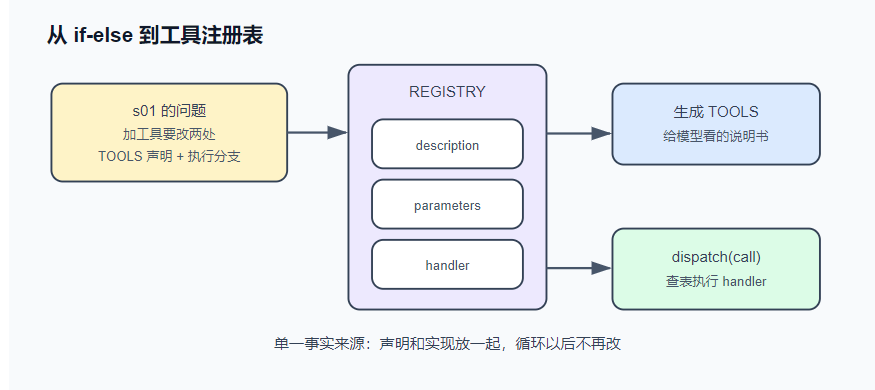
工具系统(s02) 把工具收拢成一张注册表 ——说明和实现放在同一处,天然不会失配。这就是单一事实来源 (single source of truth):同一份信息只写在一个地方,其余都从它生成。从此加工具 = 加一个条目。真实产品都是这个形状——Claude Code、Codex、Reina,本质都是一张注册表
TOOLS从注册表中生成,出口只由dispatch方法实现统一调度
读写改文件的功能写专门的文件工具去执行,只利用shell工具会不可避免地出现编码混淆,特殊字符转义等问题
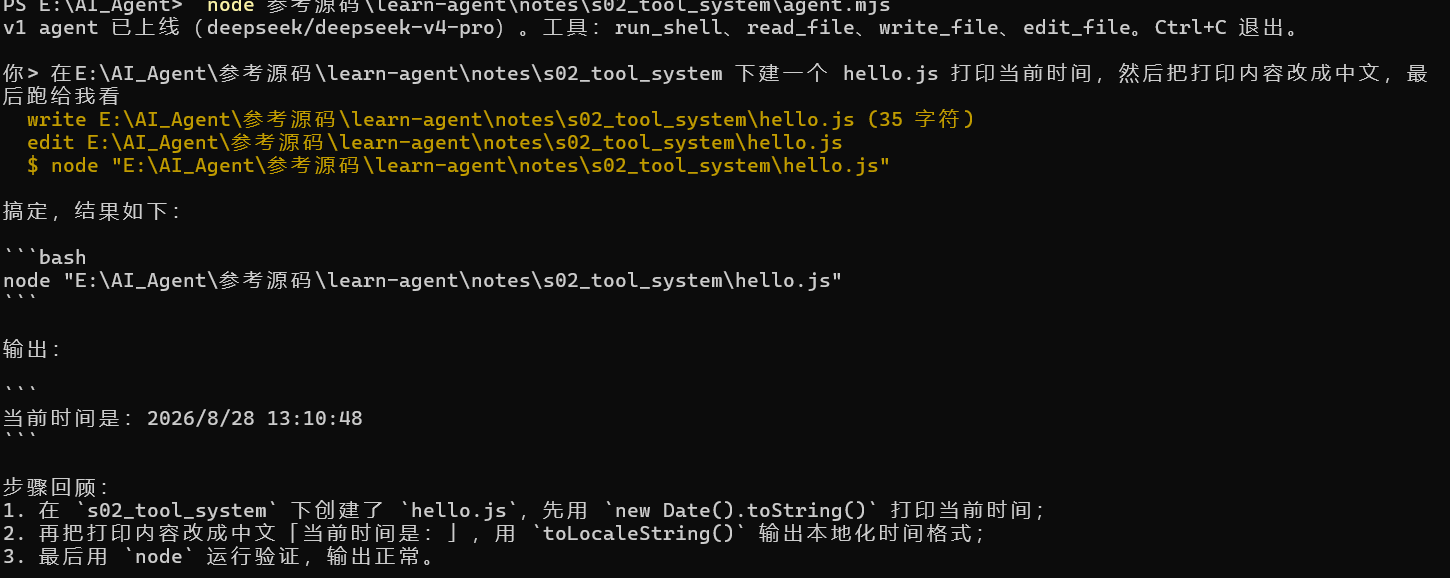
在v0基础上加工具注册表和读写文件的工具
1
2
3
4
5
6
7
8
9
10
11
12
13
14
15
16
17
18
19
20
21
22
23
24
25
26
27
28
29
30
31
32
33
34
35
36
37
38
39
40
41
42
43
44
45
46
47
48
49
50
51
52
53
54
55
56
57
58
59
60
61
62
63
64
65
66
67
68
69
70
71
72
73
74
75
76
77
78
79
80
81
82
83
84
85
86
87
88
89
90
91
92
93
94
95
96
97
98
99
100
101
102
103
104
105
106
107
108
109
110
111
112
113
114
115
116
117
118
119
120
121
122
123
124
125
126
127
128
129
130
131
132
133
134
135
136
137
138
139
140
141
142
143
144
145
146
147
148
149
150
151
152
153
154
155
156
157
158
159
160
161
162
163
164
165
166
167
168
169
170
171
172
173
174
175
176
177
178
179
180
181
182
183
184
185
186
187
188
189
190
191
192
193
194
195
196
197
198
#!/usr/bin/env node import readline from "node:readline/promises" ;import { execSync } from "node:child_process" ;import { readFileSync, writeFileSync, mkdirSync } from "node:fs" ;import path from "node:path" ;const BASE_URL = process.env .AGENT_BASE_URL ?? "https://api.deepseek.com/v1" ;const API_KEY = process.env .AGENT_API_KEY ;const MODEL = process.env .AGENT_MODEL ?? "deepseek-chat" ;if (!API_KEY ) {console .error ("缺少 AGENT_API_KEY。任何 OpenAI 兼容的 key 都行(DeepSeek / Kimi / GLM / OpenRouter / 本地 Ollama)。" );exit (1 );const SYSTEM = `你是一个运行在用户终端里的编程助手。 优先用专用工具(read_file / write_file / edit_file)操作文件,它们比 shell 命令可靠; run_shell 用于其余一切(跑测试、git、查环境)。 先观察真实世界再行动,不要凭空猜测文件内容。 当前目录:${process.cwd()} 操作系统:${process.platform} ` ;const REGISTRY = {run_shell : {description : "在用户的终端里执行一条 shell 命令,返回 stdout 和 stderr。" ,parameters : {type : "object" ,properties : { command : { type : "string" , description : "要执行的命令" } },required : ["command" ],handler : ({ command } ) => {console .log (`\x1b[33m $ ${command} \x1b[0m` );try {const out = execSync (command, {encoding : "utf8" ,timeout : 30_000 ,maxBuffer : 1024 * 1024 ,stdio : ["ignore" , "pipe" , "pipe" ],return out.trim () || "(命令执行成功,无输出)" ;catch (err) {return `命令失败(exit ${err.status ?? "?" } ):\n${err.stdout ?? "" } ${err.stderr ?? err.message} ` ;read_file : {description : "读取一个文本文件,返回带行号的内容。" ,parameters : {type : "object" ,properties : { path : { type : "string" , description : "文件路径(相对或绝对)" } },required : ["path" ],handler : ({ path: p } ) => {console .log (`\x1b[33m read ${p} \x1b[0m` );const text = readFileSync (p, "utf8" );const CAP = 50_000 ;const body = text.length > CAP ? text.slice (0 , CAP ) + `\n…(截断,共 ${text.length} 字符)` : text;return bodysplit ("\n" )map ((line, i ) => `${String (i + 1 ).padStart(4 )} \t${line} ` )join ("\n" );write_file : {description : "写入一个文件(整体覆盖)。父目录不存在时自动创建。" ,parameters : {type : "object" ,properties : {path : { type : "string" , description : "文件路径" },content : { type : "string" , description : "完整的文件内容" },required : ["path" , "content" ],handler : ({ path: p, content } ) => {console .log (`\x1b[33m write ${p} (${content.length} 字符)\x1b[0m` );mkdirSync (path.dirname (path.resolve (p)), { recursive : true });writeFileSync (p, content);return `已写入 ${p} ` ;edit_file : {description :"对文件做一次精确替换。old_string 必须在文件中出现且仅出现一次(带上足够的上下文来保证唯一),否则会失败。" ,parameters : {type : "object" ,properties : {path : { type : "string" , description : "文件路径" },old_string : { type : "string" , description : "要被替换的原文(必须唯一匹配)" },new_string : { type : "string" , description : "替换成的新文本" },required : ["path" , "old_string" , "new_string" ],handler : ({ path: p, old_string, new_string } ) => {console .log (`\x1b[33m edit ${p} \x1b[0m` );const text = readFileSync (p, "utf8" );const first = text.indexOf (old_string);if (first === -1 ) return `编辑失败:old_string 在 ${p} 中找不到。请先 read_file 确认原文。` ;if (text.indexOf (old_string, first + 1 ) !== -1 )return `编辑失败:old_string 在 ${p} 中出现多次。请带上更多上下文让它唯一。` ;writeFileSync (p, text.slice (0 , first) + new_string + text.slice (first + old_string.length ));return `已编辑 ${p} ` ;const TOOLS = Object .entries (REGISTRY ).map (([name, t] ) => ({type : "function" ,function : { name, description : t.description , parameters : t.parameters },function dispatch (call ) {const tool = REGISTRY [call.function .name ];if (!tool) return `未知工具:${call.function .name} ` ;let args;try {JSON .parse (call.function .arguments || "{}" );catch (err) {return `工具参数不是合法 JSON:${err.message} ` ;try {return tool.handler (args);catch (err) {return `工具执行出错:${err.message} ` ;async function chat (messages ) {const res = await fetch (`${BASE_URL} /chat/completions` , {method : "POST" ,headers : {"content-type" : "application/json" ,authorization : `Bearer ${API_KEY} ` ,body : JSON .stringify ({model : MODEL ,messages : [{ role : "system" , content : SYSTEM }, ...messages],tools : TOOLS ,if (!res.ok ) throw new Error (`API ${res.status} :${await res.text()} ` );const data = await res.json ();return data.choices [0 ].message ;async function runTurn (messages ) {while (true ) {const msg = await chat (messages);push (msg);if (msg.content ) console .log (`\n${msg.content} ` );if (!msg.tool_calls ?.length ) return ;for (const call of msg.tool_calls ) {push ({ role : "tool" , tool_call_id : call.id , content : dispatch (call) });const rl = readline.createInterface ({ input : process.stdin , output : process.stdout });const messages = [];console .log (`v1 agent 已上线(${MODEL} )。工具:${Object .keys(REGISTRY).join("、" )} 。Ctrl+C 退出。` );while (true ) {const line = (await rl.question ("\n你> " )).trim ();if (!line) continue ;push ({ role : "user" , content : line });await runTurn (messages);
运行
可以看到Agent能自己调用多个工具,循环能正常进行
实现 工具注册表 注册表就是一个对象,每个工具一个条目:
1
2
3
4
5
6
7
8
9
10
const REGISTRY = {run_shell : {description : "在用户的终端里执行一条 shell 命令……" ,parameters : { type : "object" , properties : { command : {...} }, required : ["command" ] },handler : ({ command } ) => { ... },read_file : { description, parameters, handler },write_file : { description, parameters, handler },edit_file : { description, parameters, handler },
给模型看的说明(description + parameters)和给机器执行的实现(handler)放在一起。API 需要的 TOOLS 数组不再手写,由注册表生成:
1
2
3
4
const TOOLS = Object .entries (REGISTRY ).map (([name, t] ) => ({type : "function" ,function : { name, description : t.description , parameters : t.parameters },
工具的调度也从 if-else 变成查表:
1
2
3
4
5
6
7
8
9
function dispatch (call ) {const tool = REGISTRY [call.function .name ];if (!tool) return `未知工具:${call.function .name} ` ;let args;try { args = JSON .parse (call.function .arguments || "{}" ); }catch (err) { return `工具参数不是合法 JSON:${err.message} ` ; }try { return tool.handler (args); }catch (err) { return `工具执行出错:${err.message} ` ; }
dispatch 把 s01 的”错误即信息”升级成了系统性约定:未知工具、坏参数、handler 抛异常,三条失败路径全部变成文本回给模型,任何一条都不打死进程。
主循环唯一的变化是把 if-else 换成 dispatch(call),之后不再修改。
read_file:带行号输出 1 2 3 4 5 6 7 8 9 10 11 12 13 const CAP = 50_000 ;const body = text.length > CAP ? text.slice (0 , CAP ) + `\n…(截断,共 ${text.length} 字符)` : text;return body.split ("\n" ).map ((line, i ) => `${String (i + 1 ).padStart(4 )} \t${line} ` ).join ("\n" );const CAP = 50_000 ; return body.split ("\n" ) const body = text.length > CAP ? text.slice (0 , CAP ) + `\n…(截断,共 ${text.length} 字符)` : text; map ((line, i ) => `${String (i + 1 ).padStart(4 )} \t${line} ` ) join ("\n" );
带行号是为了模型能精确引用位置。那个 5 万字符的硬截断是个临时方案:如果文件有 2MB,截掉的部分模型永远看不到,它也不知道自己错过了什么。s04 会正面解决这个问题。
edit_file:唯一匹配规则 1 2 3 4 5 6 7 8 9 10 11 handler : ({ path: p, old_string, new_string } ) => {const text = readFileSync (p, "utf8" );const first = text.indexOf (old_string);if (first === -1 )return `编辑失败:old_string 在 ${p} 中找不到。请先 read_file 确认原文。` ;if (text.indexOf (old_string, first + 1 ) !== -1 )return `编辑失败:old_string 在 ${p} 中出现多次。请带上更多上下文让它唯一。` ;writeFileSync (p, text.slice (0 , first) + new_string + text.slice (first + old_string.length ));return `已编辑 ${p} ` ;
edit_file 的规则:old_string 必须在文件中出现且仅出现一次 ,否则拒绝执行。这条规则把”模型脑中的文件”和”磁盘上的文件”强制对齐:
匹配不到 → 模型的记忆过期了(文件被改过,或它记错了)→ 报错引导它先 read_file 刷新认知,而不是改错地方;
匹配到多处 → 定位有歧义 → 报错引导它带上更多上下文行,精确到唯一。
再看两条报错文案:”请先 read_file 确认原文”、”请带上更多上下文让它唯一”。报错是写给模型看的界面:好的报错直接告诉模型下一步动作,模型照做就能自愈;坏的报错(”Error: -1”)只会让它原地打转。
调用工具后报错信息越清楚,越有利于模型自己解决问题完成循环
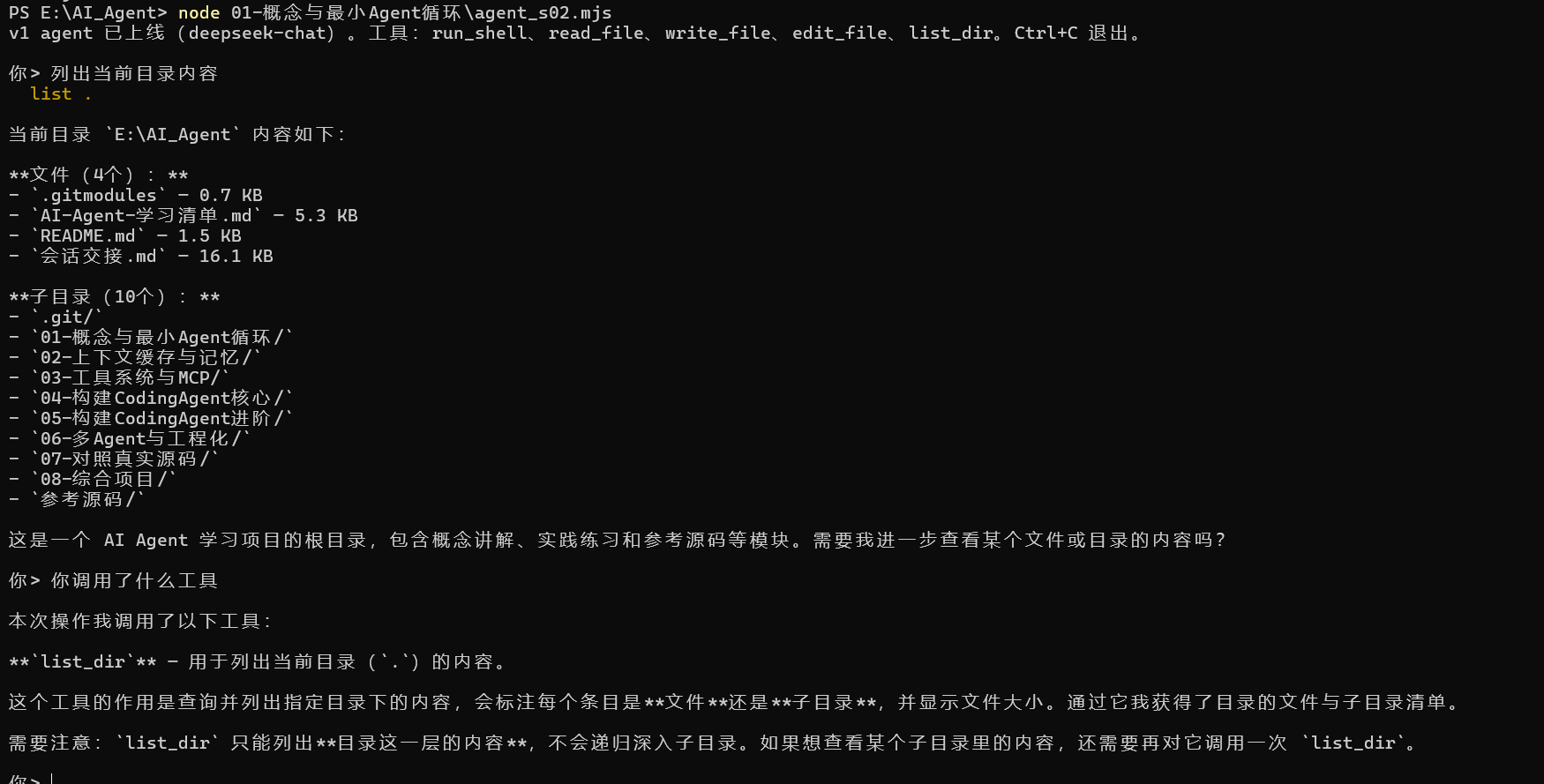
练习 加一个 list_dir 工具:列出目录内容,标注类型(文件/目录)和大小。
这次只需要在工具注册表加一个条目即可
1 2 3 4 5 6 7 8 9 10 11 12 13 14 15 16 17 18 19 20 21 22 23 24 25 26 27 28 29 30 31 32 33 34 35 36 37 38 39 40 41 42 43 44 const REGISTRY = {run_shell : {description : "在用户的终端里执行一条 shell 命令……" ,parameters : { type : "object" , properties : { command : {...} }, required : ["command" ] },handler : ({ command } ) => { ... },read_file : { description, parameters, handler },write_file : { description, parameters, handler },edit_file : { description, parameters, handler },list_dir : {description : "查询并列出指定目录内容,标注类型(文件/目录)和大小" ,parameters : {type : "object" ,properties : { dir : { type : "string" , description : "要查询的目录名称" } },required : ["dir" ],handler : ({ dir } ) => {console .log (`\x1b[33m list ${dir} \x1b[0m` );if (!existsSync (dir)) {return `错误:目录 "${dir} " 不存在` ;const items = readdirSync (dir);if (items.length === 0 ) {return `📂 ${dir} \n${'─' .repeat(40 )} \n(空目录)` ;const results = items.map (item =>const fullPath = path.join (dir, item);const stats = statSync (fullPath);const type = stats.isDirectory () ? '📁 [目录]' : '📄 [文件]' ;const size = stats.isDirectory () ? '' : ` ${(stats.size / 1024 ).toFixed(1 )} KB` ;return `${type} ${item} ${size} ` ;const totalFiles = results.filter (r =>includes ('[文件]' )).length ;const totalDirs = results.filter (r =>includes ('[目录]' )).length ;return `📂 目录 "${dir} " (文件: ${totalFiles} , 子目录: ${totalDirs} )\n${'─' .repeat(50 )} \n${results.join('\n' )} ` ;
与真实产品对照(延伸阅读)
Claude Code 的 Edit 工具与本章 edit_file 规则相同(还多一个 replace_all 参数处理”全部替换”的场景,留作思考题)。
为什么用字面量匹配而不用正则替换?因为正则转义是模型的常见出错点。字面量匹配 + 唯一性规则比正则可靠,这是各家产品从生产事故中得出的共同结论。
桌面引擎agent Reina 的工具注册表在 packages/tools/src/,每个工具一个文件,形态和本章 REGISTRY 一致;它的 CLAUDE.md 里有一条规则:”加新工具要注册进 tool registry,不许给引擎类加方法”——注册表一旦建立,就要守住它。
CRLF 问题:Windows 文件是 \r\n 换行,模型给的 old_string 是 \n,会匹配不上。真实产品都遇到过。最简单的对策是让报错引导模型重试;更彻底的做法留作思考题。
工具输出预算与溢出(s04) 工具输出可能大到撑爆上下文窗口。本章给它设预算,超预算的部分完整落盘,对话里只留一张”取件条”。本章代码 = s03 基底 + 溢出机制模块 spill.mjs。
问题 你让 agent 检查一个导出文件,它顺手执行了 cat data.json——一个 2MB 的文件。轻则这轮请求直接失败:2MB 约等于五十多万 token,超出模型一次能读的上限(上下文窗口),API 返回 400;就算窗口装得下,这五十万 token 也从此留在对话历史里,每一轮都重新计费——一次 cat,成本翻倍。
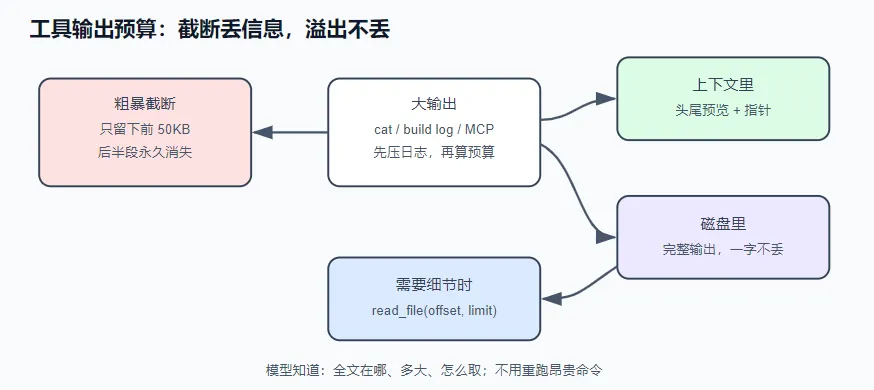
s02 给 read_file 加过一个 50KB 截断。但截掉的部分模型永远看不到,它也不知道自己错过了什么——如果问题恰好在第 51KB,就查不出来了。这三种坏结局(撑爆窗口、持续计费、截断丢信息)的共同根源是:模型每轮能看到多少,完全没有预算约束 。
解决方案 给工具输出设预算,超出的部分完整存到磁盘(落盘),对话里只留一张”取件条”——写明存在哪、有多大、怎么取——不丢任何信息。
解法不是截得更狠。截断和溢出是两种思路:
截断
溢出
超限的部分去哪了
删除——永远消失
落盘——完整保存
模型知道自己错过了什么吗
不知道
知道:指针写明全文在哪、有多大、怎么取
需要细节时
只能重跑命令(贵,还可能不可重现)
read_file 分段取回
运行 不需要 API key:
1 node notes/s04_output_budget/demo.mjs
1 2 3 4 5 6 7 8 9 10 11 12 13 14 15 16 17 18 19 20 21 22 23 24 25 26 27 28 29 30 31 32 33 34 35 36 37 38 39 40 41 42 43 44 45 46 47 48 49 50 51 52 53 54 55 56 57 58 59 60 61 62 63 64 65 66 67 68 69 70 71 72 73 74 75 76 77 78 79 80 81 82 83 #!/usr/bin/env node import { DEFAULTS , spillOne, enforceTurnBudget, compressLog } from "./spill.mjs" ;console .log (`预算:单条 ${DEFAULTS.perResult} 字符 / 整轮 ${DEFAULTS.turnTotal} 字符 / 节选 ${DEFAULTS.preview} 字符` );console .log ("\n━━━ 场景一:单条 2MB 输出(模拟 cat 大文件)━━━" );let big = "" ;for (let i = 1 ; big.length < 2 * 1024 * 1024 ; i++) {`row ${i} : id=${i * 7 } name=user_${i} email=user_${i} @example.com status=active\n` ;const one = spillOne (big);console .log (` 原始输出:${big.length} 字符` );console .log (` 回给模型:${one.content.length} 字符(压到 ${((one.content.length / big.length) * 100 ).toFixed(2 )} %)` );console .log (` 落盘全文:${one.file} ` );console .log (" 节选的收尾部分(模型看到的):" );for (const line of one.content .split ("\n" ).slice (-4 )) console .log (` ${line} ` );console .log ("\n━━━ 场景二:一轮 4 条输出合谋超总量(largest-first 溢出)━━━" );const fake = (tag, chars ) => `${tag} ` .repeat (Math .ceil (chars / (tag.length + 1 ))).slice (0 , chars);const records = [name : "run_shell(git log)" , output : fake ("commit" , 60_000 ), spillable : true },name : "run_shell(grep -r)" , output : fake ("match" , 30_000 ), spillable : true },name : "run_shell(ls -laR)" , output : fake ("file" , 30_000 ), spillable : true },name : "read_file(src/app.js)" , output : fake ("line" , 30_000 ), spillable : false }, const beforeSizes = records.map ((r ) => r.output .length );const round = enforceTurnBudget (records);console .log (` 整轮总量:${round.before} → ${round.after} 字符(预算 ${DEFAULTS.turnTotal} )` );forEach ((r, i ) => {const changed = r.output .length !== beforeSizes[i];console .log (` ${changed ? "⤵ 溢出" : "· 保留" } ${r.name} :${beforeSizes[i]} → ${r.output.length} 字符` +spillable === false ? "(read_file 不落盘副本,自带 offset/limit)" : "" ),console .log ("\n━━━ 场景三:vitest 风格日志的重要性压缩 ━━━" );const log = [];push (" RUN v1.6.0 /work/demo" , "" );for (let f = 1 ; f <= 24 ; f++) {for (let c = 1 ; c <= 8 ; c++) log.push (` ✓ src/mod${f} .test.ts > case ${c} (${c + 1 } ms)` );push (" FAIL src/billing.test.ts > charges the right amount" ," AssertionError: expected 1099 to be 999" ," at src/billing.test.ts:42:15" ," at processTicksAndRejections (node:internal/process/task_queues:95:5)" ,for (let f = 25 ; f <= 48 ; f++) {for (let c = 1 ; c <= 8 ; c++) log.push (` ✓ src/mod${f} .test.ts > case ${c} (${c + 1 } ms)` );push ("" , " Test Files 1 failed | 48 passed" , " Tests 1 failed | 384 passed" , " Duration 4.21s" );const raw = log.join ("\n" );const packed = compressLog (raw);console .log (` ${packed.inputLines} 行 → ${packed.outputLines} 行,省 ${(packed.savings * 100 ).toFixed(1 )} %(错误行一行没丢)` );console .log (" 压缩后的中段(FAIL 块完整幸存):" );const kept = packed.content .split ("\n" );const failAt = kept.findIndex ((l ) => l.includes ("FAIL" ));for (const line of kept.slice (Math .max (0 , failAt - 1 ), failAt + 5 )) console .log (` ${line} ` );console .log (` 结论: · 截断是有损的,溢出是无损的 —— 场景一里 2MB 只回给模型 ${one.content.length} 字符, 但一个字都没丢:全文躺在 ${one.file} ,read_file 一次就能取回任何一段。 · 预算要两层:单条上限接不住"十条中等输出合谋爆窗",所以整轮总量超标时 从最大的开始溢出,够了就收手(场景二只溢出了 1 条)。 · 日志先压缩再计预算:噪声行折叠、错误行和堆栈完整保留(场景三), 折叠发生时全文同样落盘 —— 压缩链路整体依然无损。 ` );
三个场景,真实输出
1 2 3 4 5 6 7 8 9 10 11 12 13 14 15 16 17 18 19 20 21 22 23 24 25 26 27 28 29 30 31 32 33 34 35 36 预算:单条 50000 字符 / 整轮 100000 字符 / 节选 2000 字符cat 大文件)━━━id =187803 name=user_26829 email=user_26829@example.com status=activeid =187810 name=user_26830 email=user_26830@example.com status=activelog ):60000 → 2140 字符ls -laR):30000 → 30000 字符case 8 (9ms)"十条中等输出合谋爆窗" ,所以整轮总量超标时
有 key 的话跑 AGENT_API_KEY=sk-xxx node notes/s04_output_budget/agent.mjs,让它 cat 一个大文件——你会看到紫色的 ⤵ 溢出 行,然后模型拿着指针自己去 read_file 取细节。
实现 1 2 3 4 5 6 7 8 9 10 11 12 13 14 15 16 17 18 19 20 21 22 23 24 25 26 27 28 29 30 31 32 33 34 35 36 37 38 39 40 41 42 43 44 45 46 47 48 49 50 51 52 53 54 55 56 57 58 59 60 61 62 63 64 65 66 67 68 69 70 71 72 73 74 75 76 77 78 79 80 81 82 83 84 85 86 87 88 89 90 91 92 93 94 95 96 97 98 99 100 101 102 103 104 105 106 107 108 109 110 111 112 113 114 115 116 117 118 119 120 121 122 123 124 125 126 127 128 129 130 131 132 133 134 135 136 137 138 139 140 141 142 143 144 145 146 147 148 149 150 151 152 153 154 155 156 157 158 159 160 161 162 163 164 165 166 167 168 169 170 171 172 173 174 175 176 177 178 179 180 181 182 183 184 185 186 187 188 189 190 191 192 193 194 195 196 197 198 199 200 201 202 203 204 205 206 207 208 209 210 211 212 213 214 215 216 217 218 219 220 221 222 223 224 225 226 227 228 229 230 231 232 233 234 235 236 237 238 239 240 241 242 243 244 245 246 247 248 249 250 251 252 253 254 255 256 257 258 259 260 261 262 263 264 265 266 267 268 269 270 271 272 273 274 275 276 #!/usr/bin/env node import readline from "node:readline/promises" ;import { execSync } from "node:child_process" ;import { readFileSync, writeFileSync, mkdirSync } from "node:fs" ;import path from "node:path" ;import { LoopBudget , isRecoverable, repairPrompt } from "./loop-budget.mjs" ;import { DEFAULTS , compressLog, saveSpill, enforceTurnBudget } from "./spill.mjs" ;const BASE_URL = process.env .AGENT_BASE_URL ?? "https://api.deepseek.com/v1" ;const API_KEY = process.env .AGENT_API_KEY ;const MODEL = process.env .AGENT_MODEL ?? "deepseek-chat" ;if (!API_KEY ) {console .error ("缺少 AGENT_API_KEY。任何 OpenAI 兼容的 key 都行(DeepSeek / Kimi / GLM / OpenRouter / 本地 Ollama)。" );exit (1 );const SYSTEM = `你是一个运行在用户终端里的编程助手。 优先用专用工具(read_file / write_file / edit_file)操作文件;run_shell 用于其余一切。 先观察真实世界再行动,不要凭空猜测文件内容。 超长的工具输出会被保存到 ${DEFAULTS.dir} / 下的文件里、只回给你节选——需要细节时用 read_file 分段读取,不要重跑命令。 当前目录:${process.cwd()} 操作系统:${process.platform} ` ;const REGISTRY = {run_shell : {description : "在用户的终端里执行一条 shell 命令,返回 stdout 和 stderr。" ,parameters : {type : "object" ,properties : { command : { type : "string" , description : "要执行的命令" } },required : ["command" ],handler : ({ command } ) => {console .log (`\x1b[33m $ ${command} \x1b[0m` );let raw;try {execSync (command, {encoding : "utf8" ,timeout : 30_000 ,maxBuffer : 16 * 1024 * 1024 ,stdio : ["ignore" , "pipe" , "pipe" ],trim () || "(命令执行成功,无输出)" ;catch (err) {`命令失败(exit ${err.status ?? "?" } ):\n${err.stdout ?? "" } ${err.stderr ?? err.message} ` ;const packed = compressLog (raw);if (!packed.compressed ) return raw;const file = saveSpill (raw);return (`${packed.content} \n` +`[已折叠 ${packed.inputLines - packed.outputLines} 行低信号日志。完整原文保存在 ${file} ,` +`如果需要的行被折叠了,用 read_file 找回,不要重跑命令。]` read_file : {description :"读取一个文本文件,返回带行号的内容。大文件用 offset(起始行号,从 1 开始)和 limit(行数)分段读取。" ,parameters : {type : "object" ,properties : {path : { type : "string" , description : "文件路径(相对或绝对)" },offset : { type : "integer" , description : "起始行号(1-based),默认 1" },limit : { type : "integer" , description : "本次最多读多少行,默认 800" },required : ["path" ],handler : ({ path: p, offset = 1 , limit = 800 } ) => {console .log (`\x1b[33m read ${p} ${offset > 1 || limit !== 800 ? ` [${offset} , +${limit} ]` : "" } \x1b[0m` );const lines = readFileSync (p, "utf8" ).split ("\n" );const start = Math .max (1 , offset);const slice = lines.slice (start - 1 , start - 1 + limit);let body = slice.map ((line, i ) => `${String (start + i).padStart(4 )} \t${line} ` ).join ("\n" );let shown = slice.length ;if (body.length > DEFAULTS .perResult ) {let cut = 0 , chars = 0 ;for (const line of slice) {if (chars + line.length + 6 > DEFAULTS .perResult ) break ;length + 6 ;Math .max (1 , cut);slice (0 , shown).map ((line, i ) => `${String (start + i).padStart(4 )} \t${line} ` ).join ("\n" ).slice (0 , DEFAULTS .perResult );const end = start + shown - 1 ;if (start > 1 || end < lines.length ) {`\n…(文件共 ${lines.length} 行,本次返回第 ${start} –${end} 行;继续读用 offset=${end + 1 } )` ;return body;write_file : {description : "写入一个文件(整体覆盖)。父目录不存在时自动创建。" ,parameters : {type : "object" ,properties : {path : { type : "string" , description : "文件路径" },content : { type : "string" , description : "完整的文件内容" },required : ["path" , "content" ],handler : ({ path: p, content } ) => {console .log (`\x1b[33m write ${p} (${content.length} 字符)\x1b[0m` );mkdirSync (path.dirname (path.resolve (p)), { recursive : true });writeFileSync (p, content);return `已写入 ${p} ` ;edit_file : {description :"对文件做一次精确替换。old_string 必须在文件中出现且仅出现一次(带上足够的上下文来保证唯一),否则会失败。" ,parameters : {type : "object" ,properties : {path : { type : "string" , description : "文件路径" },old_string : { type : "string" , description : "要被替换的原文(必须唯一匹配)" },new_string : { type : "string" , description : "替换成的新文本" },required : ["path" , "old_string" , "new_string" ],handler : ({ path: p, old_string, new_string } ) => {console .log (`\x1b[33m edit ${p} \x1b[0m` );const text = readFileSync (p, "utf8" );const first = text.indexOf (old_string);if (first === -1 ) return `编辑失败:old_string 在 ${p} 中找不到。请先 read_file 确认原文。` ;if (text.indexOf (old_string, first + 1 ) !== -1 )return `编辑失败:old_string 在 ${p} 中出现多次。请带上更多上下文让它唯一。` ;writeFileSync (p, text.slice (0 , first) + new_string + text.slice (first + old_string.length ));return `已编辑 ${p} ` ;const TOOLS = Object .entries (REGISTRY ).map (([name, t] ) => ({type : "function" ,function : { name, description : t.description , parameters : t.parameters },const FAILURE_RE = /^(命令失败|编辑失败|工具执行出错|未知工具|工具参数)/ ;function dispatch (call ) {const tool = REGISTRY [call.function .name ];if (!tool) return `未知工具:${call.function .name} ` ;let args;try {JSON .parse (call.function .arguments || "{}" );catch (err) {return `工具参数不是合法 JSON:${err.message} ` ;try {return tool.handler (args);catch (err) {return `工具执行出错:${err.message} ` ;async function chat (messages ) {const res = await fetch (`${BASE_URL} /chat/completions` , {method : "POST" ,headers : {"content-type" : "application/json" ,authorization : `Bearer ${API_KEY} ` ,body : JSON .stringify ({model : MODEL ,messages : [{ role : "system" , content : SYSTEM }, ...messages],tools : TOOLS ,if (!res.ok ) throw new Error (`API ${res.status} :${await res.text()} ` );const data = await res.json ();return data.choices [0 ].message ;async function runTurn (messages ) {const budget = new LoopBudget ({ baseSteps : 12 });let repaired = false ;while (true ) {if (!budget.canContinue ()) {const stop = budget.exhaustedStop ();console .log (`\n\x1b[31m⛔ ${stop.message} (第 ${stop.turnCount} 轮)\x1b[0m` );return ;const msg = await chat (messages);push (msg);if (msg.content ) console .log (`\n${msg.content} ` );if (!msg.tool_calls ?.length ) return ;const records = [];for (const call of msg.tool_calls ) {const output = dispatch (call);let input = {};try {JSON .parse (call.function .arguments || "{}" );catch { }push ({name : call.function .name ,status : FAILURE_RE .test (output) ? "failed" : "completed" ,spillable : call.function .name !== "read_file" ,const { spilled } = enforceTurnBudget (records);if (spilled.length > 0 ) {console .log (`\x1b[35m ⤵ ${spilled.length} 条超预算输出已溢出:${spilled.join("、" )} \x1b[0m` );for (const r of records) {push ({ role : "tool" , tool_call_id : r.call .id , content : r.output });const stop = budget.recordTurn (records);if (!stop) continue ;if (isRecoverable (stop) && !repaired) {true ;console .log (`\n\x1b[35m🟡 看门狗触发(${stop.reason} ),注入纠偏 prompt…\x1b[0m` );push ({ role : "user" , content : repairPrompt (stop) });continue ;console .log (`\n\x1b[31m⛔ ${stop.message} (reason=${stop.reason} ,第 ${stop.turnCount} 轮)\x1b[0m` );return ;const rl = readline.createInterface ({ input : process.stdin , output : process.stdout });const messages = [];console .log (`s04 agent 已上线(${MODEL} )。工具:${Object .keys(REGISTRY).join("、" )} 。` +`观测预算:单条 ${DEFAULTS.perResult} 、整轮 ${DEFAULTS.turnTotal} 字符,超限溢出到 ${DEFAULTS.dir} /。Ctrl+C 退出。` ,while (true ) {const line = (await rl.question ("\n你> " )).trim ();if (!line) continue ;push ({ role : "user" , content : line });await runTurn (messages);
1 2 3 4 5 6 7 8 9 10 11 12 13 14 15 16 17 18 19 20 21 22 23 24 25 26 27 28 29 30 31 32 33 34 35 36 37 38 39 40 41 42 43 44 45 46 47 48 49 50 51 52 53 54 55 56 57 58 59 60 61 62 63 64 65 66 67 68 69 70 71 72 73 74 75 76 77 78 79 80 81 82 83 84 85 86 87 88 89 90 91 92 93 94 95 96 97 98 99 100 101 102 103 104 105 106 107 108 109 110 111 112 113 114 115 116 117 118 119 120 121 122 123 124 125 126 127 128 129 130 131 132 133 134 135 136 137 138 139 140 141 142 143 144 import { writeFileSync, mkdirSync } from "node:fs" ;import { randomUUID } from "node:crypto" ;import path from "node:path" ;export const DEFAULTS = {perResult : 50_000 , turnTotal : 100_000 , preview : 2_000 , dir : ".agent-spill" , export function saveSpill (content, dir = DEFAULTS.dir ) {mkdirSync (dir, { recursive : true });const file = path.join (dir, `${Date .now()} -${randomUUID().slice(0 , 8 )} .txt` );writeFileSync (file, content, "utf8" );return file;export function excerpt (text, cap = DEFAULTS.preview ) {if (text.length <= cap) return text;const tailLen = Math .min (200 , Math .floor (cap / 4 ));return `${text.slice(0 , cap - tailLen)} \n… [中间省略 ${text.length - cap} 字符] …\n${text.slice(-tailLen)} ` ;export function spillOne (text, opts = {} ) {const { preview, dir } = { ...DEFAULTS , ...opts };const file = saveSpill (text, dir);const content =`${excerpt(text, preview)} \n` +`[输出超过预算:全文共 ${text.length} 字符,已完整保存到 ${file} 。` +`需要被省略的部分时,用 read_file(配 offset/limit)分段读取,不要重跑命令。]` ;return { content, file };export function enforceTurnBudget (records, opts = {} ) {const { perResult, turnTotal, preview, dir } = { ...DEFAULTS , ...opts };let total = records.reduce ((sum, r ) => sum + r.output .length , 0 );const before = total;const candidates = recordsfilter ((r ) => r.spillable !== false && r.output .length > preview)sort ((a, b ) => b.output .length - a.output .length );const spilled = [];for (const record of candidates) {if (record.output .length <= perResult && total <= turnTotal) break ;const { content, file } = spillOne (record.output , { preview, dir });output .length - content.length ;output = content;push (file);return { spilled, before, after : total };const ANCHOR_RE = /error|exception|failed|failure|fatal|panic|timeout|warn|deprecated/i ;const SUMMARY_RE = [/^\s*(FAIL|PASS)\b/ , /^\s*Tests?:?\s/i , /={3,}.*\b(passed|failed|error)\b/i , /^\s*npm (ERR|WARN)!/ ,/^(命令失败|编辑失败|工具执行出错|未知工具|工具参数)/ ,const TRACE_RE = [/^\s+at\s/ , /^\s*File ".*", line \d+/ , /^\s*-->\s/ , /^\s*\^+/ ];function classify (line ) {if (SUMMARY_RE .some ((re ) => re.test (line)) || ANCHOR_RE .test (line)) return "anchor" ;if (TRACE_RE .some ((re ) => re.test (line))) return "trace" ;return "noise" ;export function compressLog (text, { minLines = 40 , context = 2 , minSavings = 0.15 } = {} ) {const lines = text.split (/\r?\n/ );const unchanged = { content : text, compressed : false , inputLines : lines.length , outputLines : lines.length , savings : 0 };if (lines.length < minLines) return unchanged; const classes = lines.map (classify);const keep = new Array (lines.length ).fill (false );for (let i = 0 ; i < lines.length ; i++) {if (classes[i] !== "anchor" ) continue ;for (let j = Math .max (0 , i - context); j <= Math .min (lines.length - 1 , i + context); j++) keep[j] = true ;for (let i = 0 ; i < lines.length ; i++) {if (classes[i] !== "trace" ) continue ;let start = i, end = i;while (start > 0 && classes[start - 1 ] === "trace" ) start--;while (end < lines.length - 1 && classes[end + 1 ] === "trace" ) end++;if ((start > 0 && keep[start - 1 ]) || (end < lines.length - 1 && keep[end + 1 ])) {for (let j = start; j <= end; j++) keep[j] = true ;const out = [];for (let i = 0 ; i < lines.length ; ) {if (keep[i]) { out.push (lines[i]); i++; continue ; }let j = i;while (j < lines.length && !keep[j]) j++;if (j - i >= 3 ) out.push (`… [${j - i} 行省略]` );else out.push (...lines.slice (i, j));const content = out.join ("\n" );const savings = text.length > 0 ? 1 - content.length / text.length : 0 ;if (savings < minSavings) return unchanged; return { content, compressed : true , inputLines : lines.length , outputLines : out.length , savings };
四个关键决定。
① 指针的三要素:在哪、多大、怎么取 溢出后回给模型的不是一句”(已截断)”,而是头尾节选加一条指针(那张取件条):
1 2 3 row 26830: id=187810 name=user_26830 email=user_26830@example.com status=active
三个要素缺一不可:在哪 (路径),多大 (模型据此决定要不要读、分几段读),怎么取 (read_file + offset/limit,外加一句”不要重跑命令”——没有这句,模型的第一反应往往是把 cat 再跑一遍)。报错和提示都是写给模型看的界面(s02 的原则):指针写清楚,模型照做就能取回细节;不需要就省下 token。
② 预算要两层:单条上限 + 整轮总量 只设”单条不超过 50KB”防不住:模型一轮发起十个工具调用,每条 30KB,单条都不超限,合计 300KB 照样超窗。所以预算是两层的,溢出从最大的一条开始(largest-first):
1 2 3 4 5 6 7 8 for (const record of candidates) {if (record.output .length <= perResult && total <= turnTotal) break ;const { content, file } = spillOne (record.output , { preview, dir });output .length - content.length ;output = content;
从最大的开始效率最高:溢出一条 60KB 通常就能让整轮回到预算内,剩下三条 30KB 原文保留,细节仍在上下文里。达标就停——预算的目的是保住窗口,不是压缩所有输出。
③ read_file 是特例:文件本身就是指针 enforceTurnBudget 跳过了 spillable: false 的条目。read_file 读出来的内容本来就在磁盘上,再落盘一份副本是浪费。它的正确形状是自我设限:
1 2 3 4 const slice = lines.slice (start - 1 , start - 1 + limit);`\n…(文件共 ${lines.length} 行,本次返回第 ${start} –${end} 行;继续读用 offset=${end + 1 } )` ;
offset/limit 分段读取,尾注告诉模型总量和续读位置。同一个思想的两种形态:内存里的大输出 → 落盘 + 指针;磁盘上的大文件 → 指针就是它自己。所有大内容最终收敛到同一个动作:read_file 分段读取。
④ 日志先压缩,再计预算 测试/构建日志是大输出里最常见的一种,其中大部分是噪声——成百行 ✓ passed、进度条、下载提示。有信号的只有错误、失败总结和它们旁边的堆栈。所以在预算之前先做一道按重要性的压缩:
两条保险规则:行数太少不处理(太短没有压缩价值);省不到 15% 就原样返回(为 3% 的收益打乱原文格式不划算)。宁可多留几行噪声,也不折叠掉一行真错误。
压缩会不会丢信息?不会——折叠真的发生时,全文同样落盘、同样给指针。压缩决定”回给模型多少”,落盘保证”完整保存”。
练习 实操代码 现在的 excerpt 固定”头部为主、尾部 200 字符”。对失败的测试日志这个比例是错的——总结和 exit code 在尾部。给 spillOne 加一个 mode: "head" | "tail" 参数,让 run_shell 的失败输出保尾部。判定”该保哪头”的信号已经在 records 里了(提示:status)。
我们先来分析一下这个题目的所说的场景
我们知道在调用工具的时候会有成功调用返回正常结果和调用失败返回错误信息的两种情况,在调用成功的情境下excerpt 固定”头部为主、尾部 200 字符”是合理的,能够正常返回一部分调用工具执行完成后的信息
但是在调用失败的情境下,返回的靠前的信息可能是重复无用的进度保存,真正的错误信息可能在尾部,这种情况下就需要”尾部为主、头部200 字符”
1 2 3 4 5 6 7 8 9 10 11 12 run_shell 执行构建,失败了:"Config" exit code: 1 ← 真正有用的信息在尾部!
题目中让我们给 spillOne 加一个 mode: "head" | "tail" 参数,让 run_shell 的失败输出保尾部
主要的判定信号从records 的status参数中获取
看一下runTurn函数中关于records的构建
1 2 3 4 5 6 7 8 9 10 11 12 13 14 15 16 17 18 19 20 const records = [];for (const call of msg.tool_calls ) {const output = dispatch (call);let input = {};try {JSON .parse (call.function .arguments || "{}" );catch { }push ({name : call.function .name ,status : FAILURE_RE .test (output) ? "failed" : "completed" ,spillable : call.function .name !== "read_file" ,
1 2 3 4 5 6 7 // records 的结构"run_shell" ,command : "npm run build" },"failed" , // ← 这个信号!"=== 开始构建 ===\n...\nerror: ..."
那么我们实操代码
给 spillOne 加 mode 参数
1 2 3 4 5 6 7 8 9 export function spillOne (text, opts = {} ) {const { preview, dir, mode = "head" } = { ...DEFAULTS , ...opts };const file = saveSpill (text, dir);const content =`${excerpt(text, preview, mode)} \n` + `[输出超过预算:全文共 ${text.length} 字符,已完整保存到 ${file} 。...]` ;return { content, file };
修改 excerpt 支持方向
1 2 3 4 5 6 7 8 9 10 11 12 13 export function excerpt (text, cap = DEFAULTS.preview, mode = "head" ) {if (text.length <= cap) return text;const headLen = Math .min (200 , Math .floor (cap / 4 ));if (mode === "tail" ) {return `${text.slice(0 , headLen)} \n… [中间省略 ${text.length - cap} 字符] …\n${text.slice(-(cap - headLen))} ` ;const tailLen = Math .min (200 , Math .floor (cap / 4 ));return `${text.slice(0 , cap - tailLen)} \n… [中间省略 ${text.length - cap} 字符] …\n${text.slice(-tailLen)} ` ;
调用时用 status 决定方向
1 2 3 4 5 6 7 8 const { status, output } = dispatch (call);const mode = status === "failed" ? "tail" : "head" ;
思考题 一场长会话会在 .agent-spill/ 里积累几十个文件,谁来删?设计一个清理策略并想清楚什么时候删是安全的——指针还留在 messages 历史里时删掉文件,模型按指针去读就会失败。(这个问题在 s06 会更突出:压缩历史时,指针是保还是弃?)
我们先来明确一下前提
问题本质
1 2 3 4 5 6 7 8 9 10 11 12 13 14 15 16 17 ┌─────────────────────────────────────────────────────────────┐
安全删除的条件 :messages 里没有任何一条消息包含这个文件路径。
在压缩的场景中 已经被压缩成摘要的消息区间中存在文件指针的,这些指针基本作废,正常不去回退的前提下,调用模型去读上下文的时候只会读摘要,不再读压缩区间事件,指针作废对应文件也可删除
最近几条没有被压缩的消息,文件指针存在,对应文件也要保留
还有一种情况我之前没有考虑到的,指针在摘要里 (模型自己写的),这种指针应该弃掉,模型写摘要时可能引用了指针,但那是指针的副本,不是引用
场景
决定
原因
指针在被压缩的区间内
弃 这段历史被压缩成摘要了,摘要里已经概括了内容,不需要再保留指向原始输出文件的指针
指针在保留的最近 K 条消息里
保 这些消息还在可见范围内,模型可能还会去读
指针在摘要里 (模型自己写的)
弃 模型写摘要时可能引用了指针,但那是指针的副本,不是引用
删除文件的策略 引用计数
每次从 messages 里移除一条消息时,检查它里面有没有指针,有就减少对应文件的引用计数。
1 2 3 4 5 6 7 8 9 10 11 12 13 14 15 16 17 18 19 20 21 22 23 24 25 const spillRefs = new Map (); function trackSpillRefs (message ) {const matches = message.content .match (/\.agent-spill\/[^\s"]+/g ) || [];for (const ref of matches) {set (ref, (spillRefs.get (ref) || 0 ) + 1 );function untrackSpillRefs (message ) {const matches = message.content .match (/\.agent-spill\/[^\s"]+/g ) || [];for (const ref of matches) {const count = spillRefs.get (ref) - 1 ;if (count <= 0 ) {delete (ref);unlinkSync (ref);else {set (ref, count);
完整的清理策略
触发时机
清理动作
安全条件
压缩时 删除被压缩区间引用的 spill 文件
区间被移除,指针不再被任何保留消息引用
会话恢复时 扫描清理孤儿文件
文件不在当前 messages 的任何指针中
会话结束时 可选:删除所有关联文件
会话结束,不再需要
定期后台清理 删除超过 X 天未访问的 spill 文件
加上最后访问时间戳(mtime)判断
与真实产品对照(延伸阅读) 本章是 Reina 输出管线的简化版,生产实现分两层:
工具层 (packages/tools/src/utils.ts):每个内置工具的输出上限 50KB / 2000 行;shell 输出保留尾部(exit code 和失败总结都在结尾),全文落盘到 .reina/tool_outputs/ 并附 read_file 指针。引擎层 (packages/core/src/engine.ts 的 enforceTurnObservationBudget):每个请求前跑一遍整轮观测预算——单条超 100,000 字符、或整轮总量超 200,000 字符时 largest-first 溢出(小窗口模型按窗口的 15% / 30% 缩放);替换成头尾节选 + .reina/tool_outputs/<callId>.txt 指针。这层聚合预算有一个很现实的动机:MCP(接入外部工具的协议)这类外部工具的输出不经过你的单条截断——外部工具不受你控制,聚合预算是它们唯一的兜底。另有一个 24,000 字符的紧急裁剪,只在请求即将超出窗口时启用——那是有损的最后手段,但它也带指针,不留死路。
“read_file 不落盘副本”这条特例是踩过坑的:Reina 早期版本给 read_file 的输出也落盘了一份副本,纯属浪费,后来修掉了。
日志压缩在 packages/tools/src/log-compress.ts(从 headroomlabs/headroom 的 Rust 实现移植),比本章多一个细节:把行里的数字/十六进制地址归一化后,相邻近似重复的行折叠成 (line) ×N。真实 vitest 输出实测省约 65%;eslint 输出则是 safe no-op——省不到 15% 阈值,原样返回。REINA_LOG_COMPRESS=0 可整体关闭。
Claude Code 的同类行为:Bash 工具输出超过 30,000 字符会截断——超长命令后看到的 “output truncated” 就是它的观测预算在工作。
渐进式工具披露(s15) 本章的解法:冷启动只挂少数常用工具和一个搜索入口,其余工具等模型需要时再搜出来用——并避开一个反直觉的缓存坑。
问题 工具只有三五个时一切正常;接上 MCP、工具涨到几十个之后,每轮请求都要把全部工具定义(名字 + 描述 + JSON schema)原样发一遍,几千 token 轮轮都付。更隐蔽的是:工具数组一变,prompt 缓存整段失效,账单不降反升。
第一笔账好懂:没用到的工具定义,每轮白付。第二笔来自 s07(缓存命中工程):tools 数组和 system 一起位于缓存前缀的最前部(Anthropic 的序列化顺序是 tools 在前),数组一变,前缀从头失效,后面全部按全价重算。
解决方案 自然的想法:不常用的工具先藏起来(标成 deferred),只放一个 search_tool 入口;模型需要时按关键词搜,搜到后再放开给模型用——这个”放开”的动作,下文称解蔽 。冷启动的 tools 数组因此明显变小。但解蔽这个动作如果实现不当,会反过来砸掉缓存:把搜到的工具加回 tools 数组,每解蔽一次,数组变一次,缓存失效一次。正确做法是数组恒定——搜到的工具永不加回数组,schema 走搜索结果文本,调用走常驻的代理工具(不走代理而走直调派发时,这条铁律在 Anthropic 协议上有一个硬例外,见实现③)。
来拆解分析一下这段话
为什么要“藏起来”(冷启动优化)tools 数组,会导致:
Prompt 前缀过长,消耗大量 Token。
模型在海量工具中做语义匹配的速度变慢。search_tool(搜索工具),将其他工具“标为 deferred”(休眠/隐藏状态)。
“解蔽”的陷阱(缓存失效问题)send_email)时,系统通过 search_tool 搜到这个工具,然后把它“加回” tools 数组。
问题:在主流 LLM 接口(如 OpenAI)中,tools 数组是请求体(Request Body)的一部分。只要数组内容发生变化(哈希值改变),缓存系统(如 Redis/Cloudflare)就会认为这是一个全新的请求,从而无法命中缓存。
后果:每“解蔽”一个新工具,缓存就碎一次,导致大量重复计算,反而拖慢速度。
正确的“恒定数组”做法(解决方案)tools 数组必须永远恒定不变。
搜到的工具绝不加回 tools 数组。
模型如何调用? 模型看到的工具描述变成了两段文本信息(走 search_tool 返回的搜索结果文本),而不是结构化的函数定义。模型根据文本描述,决定要调用哪个工具。
系统如何执行? 请求依然通过常驻的代理工具(即那个唯一的 search_tool 入口)发出。系统在后端解析模型的文字指令,手动派发(Dispatch)给对应的真实函数执行。
唯一的“硬例外”(实现③)
原因:Anthropic 的 API 支持一种特殊的缓存机制(Prompt Caching),它允许在请求中追加新的工具定义,而不会使之前的缓存前缀失效(只要缓存前缀不变,追加内容可复用缓存)。
例外操作:在这种特定协议下,你可以直接把工具加回数组(直调派发),因为 Claude 的缓存机制允许这种动态追加,而不砸掉缓存。这属于协议层面独有的“特权”。
总结成一句话:
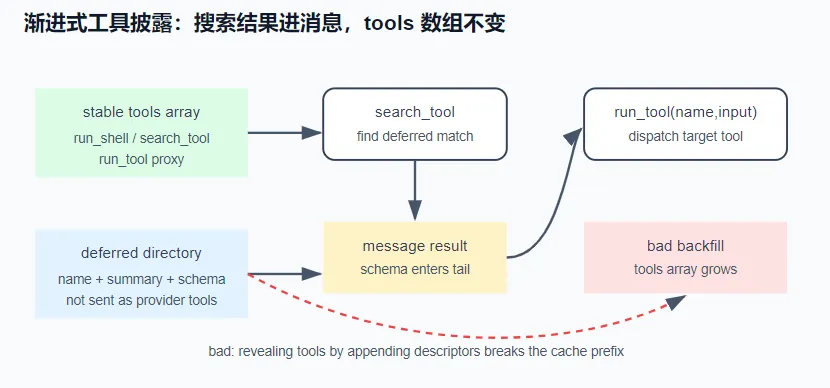
放一张流程图
第一步:看最顶部的三个“稳定基石”(绿色区域)
图最上方写了 stable tools array(稳定的工具数组),下面列了三个工具:
run_shell(运行终端命令)search_tool(搜索工具)run_tool proxy(代理执行工具)
关键信息:这三个工具是永远不变的,每次请求都只带这三个。这就保证了请求的“缓存前缀”是固定的,不会失效。
第二步:看中间“正确路径”(图的左半部分)
search_tool(搜索):当模型需要一个新工具时,它调用这个固定的搜索工具。find deferred match(找到匹配项):系统在“隐藏目录”(deferred directory)里找到了你想要的那个工具(比如 send_email)。message result schema enters tail(结果中的Schema进入消息尾部):注意这里!系统没有把 send_email 加到顶部的 tools 数组里,而是把它的使用说明(Schema)当作普通的文字结果,塞进了对话消息(Message)的末尾。模型读取文字后,调用 run_tool(name, input):模型看完文字说明,知道要调用 send_email,但它只能调用顶部的固定代理工具 run_tool proxy,并把名字和参数传给它。
dispatch target tool(派发目标工具):后端收到代理指令后,在内部真正去执行 send_email 的逻辑。
这条路径的结果:tools 数组始终只有那3个,缓存完整保留。
第三步:看右边“错误路径”(红色警告框)
框里写的是 bad backfill: tools array grows(错误的回填:工具数组变大了)。
意思就是:如果像图中那条虚线箭头一样,把搜到的 send_email “加回” 顶部的 tools 数组,数组就从3个变成4个了。
下面红字点明了后果:revealing tools by appending descriptors breaks the cache prefix(通过追加描述来披露工具,会破坏缓存前缀)——也就是我之前说的“砸掉缓存”。
总结一下,就是我们的tools数组中只包含三个可调用的tool:run_shell(运行终端命令),search_tool(搜索工具)和run_tool proxy(代理执行工具)
需要调用其他工具的时候调用search_tool,把返回的结果加到message末尾(是调用工具结果返回)。模型读取后利用run_tool调用该工具
运行 演示不需要 API key:
1 node notes/s15_tool_disclosure/demo.mjs
1 2 3 4 5 6 7 8 9 10 11 12 13 14 15 16 17 18 19 20 21 22 23 24 25 26 27 28 29 30 31 32 33 34 35 36 37 38 39 40 41 42 43 44 45 46 47 48 49 50 51 52 53 54 55 56 57 58 59 60 61 62 63 64 65 66 67 68 69 70 71 72 73 74 75 76 77 78 79 80 81 82 83 84 85 86 87 88 89 90 91 92 93 94 95 96 97 98 99 100 101 102 103 104 105 106 107 108 109 110 111 112 113 114 115 116 117 118 119 #!/usr/bin/env node const DIRECT = [name : "run_shell" , description : "执行一条 shell 命令" },name : "read_file" , description : "读取一个文本文件" },name : "search_tool" , description : "按关键词检索未加载的工具" },const DEFERRED = [name : "schedule_wakeup" , description : "安排一次未来的模型回合" },name : "convene_panel" , description : "召集多个子代理并行评审" },name : "recall_memory_chunk" , description : "把压缩掉的历史片段逐字召回" },name : "create_subtask" , description : "在任务 DAG 上新建一个子任务" },name : "notify_user" , description : "向用户发一条系统通知" },const serialize = (tools ) => JSON .stringify (tools); const commonPrefix = (a, b ) => {let i = 0 ;while (i < a.length && i < b.length && a[i] === b[i]) i++;return i;function reportTurns (label, arraysByTurn ) {console .log (`━━━ ${label} ━━━` );let misses = 0 ;for (let t = 1 ; t < arraysByTurn.length ; t++) {const prev = serialize (arraysByTurn[t - 1 ]);const cur = serialize (arraysByTurn[t]);const n = commonPrefix (prev, cur);const reuse = ((n / prev.length ) * 100 ).toFixed (0 );const hit = n === prev.length ;if (!hit) misses++;console .log (` 第 ${t} ↔${t + 1 } 轮:tools ${prev.length} →${cur.length} 字节 · 公共前缀复用 ${reuse} % ` +"✅ 前缀稳定" : "❌ 前缀击穿(tools 块变了 → 本轮全价)" ),console .log (` → ${arraysByTurn.length} 轮里发生 ${misses} 次 tools 前缀击穿\n` );return misses;const badTurns = [DIRECT .slice ()];for (let i = 0 ; i < 3 ; i++) {const grown = [...badTurns[badTurns.length - 1 ], DEFERRED [i]]; push (grown);reportTurns ("坏做法:解蔽即回灌 tools 数组" , badTurns);const DIRECT_WITH_PROXY = [DIRECT ,name : "run_tool" , description : "按名字调用任何已检索到的工具:run_tool({name,input})" },const goodTurns = [DIRECT_WITH_PROXY , DIRECT_WITH_PROXY , DIRECT_WITH_PROXY , DIRECT_WITH_PROXY ];reportTurns ("好做法:稳定代理,数组恒定" , goodTurns);const strictRejects = (tools, callName ) => !tools.some ((t ) => t.name === callName);const COLD = DIRECT .slice ();const neverTurns = [COLD , COLD , COLD , COLD ];const neverMisses = reportTurns ("硬校验协议 × 永不回灌直调" , neverTurns);let rejected = 0 ;for (let t = 1 ; t < neverTurns.length ; t++) if (strictRejects (neverTurns[t], "notify_user" )) rejected++;console .log (` ↑ 数组 ${neverMisses} 次击穿,但 notify_user 直调 ${rejected} /3 次被 API 拒绝 ❌` );console .log (" ——省下了缓存,废掉了工具。\n" );const BACKFILLED = [...COLD , DEFERRED .find ((t ) => t.name === "notify_user" )];const backfillTurns = [COLD , BACKFILLED , BACKFILLED , BACKFILLED ];reportTurns ("硬校验协议 × 解蔽名单回灌" , backfillTurns);let accepted = 0 ;for (let t = 1 ; t < backfillTurns.length ; t++) if (!strictRejects (backfillTurns[t], "notify_user" )) accepted++;console .log (` ↑ 解蔽落地付 1 次 miss,之后前缀重新稳定;notify_user 直调 ${accepted} /3 次成功 ✅\n` );const modelConfig = { subscriptionTools : ["kimi_web_search" ] }; const PROMOTED = [...DIRECT , { name : "kimi_web_search" , description : "订阅附带的服务端搜索" }];const stableTurns = [PROMOTED , PROMOTED , PROMOTED , PROMOTED ];reportTurns (`条件提升 × 会话内稳定判据(config 声明 ${JSON .stringify(modelConfig.subscriptionTools)} )` , stableTurns);const volatileTurns = [DIRECT , PROMOTED , PROMOTED , DIRECT ]; reportTurns ("条件提升 × 易变判据(中途翻转两次)" , volatileTurns);console .log ("关键:冷启动省 token 只是第一步;真正的账在'解蔽之后数组还稳不稳'。" );console .log (" Anthropic 没有服务端 defer,披露逻辑只能压在客户端——被搜到的工具永不回灌数组。" );console .log (" 但若不用代理工具而走直调派发,Anthropic 会硬校验名字——必须按协议分叉:" );console .log (" 自由文本协议保持零成本快路径,硬校验协议回灌已解蔽名单(一次性 miss)。" );
同一个”按需披露”,两种实现,对比 tools 数组的字节稳定性(真实运行输出):
1 2 3 4 5 6 7 8 9 10 11 12 13 14 15 16 17 18 19 20 21 22 23 24 25 26 27 28 29 30 31 32 33 34 35 36 37 38 39 40 41 42 43 44 45 46 47 48 49 50 51 ━━━ 坏做法:解蔽即回灌 tools 数组 ━━━"kimi_web_search" ]) ━━━'解蔽之后数组还稳不稳' 。
实现 ① deferred 目录:冷启动只放入口,不放全部工具 工具分两类:direct(每轮都进数组,比如 run_shell / read_file / search_tool)和 deferred(冷启动隐藏)。deferred 工具只把”名字 + 一句话摘要”放进一个目录 ,供 search_tool 检索。模型看到的冷启动 tools 数组因此小而稳定。
② 解蔽不能把工具加回数组 最直觉的解蔽实现:模型搜到 notify_user,就把它的完整定义追加进 tools 数组,下一轮直接调用。问题正在这:每解蔽一次,数组变一次,缓存失效一次(演示的坏做法)。省下的是冷启动的一次性 token,赔进去的是会话中段一次次前缀失效。
正确做法是数组恒定 :搜到的工具永不加回数组。它的 schema 通过搜索结果文本交给模型——搜索结果是一条消息,位于缓存前缀的尾部,往尾部追加天然安全;实际调用走一个常驻的代理工具 run_tool({ name, input })。于是不管解蔽多少工具,发给服务商的 tools 块每轮字节恒定(演示的好做法,0 次失效)。
一个重要前提:Anthropic 没有服务端的按需披露能力,这套逻辑只能放在客户端做——为什么不能照抄 Codex 的做法,见文末对照。
③ 硬校验协议:”永不回灌”的例外 ②的代理方案(run_tool)对本节的坑天然免疫——代理本身常驻数组,被调的永远是它。但很多实现(Claude Code、Reina)不走代理:模型直接喊出被搜到的工具名,引擎在派发层 认名字。这在 OpenAI 系协议没问题——tool call 的名字是自由文本,服务端不管你调的名字在不在数组里;Anthropic Messages API 却会硬校验 tool_use.name 。同一套”永不回灌 + 直调派发”,换个协议就变成:模型通过 search_tool 搜得到工具、目录里看得见,每次直调却被 API 硬拒——工具”看得见摸不着”。这个坑格外隐蔽,因为缓存指标是完美的(数组零击穿),坏掉的是功能本身。
解法是按协议分叉 :自由文本协议保持”永不回灌”的零成本快路径;硬校验协议把已解蔽名单 回灌进数组(名单排序保证字节确定性)。代价是每解蔽一个工具付一次 miss——但名单落地后不再变化,前缀立刻重新稳定,这是一次性成本,不是坏做法那种每轮击穿。演示的第三、四个场景对比的就是这两条路:不回灌 = 0 击穿但 3/3 次调用被拒;回灌名单 = 1 次击穿换 3/3 次成功。
这也回扣 s14(Provider 兼容层)的主旨:同一个客户端优化,能不能成立取决于协议语义 。做披露设计时先回答一个问题——你的 provider 校不校验工具名?
④ 第三档:条件原生提升(能力即数据) direct / deferred 之外其实还有第三档:某个会话级事实保证工具必然可用时,冷启动直接入列 。典型例子:订阅制 provider 附带的服务端工具(如 Kimi 订阅自带的 kimi_web_search)。对挂着该订阅的会话,工具百分之百能调通,还让模型跑一次 search_tool 往返纯属浪费;对其他会话它又是死重(没有凭证,调了必失败),必须留在 deferred。同一个工具,两档可见性,按会话切。
两个关键,缺一不可:
判据必须会话内稳定 。订阅身份整个会话不变,所以提升后的数组每轮字节恒定,缓存零损耗。反过来,把提升挂在一个会话中途会翻转的判据上(比如”后台任务运行中”才提升生命周期工具),判据每翻转一次数组变一次,每次都是一记 miss——不一定是错(可能算过账值得),但必须知道在付钱。演示的最后两个场景对比的就是稳定判据(0 击穿)和易变判据(2 击穿)。提升是声明式的 。厂商知识不进引擎:由订阅解析层在模型配置上声明 subscriptionTools: ["kimi_web_search", ...],引擎只执行一条通用规则”配置声明什么就提升什么”。将来接第二家带服务端工具的订阅,只在它的解析处加一行声明,引擎零改动。这和 s14 里”能力写进 models.json 而不是 baked-in 正则”是同一条纪律:能力是数据,不是代码分支 。
接进真实 agent 在 s10 的 prompt 组装里,冷启动 tools 只放 direct 类 + search_tool + run_tool;deferred 目录作为一段”可检索工具清单”注入。模型调 search_tool("发通知") → 引擎回搜索结果(含 schema 摘要)→ 模型调 run_tool({name:"notify_user", input:{...}}) → 引擎按 name 派发到真实工具。全程 tools 数组不变。权限(s13)按目标工具 裁决,不是按 run_tool 本身裁决——这是接线时最容易出错的地方。
练习
给演示的”好做法”接一个真实约束:run_tool 调用 deferred 工具时,权限要按目标工具裁决run_tool 的派发:run_tool({name:"delete_all"}) 应触发 delete_all 的deny/ask,而不是 run_tool 自己的。思考如果漏了这步,会留下多大的漏洞。
1 2 3 4 5 6 7 8 9 function runTool ({ name, input } ) {const target = REGISTRY [name]; if (!target) return `未知工具:${name} ` ;const verdict = checkPermission (name, input);if (verdict === "deny" ) return `拒绝执行 ${name} :被权限策略禁止。` ;if (verdict === "ask" ) { }return target.handler (input);
如果漏掉这步会产生权限管理不当漏洞,相当于可以通过调用run_tool执行任何工具
阈值门控
阈值门控:工具总数少(比如 < 10)时,全 direct 反而更好——省掉一次 search_tool 往返的延迟。auto:N:总数 ≤ N 就不 defer,> N 才进披露模式。N 该按什么标定?(提示:
阈值 N 的标定 = 比较”一次搜索往返的延迟(用户体验损失)”和”多带 N 个工具 Schema 的 Token 成本(金钱损失)”哪个更贵。
T单个工具 Schema 平均 Token 数
50-200 tokens(取决于描述长短)
L一次 search_tool
见下表
全 direct 额外成本 = N × T × 每Token单价
deferred 延迟成本 = 每次发现新工具 × L
最简单的估算模型:假设每个工具平均被调用 M 次,则:
1 2 全 direct 总成本 = N × T × 单价 × M 次调用
临界公式(简版):
1 2 3 N × T × 单价 × M ≈ L × N
1 2 3 4 5 6 7 8 9 10 11 def calculate_threshold (avg_tool_schema_tokens, api_latency_ms, token_price_per_million ):1000 * 0.01 1e6 return int (N)
avg_tool_schema_tokens = 100
api_latency_ms = 300(延迟成本 ≈ 3 tokens)
token_price_per_million = $10
per_tool_cost = 100 * 10 / 1e6 = $0.001
N = 3 / 0.001 = 3000 → 这个数字明显过高,说明在 $10/1M tokens 的价格下,Token 太便宜了,延迟更值钱
按协议分叉
按协议分叉(复用③):给 demo 写一个 resolveTools(protocol, unmaskedNames)——"free-text" 协议永不回灌,"strict" 协议把已解蔽名单排序后回灌。用 demo 里的
名单是按轮落地的,不是按工具。那么回灌应该只发生一次,直接一次性将两个工具名回灌到工具名单里
1 2 3 4 5 6 7 8 9 function resolveTools (protocol, unmaskedNames, { direct, deferred } ) {if (protocol === "free-text" ) return direct; const names = [...unmaskedNames].sort ();const unmasked = namesmap ((n ) => deferred.find ((t ) => t.name === n))filter (Boolean );return [...direct, ...unmasked];
与真实产品对照(延伸阅读) 为什么不能照抄 Codex?Codex 能让模型直接调用命名空间工具名、而客户端数组不增长,靠的是 OpenAI Responses API 的服务端工具管理——那是 provider 专有能力,无法迁移到 Anthropic 以及绝大多数兼容后端。由此一条通用经验:参考某个 agent 的机制之前,先确认该机制在你的 provider 上是否存在。照搬一个不可迁移的能力,比不搬更糟——表面上省了,实际每轮都在损耗。
Reina 的这套骨架在 packages/tools/src/registry.ts(isDeferredByDefault 默认白名单、deferredToolDescriptors / directToolDescriptors 分桶、resolveExposedTools 每轮按已解蔽集合重建数组)和 search-tool.ts(检索)。检索排序用了 TF-IDF cosine + 关键词混合,并加了 CJK 分词(中日韩按字 unigram + bigram),比 Codex 那套”中文拼音化再 BM25”精度高。但边界也很明确:词法检索跨不了语言 (中文 query 搜不到英文工具),这是本质限制,Codex / Claude Code 至今也没上向量检索;对 agent 而言影响不大,因为它看到的工具目录本就是英文的,自然用英文搜索。
Reina 现已落地”数组恒定”(内部叫 Phase 1.3):解蔽只记进会话状态(activeDeferredTools),tools 数组每轮字节恒定;调用走直调派发(resolveOrUnmaskDescriptor 按名字找回描述符,turn 内局部生效),没有代理工具。也正因为走直调,③的坑是在真实接入 Kimi 订阅时踩出来的——OpenAI 系模型一直没事,换到 Anthropic 兼容端点当场”看得见摸不着”,修复就是③说的按协议回灌已解蔽名单;④的声明式 subscriptionTools 也是同一次接入落地的。Claude Code 的可观察行为思路一致:核心工具常驻,MCP 等大批量工具标记为 deferred、只露名字;模型先调 ToolSearch 按需检索,schema 通过搜索结果进入上下文(缓存前缀的尾部,天然安全)——冷启动数组小而稳定,即①+②的组合。
MCP :动态挂载外部工具的协议 问题 到现在,agent 的工具全写死在 tools.ts 里——想加个新工具就得改源码。
解决方案 在配置里声明一个服务器地址,就能把数据库、Slack、GitHub 这些服务的工具接进来,不动一行 agent 代码。我们做一个最小的 MCP 客户端:通过 JSON-RPC over stdio 跟服务器握手、问它有哪些工具、把模型的调用转发过去、再把结果拿回来。
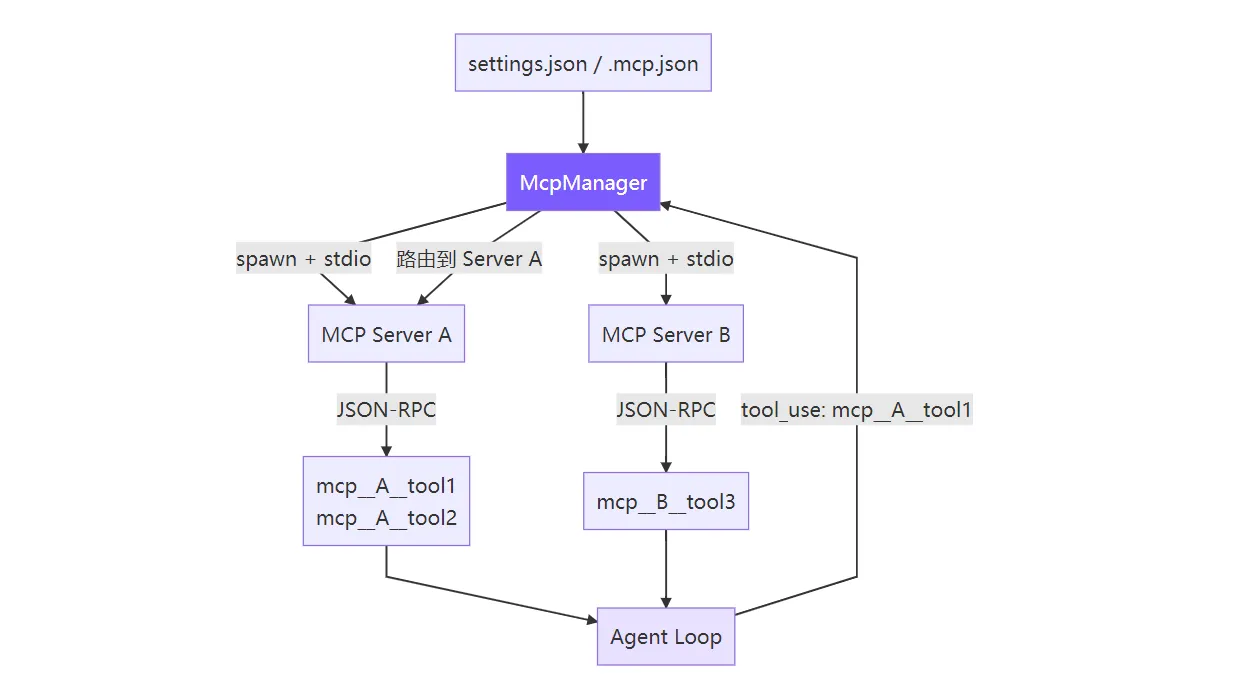
核心思路:spawn 子进程 → JSON-RPC 握手 → 发现工具 → 前缀注册 → 透明路由 。对 Agent Loop 来说,MCP 工具和内置工具没有区别——都是名字 + schema + 执行函数。
流程图
拆解一下这个流程
“spawn 子进程”
含义:McpManager 为每一个 MCP Server 启动一个独立的子进程(Node.js 的 child_process.spawn 或 Python 的 subprocess.Popen)
为什么这么做:每个 MCP Server 可能用不同语言编写(Python/Node/Go),独立进程隔离了运行环境,一个崩溃不影响其他
“JSON-RPC 握手”
含义:McpManager 启动子进程后,通过 stdio(标准输入/输出)与子进程建立 JSON-RPC 通信
握手过程:按照 MCP 协议规范,双方交换初始化信息(协议版本、能力声明等)
为什么用 stdio:子进程的 stdin/stdout 是字节流,天然适合传输 JSON-RPC 消息,比网络端口更简单、更安全
“发现工具”
含义:握手完成后,McpManager 调用 MCP 协议中的 tools/list 方法(或类似机制),询问每个 Server 提供了哪些工具
举例:
Server A 返回:[mcp_A_tool1, mcp_A_tool2]
Server B 返回:[mcp_B_tool3]
“前缀注册”
含义:为了避免不同 Server 的工具重名,McpManager 在注册工具时加上前缀来区分来源
举例:
Server A 的工具 → 注册为 serverA__mcp_A_tool1 和 serverA__mcp_A_tool2
Server B 的工具 → 注册为 serverB__mcp_B_tool3
这样 Agent 调用时:serverA__mcp_A_tool1 和 serverB__mcp_A_tool1(如果有重名)就分得清了
“透明路由”
含义:当 Agent 调用一个带前缀的工具时,McpManager 根据前缀自动路由到对应的 MCP Server 子进程
流程:Agent 调用 serverA__mcp_A_tool1 → McpManager 去掉前缀 → 通过 JSON-RPC 转发给 Server A 的子进程 → 拿到结果 → 返回给 Agent
透明:对 Agent 来说,它只知道”我调用了 serverA__mcp_A_tool1“,不知道背后有子进程、JSON-RPC、路由这些复杂逻辑
“对 Agent Loop 来说,MCP 工具和内置工具没有区别”
核心设计理念:McpManager 把来自外部 Server 的工具和 Agent 自身内置的工具抽象成统一接口
统一接口包含:
名字(如 serverA__mcp_A_tool1)
Schema(参数定义:需要哪些参数、类型是什么)
执行函数(调用时实际执行的代码)
效果:Agent 的”工具选择逻辑”完全通用,不需要区分”这个工具是内置的”还是”来自某个 MCP Server”
实现 配置格式 用户只需在配置文件中声明 MCP 服务器,Agent 会在首次 chat 时自动连接并注册它们的工具:
1 2 3 4 5 6 7 8 9 10 11 12 13 14 15 16 17 { "mcpServers" : { "filesystem" : { "command" : "npx" , "args" : [ "@modelcontextprotocol/server-filesystem" , "/tmp" ] , "env" : { } } , "github" : { "command" : "npx" , "args" : [ "@modelcontextprotocol/server-github" ] , "env" : { "GITHUB_TOKEN" : "ghp_xxx" } } } }
mcp客户端实现 1 2 3 4 5 6 7 8 9 10 11 12 13 14 15 16 17 18 19 20 21 22 23 24 25 26 27 28 29 30 31 32 33 34 35 36 37 38 39 40 41 42 43 44 45 46 47 48 49 50 51 52 53 54 55 56 57 58 59 60 61 62 63 64 65 66 67 68 69 70 71 72 73 74 75 76 77 78 79 80 81 82 83 84 85 86 87 88 89 90 91 92 93 94 95 96 97 98 99 100 101 102 103 104 105 106 107 108 109 110 111 112 113 114 115 116 117 118 119 120 121 122 123 124 125 126 127 128 129 130 131 132 133 134 135 136 137 138 139 140 141 142 143 144 145 146 147 148 149 150 151 152 153 154 155 156 157 158 159 160 161 162 163 164 165 166 167 168 169 170 171 172 173 174 175 176 177 178 179 180 181 182 183 184 185 186 187 188 189 190 191 192 193 194 195 196 197 198 199 200 201 202 203 204 205 206 207 208 209 210 211 212 213 214 215 216 217 218 219 220 221 222 223 224 225 226 227 228 229 230 231 232 233 234 235 236 237 238 239 240 241 242 243 244 245 246 247 248 249 250 251 252 253 254 255 256 257 258 259 260 261 262 263 264 265 266 267 268 269 270 271 272 273 274 275 276 277 278 import { spawn, type ChildProcess } from "child_process" ;import { readFileSync, existsSync } from "fs" ;import { join } from "path" ;import { homedir } from "os" ;import { createInterface, type Interface } from "readline" ;interface McpServerConfig {command : string ;args ?: string [];env ?: Record <string , string >;interface McpToolInfo {name : string ;description ?: string ;inputSchema ?: any ;serverName : string ;async function withTimeout<T>(promise : Promise <T>, ms : number ): Promise <T> {let timer : NodeJS .Timeout | undefined ;try {return await Promise .race ([new Promise <never >((_, rej ) => {setTimeout (() => rej (new Error ("timeout" )), ms);finally {clearTimeout (timer);class McpConnection {private process : ChildProcess | null = null ;private nextId = 1 ;private pending = new Map <number , { resolve : (v : any void ; reject : (e : Error void }>();private rl : Interface | null = null ;constructor (private serverName : string , private config : McpServerConfig async connect (): Promise <void > {const env = { ...process.env , ...(this .config .env || {}) };this .process = spawn (this .config .command , this .config .args || [], {stdio : ["pipe" , "pipe" , "pipe" ],this .rl = createInterface ({ input : this .process .stdout ! });this .rl .on ("line" , (line : string {try {const msg = JSON .parse (line);if (msg.id !== undefined && this .pending .has (msg.id )) {const { resolve, reject } = this .pending .get (msg.id )!;this .pending .delete (msg.id );if (msg.error ) {reject (new Error (`MCP error ${msg.error.code} : ${msg.error.message} ` ));else {resolve (msg.result );catch {this .process .stderr ?.on ("data" , () => {});this .process .on ("error" , (err ) => {console .error (`[mcp:${this .serverName} ] process error: ${err.message} ` );this .process .on ("exit" , (code ) => {for (const [, { reject }] of this .pending ) {reject (new Error (`MCP server '${this .serverName} ' exited with code ${code} ` ));this .pending .clear ();private sendRequest (method : string , params : any = {}): Promise <any > {return new Promise ((resolve, reject ) => {if (!this .process ?.stdin ?.writable ) {return reject (new Error (`MCP server '${this .serverName} ' is not connected` ));const id = this .nextId ++;this .pending .set (id, { resolve, reject });const msg = JSON .stringify ({ jsonrpc : "2.0" , id, method, params }) + "\n" ;this .process .stdin .write (msg);private sendNotification (method : string , params : any = {}): void {if (!this .process ?.stdin ?.writable ) return ;const msg = JSON .stringify ({ jsonrpc : "2.0" , method, params }) + "\n" ;this .process .stdin .write (msg);async initialize (): Promise <void > {await this .sendRequest ("initialize" , {protocolVersion : "2024-11-05" ,capabilities : {},clientInfo : { name : "mini-claude" , version : "1.0.0" },this .sendNotification ("notifications/initialized" );async listTools (): Promise <McpToolInfo []> {const result = await this .sendRequest ("tools/list" );if (!result?.tools || !Array .isArray (result.tools )) return [];return result.tools .map ((t : any ({name : t.name ,description : t.description || "" ,inputSchema : t.inputSchema ,serverName : this .serverName ,async callTool (name : string , args : any ): Promise <string > {const result = await this .sendRequest ("tools/call" , { name, arguments : args });if (result?.content && Array .isArray (result.content )) {return result.content filter ((c : any c.type === "text" )map ((c : any c.text )join ("\n" );return JSON .stringify (result);close (): void {this .rl ?.close ();this .process ?.kill ();this .process = null ;export class McpManager {private connections = new Map <string , McpConnection >();private tools : McpToolInfo [] = [];private connected = false ;async loadAndConnect (): Promise <void > {if (this .connected ) return ;this .connected = true ;const configs = this .loadConfigs ();if (Object .keys (configs).length === 0 ) return ;const TIMEOUT_MS = 15_000 ;for (const [name, config] of Object .entries (configs)) {const conn = new McpConnection (name, config);try {await conn.connect ();await withTimeout (conn.initialize (), TIMEOUT_MS );const serverTools = await withTimeout (conn.listTools (), TIMEOUT_MS );this .connections .set (name, conn);this .tools .push (...serverTools);console .error (`[mcp] Connected to '${name} ' — ${serverTools.length} tools` );catch (err : any ) {console .error (`[mcp] Failed to connect to '${name} ': ${err.message} ` );close ();getToolDefinitions (): Array <{ name : string ; description : string ; input_schema : any }> {return this .tools .map ((t ) => ({name : `mcp__${t.serverName} __${t.name} ` ,description : t.description || `MCP tool ${t.name} from ${t.serverName} ` ,input_schema : t.inputSchema || { type : "object" , properties : {} },isMcpTool (name : string ): boolean {return name.startsWith ("mcp__" );async callTool (prefixedName : string , args : any ): Promise <string > {const parts = prefixedName.split ("__" );if (parts.length < 3 ) throw new Error (`Invalid MCP tool name: ${prefixedName} ` );const serverName = parts[1 ];const toolName = parts.slice (2 ).join ("__" ); const conn = this .connections .get (serverName);if (!conn) throw new Error (`MCP server '${serverName} ' not connected` );return conn.callTool (toolName, args);async disconnectAll (): Promise <void > {for (const [, conn] of this .connections ) {close ();this .connections .clear ();this .tools = [];this .connected = false ;private loadConfigs (): Record <string , McpServerConfig > {const merged : Record <string , McpServerConfig > = {};const globalPath = join (homedir (), ".claude" , "settings.json" );this .mergeConfigFile (globalPath, merged);const projectPath = join (process.cwd (), ".claude" , "settings.json" );this .mergeConfigFile (projectPath, merged);const mcpJsonPath = join (process.cwd (), ".mcp.json" );this .mergeConfigFile (mcpJsonPath, merged);return merged;private mergeConfigFile (filePath : string , target : Record <string , McpServerConfig >): void {if (!existsSync (filePath)) return ;try {const raw = JSON .parse (readFileSync (filePath, "utf-8" ));const servers = raw.mcpServers || raw;for (const [name, config] of Object .entries (servers)) {if (this .isValidConfig (config)) {as McpServerConfig ;catch {private isValidConfig (config : any ): boolean {return config && typeof config === "object" && typeof config.command === "string" ;
连接生命周期 MCP 协议的标准流程:
1 2 3 4 5 spawn 子进程
客户端侧三个关键状态:process(子进程句柄)、pending(请求-响应关联表:自增 id → Promise)、rl(readline 按行解析 JSON-RPC)。
关键设计决策 为什么用 JSON-RPC over stdio 而不是 HTTP? stdio 的优势是零配置 :不需要端口管理、不需要发现服务、进程生命周期自动绑定到父进程。子进程退出时所有 pending 请求自动 reject,不存在连接泄漏。HTTP 方案需要处理端口冲突、进程发现、心跳检测,复杂度高一个数量级。
一个名字同时解决两个问题:避免冲突 (不同服务器可能有同名工具)和嵌入路由信息 (从名字直接提取服务器名,无需额外映射表)。Claude Code 用完全相同的命名方案。
为什么 15 秒超时? MCP 服务器常用 npx 启动,首次运行需要下载 npm 包,通常需要 3-8 秒。15 秒足够覆盖大多数情况,但不至于让用户等太久。超时后静默跳过该服务器,Agent 继续用其他可用工具工作。
为什么懒连接(首次 chat 时而非启动时)? 用户可能启动 Agent 只是想问一句”这个函数是什么意思”,根本用不到 MCP 工具。懒连接让这种场景零开销。代价是第一次需要 MCP 工具时会有几秒延迟,但只发生一次。
为什么不用 MCP SDK? @anthropic-ai/sdk 提供了 MCP 客户端封装,但直接用原始 JSON-RPC 有两个好处:零依赖 (不增加包体积)和教学价值 (读者能看到协议的完整细节,理解 MCP 到底在做什么)。整个 JSON-RPC 通信只有 ~60 行代码,足够简单。
简化对比
维度
Claude Code
mini-claude
MCP SDK
@anthropic-ai/sdk 内置客户端原始 JSON-RPC(无 SDK 依赖)
服务器协议
stdio + SSE
仅 stdio
工具发现
动态刷新(服务器可通知变更)
一次性发现
配置来源
settings.json + .mcp.json + 企业策略
settings.json + .mcp.json
错误处理
重试 + 降级
静默跳过失败服务器
连接时机
首次 chat 时懒加载
首次 chat 时懒加载
子 Agent 支持
独立 MCP 连接
主 Agent 专属,子 Agent 不连接